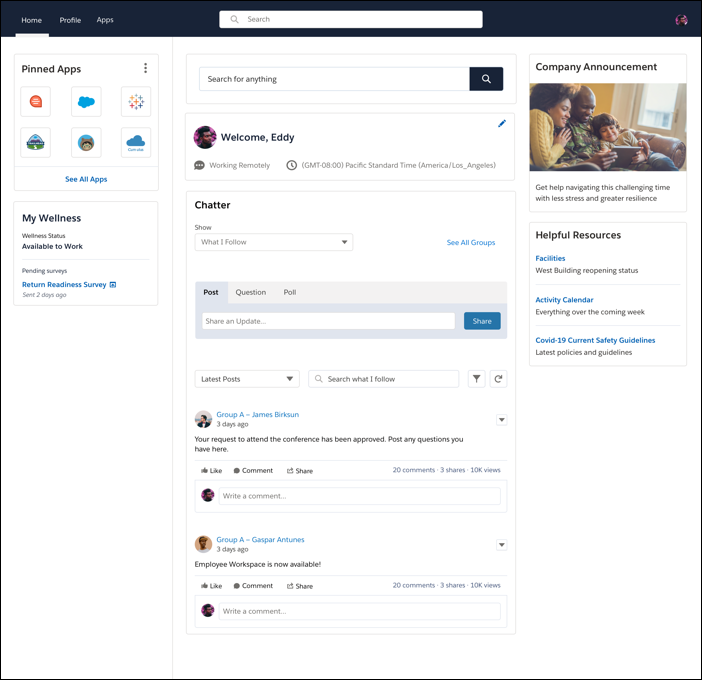
Empower your employees to work from anywhere and be productive and engaged. With
Employee Workspace, give your employees an integrated experience and enable employee productivity
and collaboration. Employee Workspace provides a central hub for tools and resources your
employees need to work from anywhere.
Required Editions
Available in: Lightning Experience
Available in: Enterprise and Unlimited Editions
Employee Workspace requires a Workplace Command Center add-on license, Employee
Experience add-on, or Employee Productivity Plus license.
Employees can personalize their home page to view work that’s most important and relevant to them. They can access
their favorite apps, collaborate with colleagues, receive company communications, review and confirm shifts, respond to
latest surveys, and more. Employees can also personalize their profile page to connect with their coworkers and
introduce themselves and what they do.
Set Up Employee Workspace Configure general settings and use our installer service to install the package and complete some configuration automatically. Then follow the post-installation steps and import data to finish your setup.
Work From Anywhere With Employee Workspace Employee Workspace gives you access to all the tools and resources you need to work from anywhere and be productive. You can personalize your workspace to create a single pane of glass to manage your work life. Use Employee Workspace to access apps, stay informed with company news, collaborate with your colleagues, share your work experiences, manage your profile details, and more.
We use three kinds of cookies on our websites: required, functional, and advertising. You can choose whether functional and advertising cookies apply. Click on the different cookie categories to find out more about each category and to change the default settings.
Privacy Statement
Required Cookies
Always Active
Required cookies are necessary for basic website functionality. Some examples include: session cookies needed to transmit the website, authentication cookies, and security cookies.
Functional Cookies
Functional cookies enhance functions, performance, and services on the website. Some examples include: cookies used to analyze site traffic, cookies used for market research, and cookies used to display advertising that is not directed to a particular individual.
Advertising Cookies
Advertising cookies track activity across websites in order to understand a viewer’s interests, and direct them specific marketing. Some examples include: cookies used for remarketing, or interest-based advertising.