
You are here:
Manage Threshold Monitoring for Field Service Asset Attributes
Set up monitoring based on recordset filter criteria defined for asset fields and asset attributes. Recordset Filter Criteria Monitoring uses the thresholds defined by recordset filter criteria for the fields and attributes to determine whether they’re within the defined thresholds.
Required Editions
| Available in: both Salesforce Classic (not available in all orgs) and Lightning Experience |
| The Field Service core features, managed package, and mobile app are available in Enterprise, Unlimited, and Developer Editions. |
- Recordset Filter Criteria Monitoring and Thresholds
An asset manager can define recordset filter criteria monitors that monitor an asset by considering one or more asset fields and asset attributes filtered by recordset filter criteria. - Set Up Threshold Monitoring
Add the Threshold Monitoring Lightning web component to the asset record page. - Create Recordset Filter Criteria for Asset Fields and Attributes
Create recordset filter criteria based on asset fields or asset attributes. Then, add the recordset filter criteria to a recordset filter criteria monitor to monitor threshold compliance. - Create Thresholds
After creating the recordset filter criteria, add it to a recordset filter criteria monitor to monitor the threshold compliance of an asset’s fields and attributes.
Recordset Filter Criteria Monitoring and Thresholds
An asset manager can define recordset filter criteria monitors that monitor an asset by considering one or more asset fields and asset attributes filtered by recordset filter criteria.
The recordset filter criteria monitor uses thresholds for the fields and attributes to determine whether the values comply with the filter definitions. You can, for example, define a threshold based on attributes such as engine temperature, engine pressure, engine oil level, engine air influx, and RPM. You can then monitor the engine for faults by monitoring these attributes.
Example: Air Conditioning Unit (HVAC)
| Attribute Definition | Data Type | Unit of Measure |
|---|---|---|
| Relative Humidity | Number | % |
| Temperature | Number | Degrees F |
| Air Direction | Picklist | Picklist values: up, down, right, left |
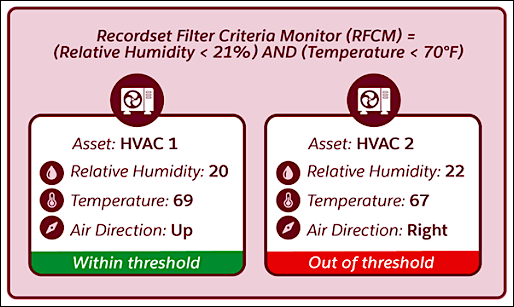
The asset’s Attributes tab shows a card for each threshold defined for the asset. The cards show the compliance status of a threshold depending on whether it meets the recordset filter criteria conditions. If a recordset filter criteria condition is invalid, an Undetermined compliance status is shown on the threshold card.
Set Up Threshold Monitoring
Add the Threshold Monitoring Lightning web component to the asset record page.
Required Editions
| User Permissions Needed | |
|---|---|
| To edit Lightning pages in the Lightning App Builder: | Customize Application |
- From the object management settings for assets, go to Lightning Record Pages.
- Select the relevant Lightning record page, and then click Edit.
- In Lightning App Builder, create a custom tab and name it Attributes.
- Drag the Threshold Monitoring component onto the canvas.
- Save your work and activate the Lightning record page.
Create Recordset Filter Criteria for Asset Fields and Attributes
Create recordset filter criteria based on asset fields or asset attributes. Then, add the recordset filter criteria to a recordset filter criteria monitor to monitor threshold compliance.
Required Editions
| User Permissions Needed | |
|---|---|
| To view, create, and update recordset filter criteria: | View, create, and edit on Asset, Recordset Filter Criteria, and Recordset Filter Criteria Rule AND View on Attribute Definition AND Delete on Recordset Filter Criteria Rule |
- From the App Launcher, find and select Recordset Filter Criteria.
- Click New and enter a name and a description for the recordset filter criteria.
- For Source Object, select Recordset Filter Criteria Monitor.
- For Filtered Object, select Asset.
- In the Conditions section, select the relevant option for when the recordset filter criteria is valid.
- Add filter conditions.
- Save the recordset filter criteria.
After you create a recordset filter criteria, recordset filter criteria rules for each asset field or asset attribute used in the recordset filter criteria are created for you.
Create Thresholds
After creating the recordset filter criteria, add it to a recordset filter criteria monitor to monitor the threshold compliance of an asset’s fields and attributes.
Required Editions
| User Permissions Needed | |
|---|---|
| To create, view, edit, or delete a recordset filter criteria monitor: | Create, Read, Update, or Delete on Recordset Filter Criteria |
- From the App Launcher, find and select Assets.
- Click the relevant asset record and open the Attributes tab. If you don’t see the Attributes tab, refresh the page.
- Click New Threshold and enter a name and a description for the recordset filter criteria monitor.
- Select a recordset filter criteria defined for the asset.
- Save the recordset filter criteria monitor.
