
You are here:
Understanding Proactive Asset Service Scheduling
Free up your operations managers to deal with other tasks by streamlining the process of scheduling maintenance appointments. Agentforce autonomously contacts the customer so that they can coordinate the appointment and makes sure assets are scheduled for maintenance on time.
Required Editions
| Available in: Lightning Experience |
| Available in: Enterprise, Performance, Unlimited, and Developer Editions with Field Service and Foundations, or Einstein 1 Field Service Edition or Agentforce 1 Field Service Edition. |
By default, Proactive Asset Service Scheduling works as described here. However, you can configure the solution to suit your needs.
- Maintenance plans have an associated service appointment that has a due date but hasn't been scheduled.
-
The Field Service: Schedule Asset Maintenance Appointment flow
checks all of these appointments on a daily basis and only starts if the appointment:
- Doesn’t have an assigned status
- Has a subject that starts with “Maintenance”
- Has a service territory
- Has a contact
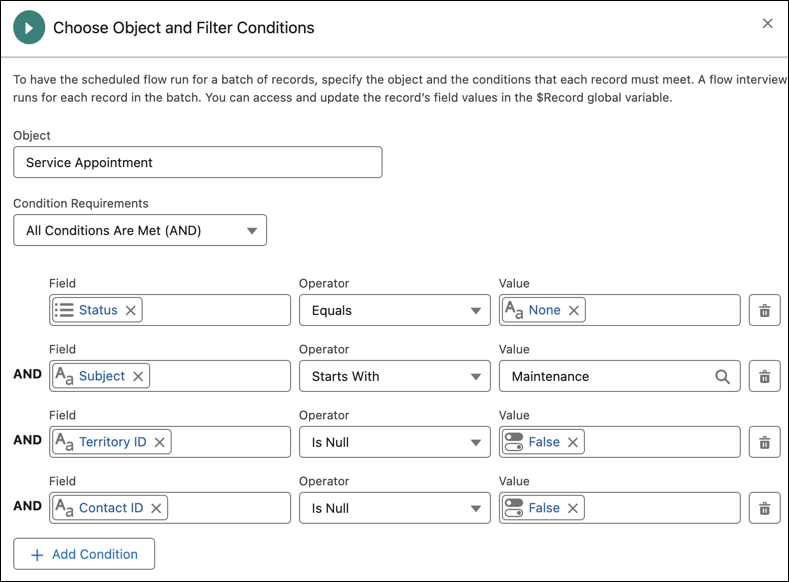
- If all of these checks pass, it checks the due date. If the due date is within a month from today, the appointment is considered eligible for scheduling.
-
The flow then checks the following for the appointment:
- Doesn't have an assigned resource
- Has a work order
- Came from a maintenance plan that has an associated asset
- Doesn't already have an engagement topic
- If all of these checks pass, it triggers the Field Service: Notify Customer subflow.
-
The notification flow performs the following checks to see if the appointment:
- Still exists
- Has a contact
- Has a related messaging channel
- Has a related messaging user who hasn’t opted out of this service
- If all of these checks pass, a message is sent to the customer to let them know that their asset is due for maintenance. The message itself is stored in the messaging component.
- The omni-channel flow recognizes that this is an inbound messaging session and directs the request to the Customer Outreach agent. The agent doesn’t show a welcome message and doesn’t verify the customer’s identity.
- An engagement topic that connects between the messaging session and the service appointment is created.
- If the customer replies and proceeds with scheduling the appointment, Agentforce uses the Appointment Management for Field Service subagent to find a time slot and schedule the appointment.
- If the customer confirms, the appointment is scheduled. If the customer doesn’t reply, after 80% of the time between the due date and the time that the initial message was sent transpires, we send the customer a reminder message. If the customer still doesn’t reply, after an additional 2 hours, the conversation is escalated to a representative.
- If Agentforce manages to find a time slot that the customer confirms, the appointment is then scheduled.
- You can keep an eye on the status in the Agentforce Scheduling Supervisor View.
Did this article solve your issue?
Let us know so we can improve!
