
You are here:
Geolocation-Based Actions
Leverage an automation layer by adding geolocation-based actions to your mobile workers’ daily journey.
Required Editions
| Available in: both Salesforce Classic (not available in all orgs) and Lightning Experience |
| The Field Service core features, managed package, and mobile app are available in Enterprise, Unlimited, and Developer Editions. |
| To access the Field Service mobile app, users need the Field Service Mobile user license. |
What’s a geolocation-based action?
Geolocation-Based Action is a Salesforce object that lets you automate actions when mobile workers enter or exit a geofence. For an explanation about the object’s fields, see Geolocation-Based Action Fields.
What types of geolocation-based actions are there?
You can create three types of geolocation-based actions.
- Platform Alerts: Silently logs a timestamp based on the mobile worker’s location when they arrive or leave a job site. You can run mobile screen flows using platform alerts and specify the quick action flow in the action data.
- Quick Actions: When the mobile worker arrives or leaves a job site, a quick action pops up.
- View Records: When the mobile worker arrives or leaves a job site, a record opens.
How do I set up geolocation-based actions?
You can create a geolocation-based action manually for a specific mobile worker or set up an automation that lets you create actions at scale for all your mobile workers.
For testing purposes, we recommend that you first set up one action so that you can see how it works. Then you can set up flows to automate the actions for you. See Set Up Geolocation-Based Actions for Field Service Mobile Workers.
How can I use geolocation-based actions?
The options are endless, but if you want to get some ideas, take a look at these examples.

What?
Automate Site Check-Ins and Check-Outs
Why?
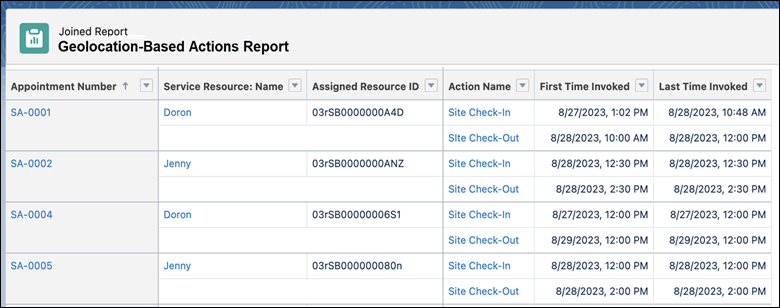
Keep track of the times that mobile workers arrived and left job sites. With automated timestamps for geolocation-based actions, you can then create reports that give insights on the time that mobile workers spend at each location. Timestamps are captured even when the mobile app is offline and are more reliable than the manual input given by mobile workers.
How?
Create two geolocation-based actions. The first action is silently triggered by a platform alert when the mobile worker arrives at a location. The second action is silently triggered by a platform alert when they leave the location. Then create a report that lists the timestamps of the first check-in and the last check-out. This lets you take into account that it’s possible that the mobile worker has come and gone more than one time. See Build a Report.
What?
Get Mobile Workers to Complete a Site Arrival Checklist
Why?
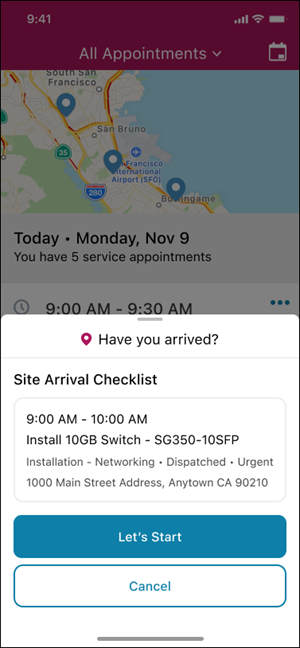
Keep the workers and your customers safe by making sure that mobile workers never forget to fill out your site arrival checklist.
How?
Create a quick action that opens a checklist. Then create a geolocation-based action that prompts the mobile worker to open the checklist when they arrive at a location.
What?
Track Mobile Worker's Location for Safety and Get Their Real-time Location.
Why?
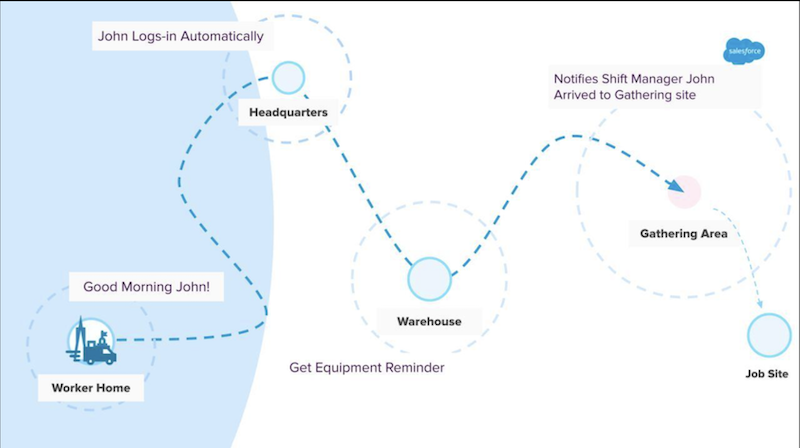
Keep workers safe and your customers informed with automated location-based notifications on the app when workers arrive at the office or pass by a work facility.
How?
When a mobile worker arrives at headquarters, the app automatically clocks them in using service territory. As they move closer to the warehouse, they receive a notification about missing parts. So they can quickly pick up spare parts on the go. Next, when they arrive at the gathering area, the app notifies the shift manager. Finally, when the employee returns from servicing a high-risk area, a message is sent to the service territory manager.
- Set Up Geolocation-Based Actions for Field Service Mobile Workers
Automate actions based on the location of your mobile workers. Prompt your mobile workers to complete the actions before or after their service appointments and also at other locations like dispatch centers (service territory or service territory members). - Automate Geolocation-Based Actions
Set up a flow to automate your actions at scale for all your mobile workers.
