
You are here:
Field Service Guidelines for Shift Availability
Learn how to define valid shifts and show when your workers are available for shift work. Shifts can work alone or alongside operating hours and service territory memberships to define workforce availability. Designate shifts to show availability for specific types of work or tasks, or for specific territories. For example, you can designate an on-call shift for emergency appointments only.
Required Editions
| Available in: Lightning Experience |
| The Field Service core features, managed package, and mobile app are available in Enterprise, Unlimited, and Developer Editions. |
Considerations
For shifts to be valid, they must meet the following criteria.
- All shifts
- To create shifts, you must have at least one service territory and one service resource that’s assigned to that service territory. A shift must be fully contained within a primary service territory membership for a service resource in that territory.
- If you're not using Enhanced Scheduling and Optimization, when you schedule designated shifts for secondary service territories, use optimization rather than scheduling operations. Scheduling operations, such as Book Appointments or Get Candidates, don’t consider designated shifts with secondary service territories.
- Add the Timeslot Designated work rule to the scheduling policy for scheduling and optimization to respect shift and time slot designations. The Overtime field in the Service Resource Availability work rule enables scheduling service appointments on Extended shifts. You may need to add the Overtime field to the layout.
- Shift availability (Extended or Normal) must correspond across all of a resource’s service territories.
- Add the Limit Non-Standard Shifts scheduling rule to balance less desirable shifts amongst your team. The Non-Standard field on shifts marks the shift as nonstandard.
- Shifts with a specified service territory
- When you create a shift with a specified service territory, the shift’s time span must be fully contained within the service resource's primary service territory membership for that territory.
- Shifts without a specified service territory
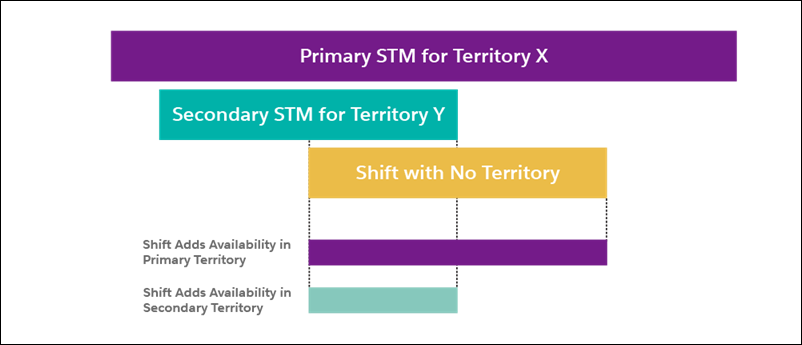
- When you want to define workforce availability across many territories, create the shift without a specified territory. A shift without a specified service territory must be fully contained in a primary service territory membership (STM). It adds availability in all territories based on territory memberships; availability is added where the shift intersects service territory memberships.
Scheduling, Optimization, and Shift Availability
When the managed package is installed, scheduling and optimization considers workforce availability during shifts.
- Shifts and worker availability
-
- Shifts always add availability.
- Shifts have priority over overlapping time slots.
- Shifts relax time slots for designated work or extended work (overtime). For example, if you assign a time period for emergency work and create a shift that overlaps, scheduling can assign non-emergency appointments during the shift. Or, if you create a shift for weekend on-call duties, you can schedule appointments although the shift is during extended hours.
- When Shifts overlap for a certain resource, territory-specific shifts have priority over shifts that aren’t territory-specific.
- When shifts overlap for a certain resource and the overlapping shifts are both territory-specific or both non territory-specific, the first shift of the day takes precedence.
- Shifts with designation don’t take precedence over shifts without designation.
- For shifts that aren’t territory-specific, you can apply work rules to narrow the territories in which scheduling uses shift availability. To use shift availability in the primary service territory, use a Match Territory work rule in your scheduling policy. To use shift availability in the primary and other territories, use the Working Territories work rule.
- If a service resource is unavailable during the day at a specific time slot or during a specific shift, you must indicate this using Resource Absence, and not split availability. For example, if a resource is available on Wednesday, 6 AM to 12 PM, and again from 1 PM to 6 PM, then extend availability from 6 AM to 6 PM and insert a Resource Absence between 12 PM and 1 PM.
- When you use Enhanced Scheduling and Optimization, if a service appointment doesn’t have a territory and a shift with designation is configured, the service appointment must match the designation in order to be scheduled. If a resource has primary and secondary territories and each territory has a shift with a different designation, the service appointment without territory must match both designations.
- Scheduling processes
-
- When you schedule work using the dispatcher console or Book Appointments or Candidates global actions, scheduling uses availability from confirmed shifts. Optimization also uses available resources from confirmed shifts.
- When you use the Get Candidates and Mass Shift Update features, the scheduling logic takes into account any scheduling rules and objectives.
- Scheduling and optimization match shifts to service appointments according to the shift’s filter criteria. Recordset filter criteria help you narrow the scope so that only appointments matching the criteria get scheduled.
Example: Adding Availability with Shifts
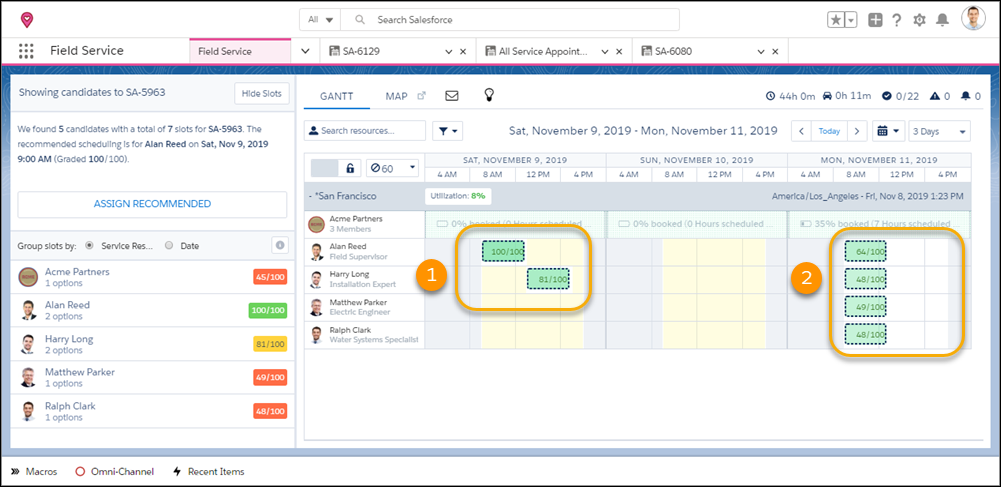
Rotating on-call duties are split into two shifts for Saturday morning and afternoon. The shift is associated with the San Francisco territory and is fully contained in the service territory membership. The shifts are assigned to two workers that have accepted the shift work. The managed package is installed in this org, so the Gantt displays the workers’ additional availability. When the dispatcher looks for candidates, scheduling considers availability from the confirmed shifts (1) and from service territory membership (2).
See Also
- Manage Your Shift Schedule in Field Service
- Add Field Service Shifts
- Define Which Appointments Can Be Scheduled During Shifts
- Assign and Update Field Service Shifts
- Color-Code Field Service Shifts
- Nonstandard Field Service Shifts
- Guidelines for Creating Operating Hours for Field Service
- Guidelines for Recordset Filter Criteria
- Guidelines for Creating Service Territories for Field Service
- Reserve Time Slots for Designated Types of Work
