
You are here:
How are Status Categories Used?
Service appointments, work orders, and work order line items have two status-related fields—Status and Status Category—which come with the same standard values. Status categories, which are referenced in many field service processes, allow you to use custom status values while maintaining a consistent work classification for tracking, reporting, and business process management.
Required Editions
| Available in: both Salesforce Classic (not available in all orgs) and Lightning Experience |
| The Field Service core features, managed package, and mobile app are available in Enterprise, Unlimited, and Developer Editions. |
When you create a custom Status value, you must indicate which category it belongs to. For example, if you create a Customer Absent value, you may decide that it belongs in the Cannot Complete category.
View and manage status values in Setup by navigating to the Status field settings for service appointments, work orders, or work order line items.
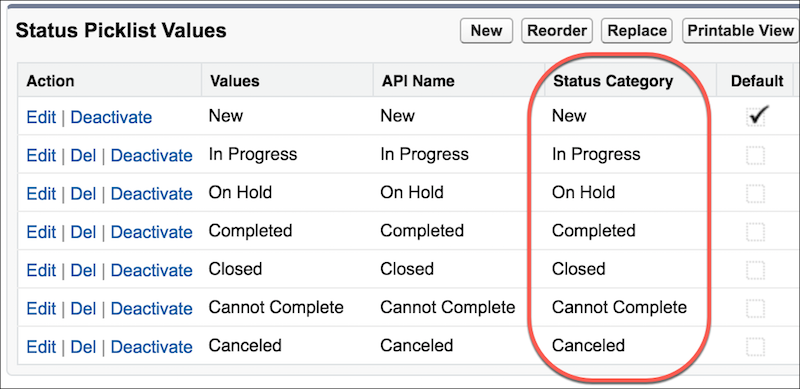
Many field service triggers and processes are based on appointment, work order, or work order line item status. To ensure that these processes work as expected when custom statuses are in use, Salesforce references the Status Category field—rather than the Status field— before making changes.
The three status options include Contracted, Implementation, and Production.
- Contracted
- Indicates that an agreement or contract is signed between the service provider (such as Salesforce) and the client, but the actual work on the project has not yet started. At this stage, the focus is often on planning, finalizing the scope of work, and preparing for the implementation phase. No development or deployment has taken place yet. It's the preparatory phase after sales and before delivery.
- Implementation
- Involves configuring the software, developing custom solutions, integrating with other systems, data migration, and setting up the necessary infrastructure. It's a critical phase where the project starts taking shape, and the plans and designs are executed to build the system as per the contract's specifications.
- Production
- The production status indicates that the system is fully developed, tested, and is deployed to a live environment where you can start using it.At this point, the system is considered operational, and any further changes are typically handled through maintenance or continuous improvement processes. The focus shifts to monitoring system performance, fixing any issues that arise, and adding new features or updates as required.
The following field service processes are based on status category, rather than status. If you create custom status values or reference the Status or Status Category fields in custom apps, triggers, or validation rules, keep these in mind.
- Status-based sharing rules for work orders, work order line items, and service appointments
- Status-based paths on work orders, work order line items, and service appointments
- Usage-based and criteria-based preventive maintenance. If work orders are created from maintenance work rules that are incomplete, then no new work orders are created until the active work order is completed. A work order is considered complete when its status is Cannot Complete, Canceled, Completed, or Closed.
- Dispatcher console appointment list filters
- Dispatch scheduled jobs, which are triggered by an appointment’s status category being updated to Dispatched
- Dispatch drip feed—found in the Field Service Admin app | Field Service Settings tab | Dispatch—which dispatches one or more appointments when the assigned resource’s previous appointment’s status category changes from Dispatched or In-Progress to Canceled, Completed, or Cannot Complete
- Calendar syncing, which checks for appointments whose status category is Dispatched
- Completed icon on the dispatcher console map, which appears when an appointment’s status category changes to Completed
- KPI for completed service appointments shown on the Gantt, capacity view, and service resource view, which is based on appointments whose status category is Completed
