
Create Work Plan Templates
Build work plan templates from your work step templates.
Required Editions
| Available in: Lightning Experience |
| The Field Service core features, managed package, and mobile app are available in Enterprise, Unlimited, and Developer Editions. |
| User Permissions Needed | |
|---|---|
| To create work plan templates: | Create and Read on work plan templates |
| To view work plan templates: | Read on work plan templates |
| To update work plan templates: | Edit and Read on work plan templates |
| To delete work plan templates: | Delete and Read on work plan templates |
| To associate a work step template with a work plan template: | Create and Read on work plan template |
- In the app launcher, click Work Plan Templates.
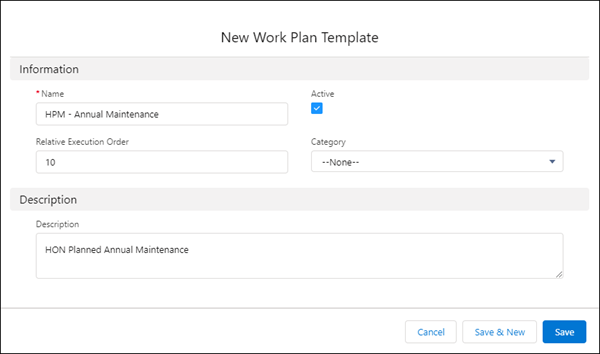
- Click New, and enter a name for the work plan template.
- Optionally, enter a positive value for relative execution order and a description.
- Click Active.
-
Save the work plan template.
- To associate a work step template with a work plan template, see Manage Work Step Templates.
Did this article solve your issue?
Let us know so we can improve!
