
You are here:
How Does an Omni-Channel Flow Work?
When your customer initiates a chat, voice, or messaging conversation, launch an Omni-Channel flow to route the work item to a queue, skill, service rep, or bot.
| View supported editions. |
To see some possibilities of routing with an Omni-Channel flow, look at a sample flow.
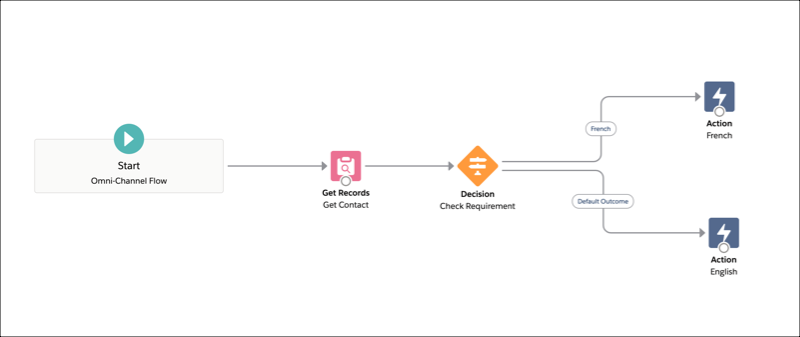
In the previous example, the flow runs at the start of a chat conversation. The Get Records element obtains the customer’s Contact record. The Decision element checks that record for the customer’s language. The flow then executes the appropriate Route Work action based on the customer’s language. Route work to Queue 1 for an English-speaking service rep or to Queue 2 for a French-speaking service rep. Route Work actions are the last elements in a flow. Use them to route work to queues, service reps, or skills.
To understand how to route a work item, Omni Channel identifies the routing information specified in the service channel details. To route work items using an Omni-Channel flow, you have to create the flow and then assign it to the service channel. To see an example about how to assign an Omni-Channel flow to a phone channel, see Create a Phone Channel.
