
You are here:
Use Flows to Automate HR Processes
HR Service Center provides a series of sample flows that you can customize and activate to meet your business needs. A flow can be associated with an onboarding task or linked from a knowledge article.
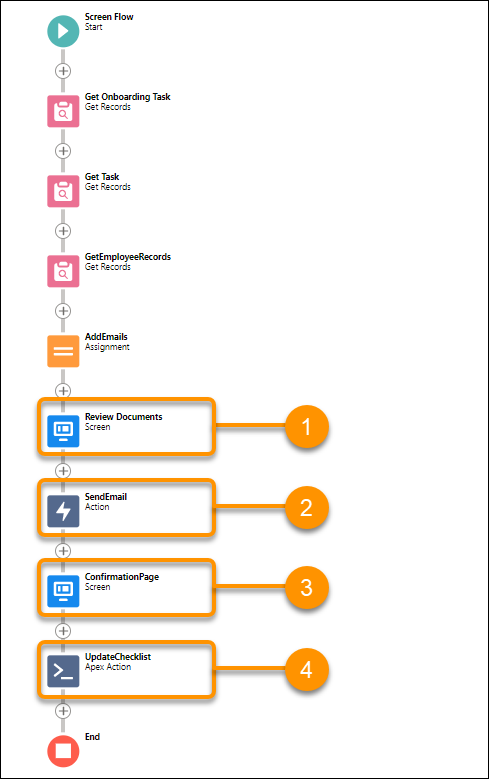
For example, the sample Review Documents flow includes the following components.
- A Review Documents Screen component with a link that opens documents for new employees to review, such as a non-disclosure statement. The user clicks a checkbox, then acknowledging they’ve reviewed the document.
- A SendEmail Action component that sends a confirmation email to the manager and the new employee.
- A ConfirmationPage Screen component that shows that the task is complete.
-
An UpdateChecklist Apex Action component that enables the system to change the task status
to complete.
- Sample HR Service Center Flows
HR Service Center provides a series of sample flows to get you started. - Link to Relevant Flows Directly from Knowledge Articles
Link knowledge articles with relevant flows to create an efficient, easily discoverable way to initiate key processes directly from a knowledge article. For example, let’s say employees want to complete an ergonomic assessment of their home office. When they search from concierge, the returned article can include a button that launches the ergonomic assessment flow. - Add the Flow Launch Button to the Knowledge Article Layout
Add the flow launch component to the page in the experience site.
Did this article solve your issue?
Let us know so we can improve!
