
You are here:
Field Service Intelligence Setup
Use the Field Service Intelligence Setup page to walk through the steps for Data 360 prerequisites, installation prerequisites, and then install Field Service Intelligence.

Note Data 360 must be enabled and setup in order to start these steps. For more information,
see Set Up and Maintain Data 360.
From Setup, in the Quick Find box, enter Field Service Intelligence, and then select Field Service Intelligence. This setup page leads you through everything you need to do for the successful installation of Field Service Intelligence.
As you progress through the setup steps, refresh the page to update the steps that are complete.
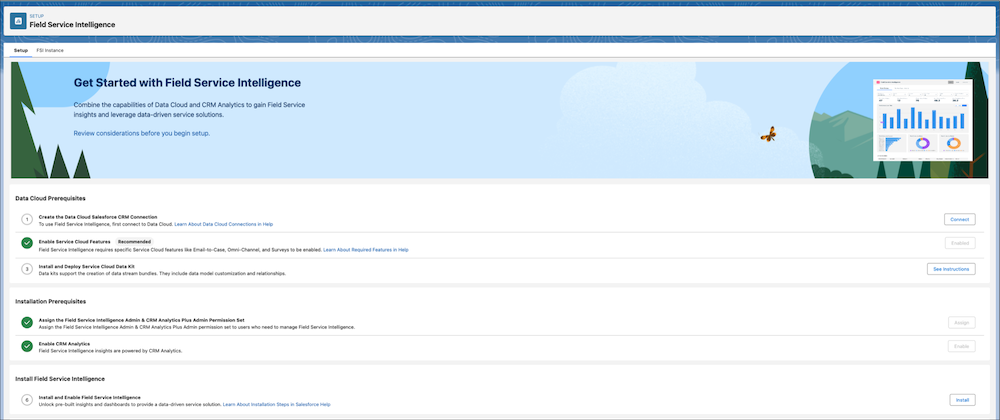
- Create a Data 360 Salesforce CRM Connection
Before installing the Service data kit and Field Service Intelligence, connect Data 360 to Agentforce Service (formerly Service Cloud). - Enable Service Features for Field Service Intelligence
To install the Field Service Intelligence data kit, you need to enable certain Agentforce Service (formerly Service Cloud) features, even if they're not currently in use for your operations. - Update the Data Cloud Salesforce Connector Permission Set
Update the Data Cloud Salesforce permission set to enable Service object settings and system permissions. - Install the Service Data Kit for Field Service Intelligence
The Service data kit includes the Service data bundle and provides the necessary data streams, data model objects, and data mappings for Field Service Intelligence. - Enable CRM Analytics for Field Service Intelligence
To use Field Service Intelligence, enable CRM Analytics and set up permissions. - Install Field Service Intelligence
After Service data is ingested into Data 360 and CRM Analytics is enabled, you’re ready to install Field Service Intelligence.
Did this article solve your issue?
Let us know so we can improve!
