Configuration items (CIs) represent the individual assets in your IT environment. Each
CI stores key details about a specific hardware or software component, helping your teams track,
manage, and understand the infrastructure that supports your business. CIs provide the
foundation for service management, impact analysis, and discovery.
Required Editions
Available in: Lightning Experience
Available in: Unlimited, Enterprise, and Performance
Editions with Agentforce IT Service that have CMDB and Service Graph enabled.
A CI is a digital record of an asset or service that plays a role in your IT operations. The
assets or services can include physical devices like laptops and routers, virtual machines,
software applications, cloud services, and databases. CIs help create a real-time view of your
IT ecosystem. Each CI has:
A type, such as workstation, server, or application
A set of attributes, like name, owner, IP address, location, or software version
Optional relationships, such as which server a database runs on or what software is
installed on a machine
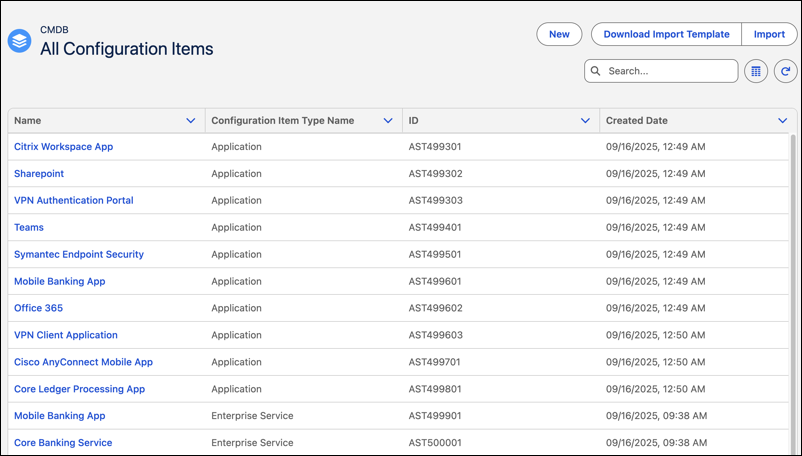
In CMDB, the All Configuration Items tab displays every configuration
item (CI) in your environment, including those created manually or added through Discovery.
Use this tab to browse, search, and manage the full set of CIs across the organization.
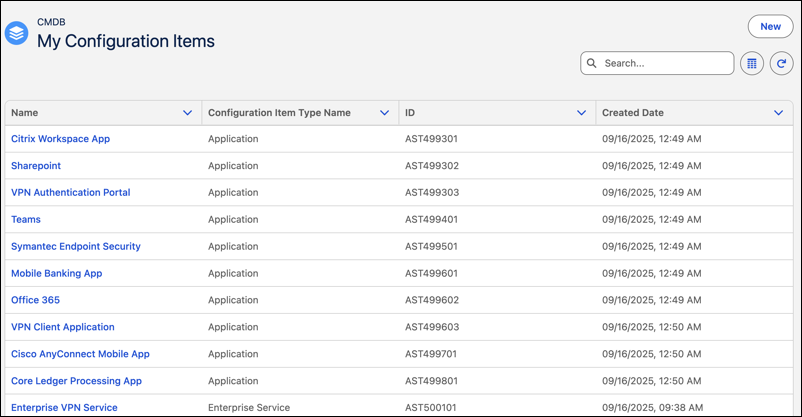
The My Configuration Items tab shows only the CIs assigned to the
current logged in user. Use this view to track assets you own, update details, or monitor
relevant changes.
Example Track a Workstation in CMDB
A support engineer wants to track all company-issued
laptops. Each laptop is represented as a workstation CI in CMDB. The CI includes fields like
hostname, model number, operating system, assigned user, and location. The engineer can also
define relationships between the workstation and installed applications, connected printers,
and network devices. When discovery runs, it detects the laptop and updates its CI with the
latest attribute values. If a new device is found, CMDB creates a new CI
automatically.
Create a Configuration Item A configuration item (CI) represents a physical or virtual asset in your IT environment. Create CI manually when setting up Configuration Management Database (CMDB) or when you need to capture a new asset that isn’t detected through discovery.
Import Configuration Items to CMDB Import configuration items (CIs) in bulk using a predefined CSV template. Download a prestructured template that matches the selected CI type and then upload the completed CSV to import CIs into CMDB. Use this method to maintain consistency and reduce manual effort during CMDB setup.
Configuration Item Record and Tabs Each configuration item (CI) record contains essential asset details collected manually or through asset discovery. You can view the record to assess technical and business metadata, verify ownership, and understand upstream and downstream dependencies. Use the record to troubleshoot incidents faster, assess ownership, and track related issues across IT operations.
Did this article solve your issue?
Let us know so we can improve!
Loading
Salesforce Help | Article
Cookie Consent Manager
General Information
Required Cookies
Functional Cookies
Advertising Cookies
General Information
We use three kinds of cookies on our websites: required, functional, and advertising. You can choose whether functional and advertising cookies apply. Click on the different cookie categories to find out more about each category and to change the default settings.
Privacy Statement
Required Cookies
Always Active
Required cookies are necessary for basic website functionality. Some examples include: session cookies needed to transmit the website, authentication cookies, and security cookies.
Functional Cookies
Functional cookies enhance functions, performance, and services on the website. Some examples include: cookies used to analyze site traffic, cookies used for market research, and cookies used to display advertising that is not directed to a particular individual.
Advertising Cookies
Advertising cookies track activity across websites in order to understand a viewer’s interests, and direct them specific marketing. Some examples include: cookies used for remarketing, or interest-based advertising.