Define Configuration Item Dependencies with Relationships
Configuration Item (CI) relationships connect configuration items to show how they
interact or depend on each other. CI relationships help define real-world dependencies between
hardware, software, cloud resources, and services.
Required Editions
Available in: Lightning Experience
Available in: Unlimited, Enterprise, and Performance
Editions with Agentforce IT Service that have CMDB and Service Graph enabled.
CI relationships connect configuration items to show how they interact or depend on each
other. For example, a server may run an application, or a virtual machine may connect to a
network switch. These relationships help define real-world dependencies between hardware,
software, cloud resources, and services.
Admins use predefined relationship types to describe these links. Each relationship type
has a direction and a meaning such as runs on, depends on, or connected to. When you define
CI relationships, you create a structured view of how assets rely on one another to deliver
services.
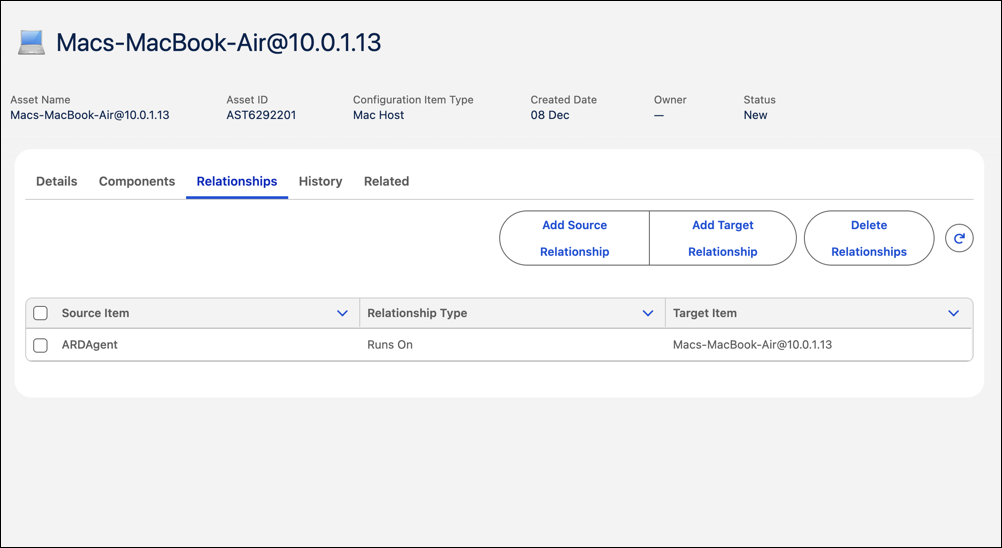
In Salesforce CMDB and Service Graph, relationships can be added from either direction, as
a source or a target. In a source relationship, the current CI points to another CI that it
depends on or uses. For example, if a Linux server depends on a storage device, the server
is the source and the storage device is the target. A target relationship means another
configuration item is pointing to the current CI as a dependency. For example, if a load
balancer routes traffic to a web application, the load balancer is the source and the web
application is the target. You can create either type of relationship directly from the
Relationships tab of a CI record, depending on how you want to
model the connection.
You can choose from predefined relationship types such as runs on, depends on, or connected
to. You can view the list of predefined relationship types from CI Relationship
Types in the CMDB app.
Create Relationships Between Configuration Items Understand how configuration items (CIs) interact and depend on each other by creating relationships. Use the Relationships tab in a CI record to define source or target relationships. Mapping these connections helps your teams understand system dependencies, assess impact, and troubleshoot issues faster.
Did this article solve your issue?
Let us know so we can improve!
Loading
Salesforce Help | Article
Cookie Consent Manager
General Information
Required Cookies
Functional Cookies
Advertising Cookies
General Information
We use three kinds of cookies on our websites: required, functional, and advertising. You can choose whether functional and advertising cookies apply. Click on the different cookie categories to find out more about each category and to change the default settings.
Privacy Statement
Required Cookies
Always Active
Required cookies are necessary for basic website functionality. Some examples include: session cookies needed to transmit the website, authentication cookies, and security cookies.
Functional Cookies
Functional cookies enhance functions, performance, and services on the website. Some examples include: cookies used to analyze site traffic, cookies used for market research, and cookies used to display advertising that is not directed to a particular individual.
Advertising Cookies
Advertising cookies track activity across websites in order to understand a viewer’s interests, and direct them specific marketing. Some examples include: cookies used for remarketing, or interest-based advertising.