
Maintain clean and reliable asset records in Configuration Management Database (CMDB)
by using identification rules. Determine how the system identifies configuration items (CIs)
when new data is added, either manually or through discovery. By matching key attributes like
serial number or MAC address, identification rules prevent duplicates, reduce confusion, and
ensure the right CI record gets updated.
Required Editions
Available in: Lightning Experience
Available in: Unlimited, Enterprise, and Performance
Editions with Agentforce IT Service that have CMDB and Service Graph enabled.
Identification rules define how CMDB recognizes a configuration item based on specific
attributes. When new asset data is added to CMDB, these rules help match it to an existing CI
or create a new CI when no match exists. Admins configure these rules at the CI type level,
selecting one or more attributes that uniquely identify a CI of that type.
Identification rules are essential for environments where data is collected from multiple
sources. If identification rules are not defined, CMDB could create duplicate records or
update the wrong asset, leading to broken relationships and inaccurate reporting.
Example Identify Workstations by Serial Number and MAC Address
An organization uses discovery
to scan workstations across multiple offices. Each scan collects data such as serial number,
MAC address, hostname, and operating system. To avoid creating duplicate CIs every time a
scan runs, the admin sets up an identification rule for the workstation CI type.
The
rule specifies serial number and MAC address as the identifying attributes. When discovery
sends data, CMDB uses this rule to compare new records with existing ones. If a match is
found, the existing CI is updated. If no match is found, a new CI is created. This process
ensures each workstation appears once in the system, with the latest
information.
How Identification Rules Affect CI Import
Identification rules makes sure that Configuration Item (CI) imports update the correct
records and prevent duplicate CIs by controlling how CMDB matches imported data to existing
CIs.
When you import CIs, CMDB applies identification rules to determine whether to update an
existing CI or create a new CI. If the imported data matches an existing CI based on the
active identification rules, CMDB updates the existing record. If no match is found, CMDB
creates a new configuration item.
Example An administrator imports a CSV file that includes asset ID and configuration item type.
If the imported asset ID matches an existing configuration item based on the active
identification rules, CMDB updates that CI. If the asset ID does not match any existing CI,
CMDB creates a new CI. If the imported file does not include attributes used in identification
rules, CMDB cannot match records and creates new CIs.
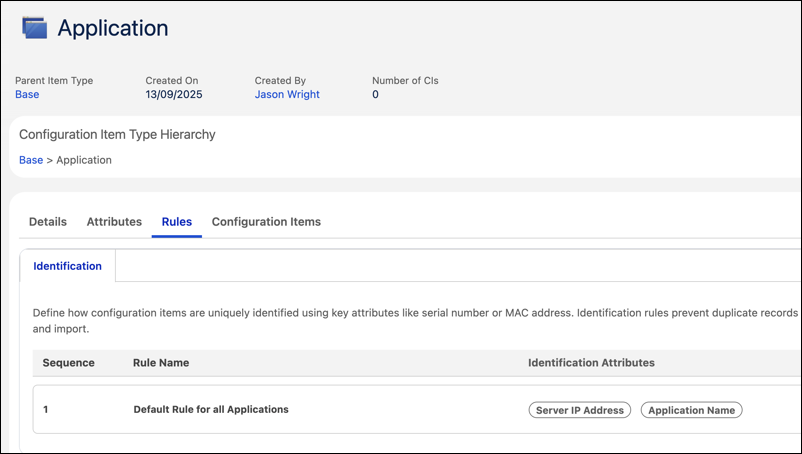
Edit an Identification Rule Use identification rules to define how configuration items (CIs) are uniquely identified during discovery or import. Accurate matching helps prevent duplicate records and improves CMDB data quality.
Did this article solve your issue?
Let us know so we can improve!
Loading
Salesforce Help | Article
Cookie Consent Manager
General Information
Required Cookies
Functional Cookies
Advertising Cookies
General Information
We use three kinds of cookies on our websites: required, functional, and advertising. You can choose whether functional and advertising cookies apply. Click on the different cookie categories to find out more about each category and to change the default settings.
Privacy Statement
Required Cookies
Always Active
Required cookies are necessary for basic website functionality. Some examples include: session cookies needed to transmit the website, authentication cookies, and security cookies.
Functional Cookies
Functional cookies enhance functions, performance, and services on the website. Some examples include: cookies used to analyze site traffic, cookies used for market research, and cookies used to display advertising that is not directed to a particular individual.
Advertising Cookies
Advertising cookies track activity across websites in order to understand a viewer’s interests, and direct them specific marketing. Some examples include: cookies used for remarketing, or interest-based advertising.