
You are here:
Key Features of the Agentic IT Service Desk Console
The Home page of the Agentic IT Service Desk is the main landing page after you log in. The console helps IT managers and fulfillers get the most important information when they start their day, and gives them quick access to key components through the navigation menu and other widgets.
Required Editions
| Available in: Lightning Experience |
| Available in: Unlimited and Enterprise editions with Agentforce IT Service. |
Navigation menu
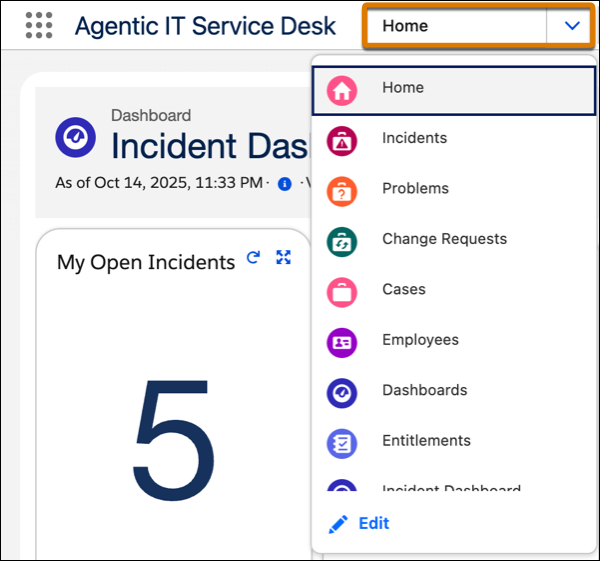
The navigation menu on the console gives you quick access to these areas.
- Home
- Incidents
- Problems
- Change Requests
- Cases
- Employees
- Dashboards
- Entitlements
- Incident Dashboard
- Problem Dashboard
- Change Request Dashboard
- IT Service Calendar
- Releases
- IT Services Assignment
- Knowledge

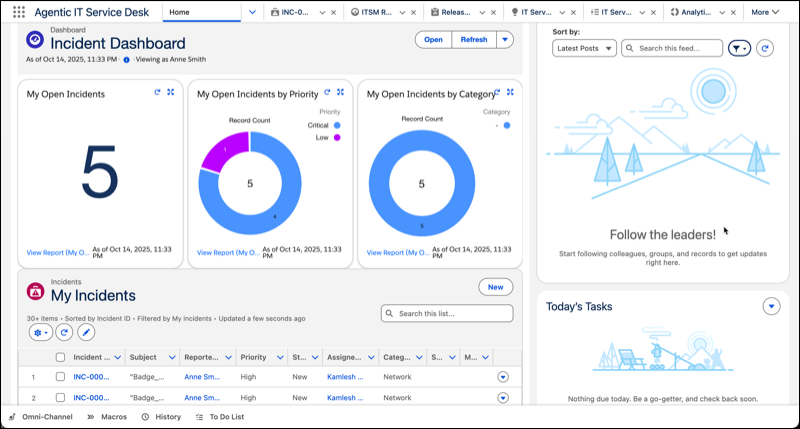
Home Page
The Home page of the console provides a quick, visual overview of your service operations.
- The Home page features dashboards that give you a complete visual look at key metrics, tailored to your role. All IT representatives see charts for incidents across the entire organization whereas support reps logged in as Incident Fulfillers see charts for incidents assigned specifically to them.
- The All Incidents list view shows a list of all incidents, so you can quickly filter, and find issues that need your attention.
- The sidebar includes a Chatter feed to keep you updated, or a list of today's tasks. For views other than the Home page, the content in this sidebar dynamically updates based on the active record, giving reps a contextual view without having to navigate away from the main record page.
- The utility bar at the bottom of the page provides quick access to other tools such as Omni-Channel, Macros, and History. With the Omni-Channel utility bar, you can view incoming incidents and chats.
Employee Information
Get 360-degree insights with a centralized view into an employee's IT assets, support cases, incidents, and historical interactions. Understanding the employee's profile helps you provide faster, more personalized support. The Employee page includes these key details.
- Employee details: Shows identification and contact information, including employee number, employment type, status, and alternate email.
- Assets: Lists all IT equipment assigned to the employee to assist with troubleshooting.
- Cases: Provides a complete history of associated cases so you can understand past support and avoid duplicating efforts.
- Incidents: Lists incidents linked to the employee, including details, such as subject, priority, and status, to help you assess the impact of broader issues.
- Service requests: Shows service catalog requests made by or for the employee, with important details such as the service name, status, and date submitted. You can also submit a new request on behalf of the employee directly from their profile.
- Activity and Chatter feed: Consolidates email logs, service request updates, and internal collaboration notes into a single chronological feed.
