You are here:
SLA Lifecycle in an IT Services Organization (Example)
This example shows how an IT admin at Cumulus Bank uses SLA Management to make sure that incidents, problems, and change requests are handled efficiently and according to service-level agreements (SLAs).
Required Editions
| Available in: Lightning Experience |
| Available in: Unlimited and Enterprise editions with Agentforce IT Service. |
Business Challenge
Paula is an IT admin and wants to ensure that critical IT issues are addressed promptly and that her team meets service targets for resolving problems and changes. She also wants to provide her team with clear, automated timelines for different IT service records with different priorities and an easy visual way to keep track of these timelines.
If the target is breached, she wants certain actions to take place, such as an email being sent to the required stakeholders and team members for escalation.
Solution
She decides to set up SLA Management for Agentforce IT Service with predefined SLA policies for incidents, problems, and changes to provide clear, automated timelines for her IT support team.
SLA Setup
Paula starts by turning on SLA Management and SLA versioning from the simplified setup. She then creates the necessary predefined policies for incidents, problems, and change requests. This simple action sets up industry standard policies, defines the milestones, cancellation criteria, escalation actions, and auto-applies entitlement rules.
She also configures the option to manually pause milestones to prevent unfair breaches when IT reps are waiting for external or stakeholder dependencies.
SLA Lifecycle in Action
With the policies and rules in place, here is how the system handles a new IT incident reported by an employee.
| Stage | Actions |
|---|---|
| Incident Creation | An employee reports a VPN issue via the self-service portal. Salesforce automatically logs an incident record with a critical priority and assigns it to the Critical Priority Incident queue. |
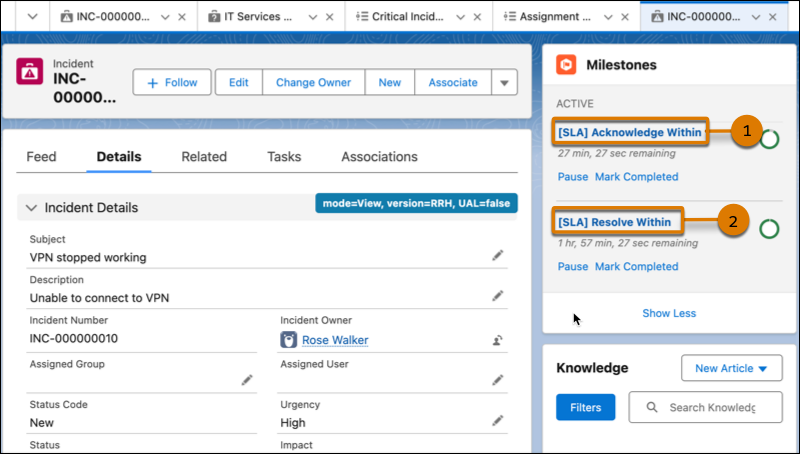
| Incident SLA Policy Entry | The incident enters the Standard Support for Incident SLA policy and is assigned the Acknowledge Within milestone with a 30-minute time target and the Resolve Within milestone with a 2-hour time target based on the record's properties. |
| Incident Milestone in Progress | Jake, an IT fulfiller, opens the record, sees the SLA timer has started, and acknowledges the incident. |
| Problem Creation | After investigating, Jake finds many employees have reported the same issue. He creates a problem record for the incident. He also associates all similar incidents with it with the help of Agentforce. |
| Problem SLA Policy Entry | The problem record enters the Standard Support for Problem SLA policy. The system assigns a Root Cause Completion Time milestone with a 24-hour target for critical priority problems. This is a key metric for measuring Paula's team's performance. |
| Pausing Milestones | John, a problem fulfiller, gets assigned the problem and starts work on it. He realizes he needs input from an external vendor to solve the issue. To ensure the SLA timeline is accurately tracked and does not breach due to an external dependency, he manually pauses the milestone. |
| Problem Milestone Completion | After John gets the required information, he resumes the timer, updates the problem record, and creates a change request to implement the fix. |
| Problem Policy Recalculation and Exit | After each record update, the SLA policy checks for new milestones. The record remains in the policy until the defined exit criteria are met. After John creates the change request to implement the fix, the root cause analysis for the problem is complete which means the exit criteria for Problem SLA policy is met. |
| Change Request SLA Policy Entry | The change request record automatically enters the Standard Support for Change Request SLA policy. The system assigns the Acknowledging Change milestone with a 4-hour time target. |
| Change Milestone Completion | Sara, a change fulfiller, completes the milestone by updating the status of the change request from New to an in-progress status. |
| Change Request and Incident Policy Exit | Change Request policy exits SLA when the status is no longer New. For incident, once the change request is implemented, the status for the incident is resolved, and the incident record exits SLA policy. |