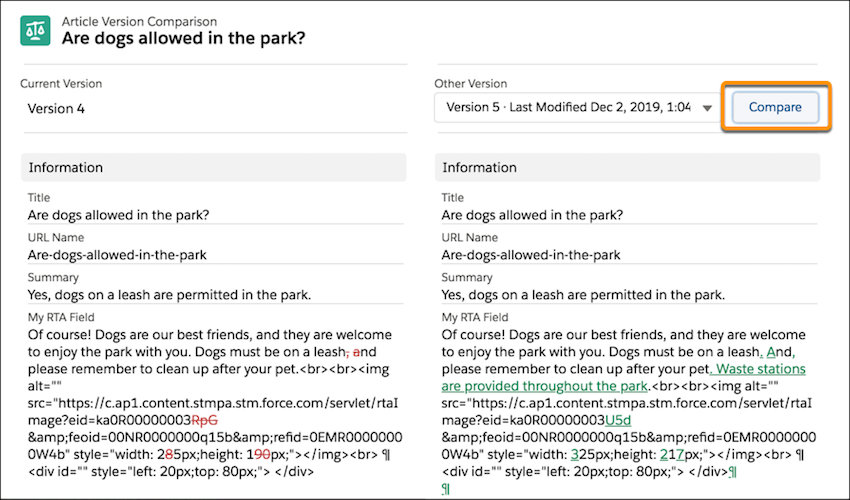
View what's changed between two versions of an article. Content that is added,
deleted, or changed is highlighted side by side in the Article Version Comparison
component.
Article Version Comparison is a component you can add to your Lightning pages. We
recommend creating a tab in your layout for this tool so it’s available for your
team when they need it.
For the best experience, view an older version and then choose a newer version to
compare. Content that's new in the compared version is green and underlined.
Content deleted from the current version appears in red strikethrough text.
Considerations
Keep these considerations in mind when you compare articles.
The HTML tags show because the source code is used in the comparison. By
comparing the HTML source, you can see differences in formatting and
image or video links, indicating content that changed.
Articles are compared character by character. For instance, “Online” and
“Archived” share an ‘i’ and ‘e’.
You can use the Article Comparison component only for versions with the
same record type and language.
In Lookup fields, the linked record’s 18-character ID appears, such as
the ID to identify users in Modified By and Created By fields.
If another version is modified, created, or deleted while you view an
article, it doesn't appear in the version dropdown. You can refresh
the page to see the latest list of article versions.
Comparing articles isn’t supported in Microsoft IE11 or the Microsoft
Edge browser.
Did this article solve your issue?
Let us know so we can improve!
Loading
Salesforce Help | Article
Cookie Consent Manager
General Information
Required Cookies
Functional Cookies
Advertising Cookies
General Information
We use three kinds of cookies on our websites: required, functional, and advertising. You can choose whether functional and advertising cookies apply. Click on the different cookie categories to find out more about each category and to change the default settings.
Privacy Statement
Required Cookies
Always Active
Required cookies are necessary for basic website functionality. Some examples include: session cookies needed to transmit the website, authentication cookies, and security cookies.
Functional Cookies
Functional cookies enhance functions, performance, and services on the website. Some examples include: cookies used to analyze site traffic, cookies used for market research, and cookies used to display advertising that is not directed to a particular individual.
Advertising Cookies
Advertising cookies track activity across websites in order to understand a viewer’s interests, and direct them specific marketing. Some examples include: cookies used for remarketing, or interest-based advertising.