
You are here:
What’s Service Cloud Messaging?
Seventy-five percent of adults want to communicate with brands the same way they do friends and family—through messaging. Messaging in Service Cloud provides a rich, efficient conversation experience for customers, service reps, and supervisors.
Required Editions
| View supported editions. | |
 This article applies to:
|
Enhanced In-App Chat, Enhanced Web Chat v1, Enhanced Web Chat v2, Enhanced WhatsApp, Standard and Enhanced Facebook Messenger, Standard and Enhanced SMS, Enhanced Apple Messages for Business, Enhanced LINE, and Bring Your Own Channel |
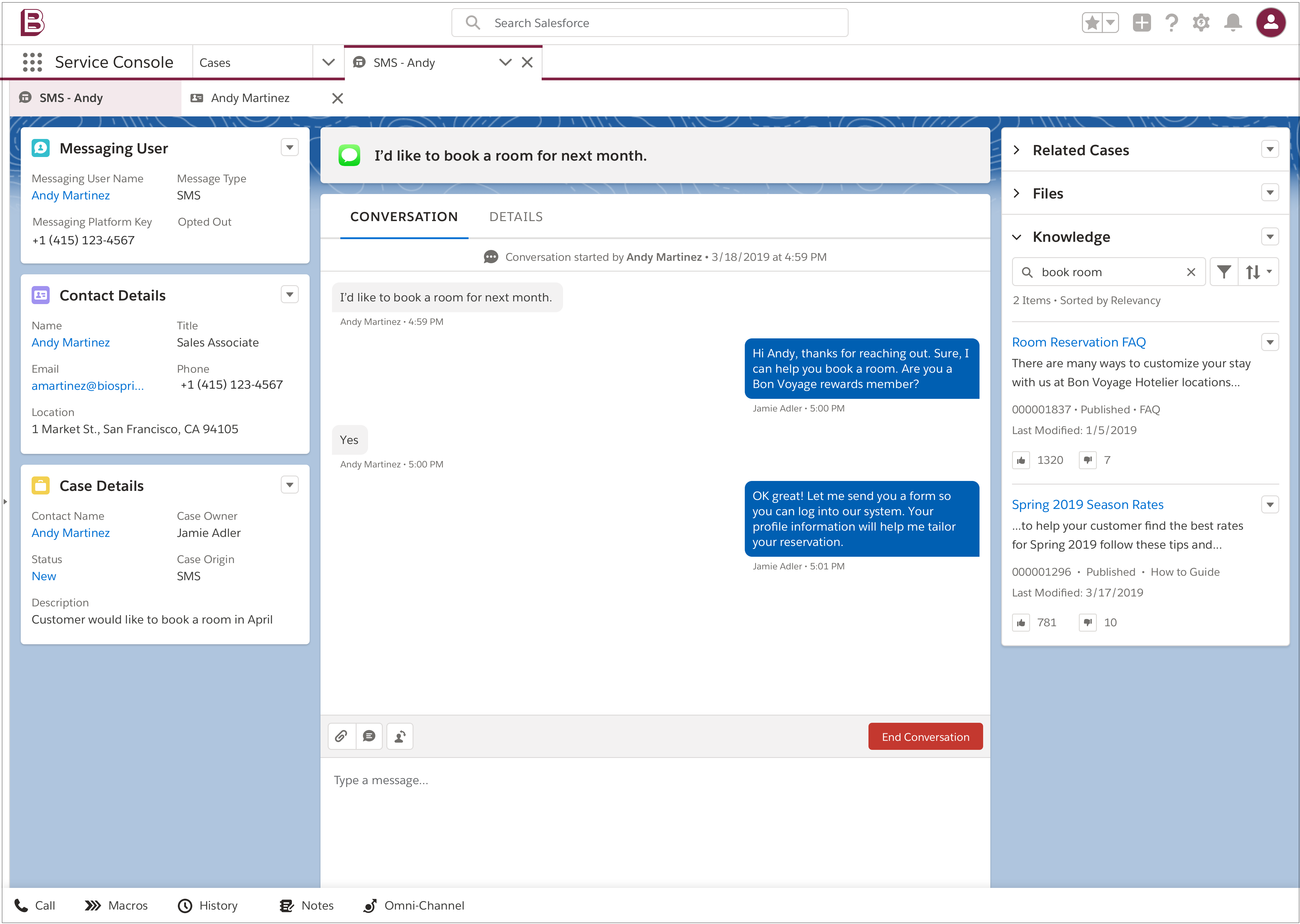
Salesforce supports multiple types of Messaging channels. With Enhanced Chat, you can add messaging to your website or mobile app. With a WhatsApp, Facebook Messenger, LINE, Apple Messages for Business, or SMS channel, you can support customers in a familiar setting—all from one browser tab. And with Bring Your Own Channel for Messaging and Bring Your Own Channel for CCaaS, you can add a partner integration with an external messaging service.
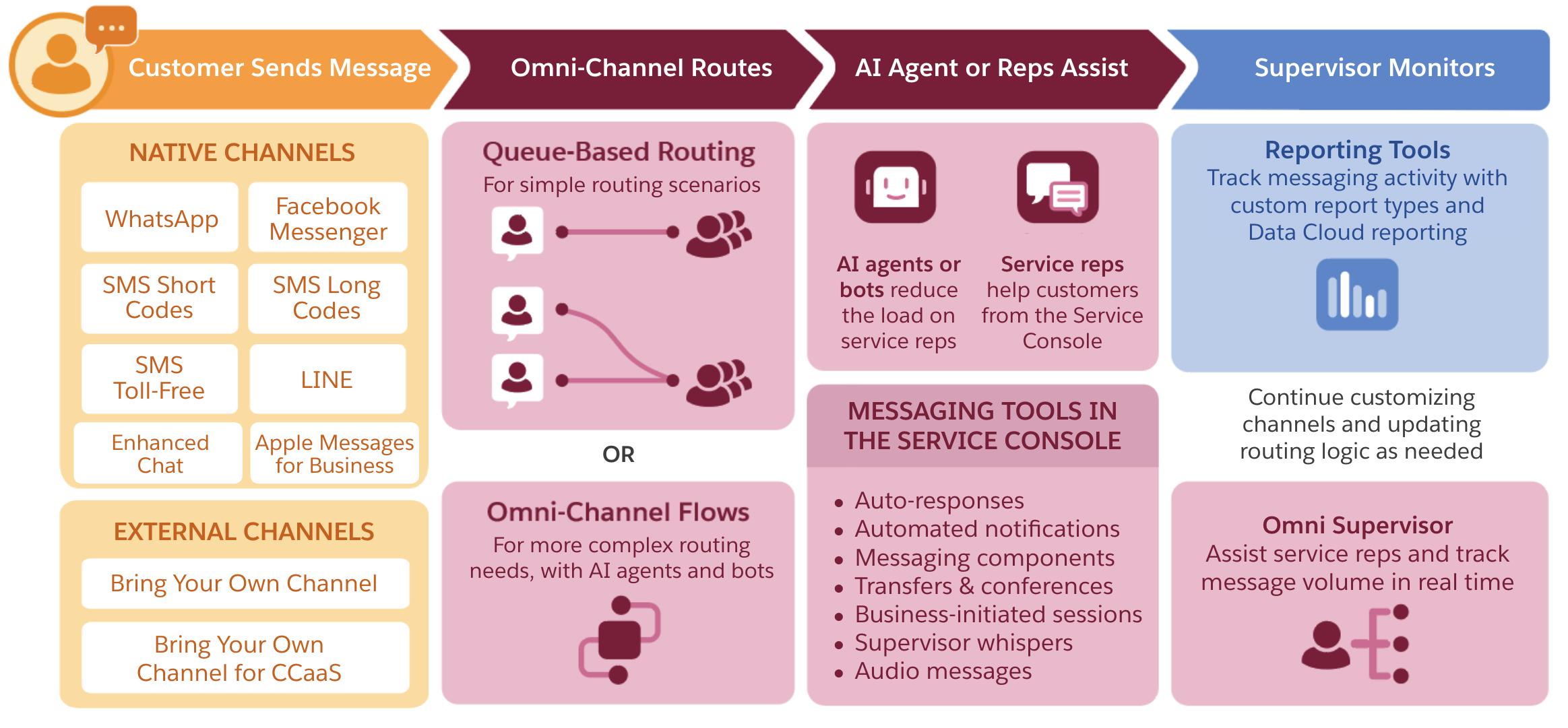
Multi-Channel Support
With Salesforce Messaging, your support team helps customers over their preferred messaging channel without leaving the Service Console. When customers need help from your business, they can message you on any channel you’ve set up and get help from a service rep, AI agent, or bot. You choose the channels where you communicate with your customers—for example, you may prefer to set up only a WhatsApp channel.
Reps in most Messaging channels can also proactively start conversations with customers, or your business can add automation to send notification messages to customers. If a customer responds to a notification, their response is routed back to your support team.
Routing by Omni-Channel
Salesforce's routing tool assigns incoming messages to queues, flows, or service reps. Queue-based routing is ideal for simple routing scenarios. Alternatively, use Flow Builder to set up an Omni-Channel flow, which supports more complex routing logic.
Service Console
Incoming messages appear in the Omni-Channel utility or sidebar in the Service Console, just like phone calls. Service reps can accept a message and start chatting.
The Enhanced Conversation component in the console shows current and past messages exchanged with the customer. Messaging user records, created for anyone who has exchanged messages with your company, show the user's related Salesforce records and all of their messaging sessions in a particular channel.
To let service reps gather and share information in familiar formats, create a library of interactive components. Messaging components are available in several formats, including rich links, questions with options, forms, and time selectors. Reps use the messaging component action or a custom flow to send a messaging component to a customer during a session. Depending on the channel capabilities, your team can also send and receive familiar content types such as images, videos, audio messages, and PDFs.
Sometimes, a service rep isn't able to resolve a customer's issue on their own. When this happens, they have options: they can exchange private messages with a supervisor to troubleshoot, transfer the session to another member of their team, or if the customer stops responding, mark the session inactive.
AI Solutions
To reduce the load on your support reps, create an enhanced bot or an AI agent, such as Agentforce Service Agent. An AI agent functions as an autonomous member of your support team: with the help of the Salesforce AI reasoning engine, it can carry on realistic conversations with customers, complete a range of actions in Salesforce, and proactively advance your customer service goals. Best of all, setting one up takes just a few minutes, and you can try it yourself in Trailhead. Alternatively, add an enhanced bot to your Messaging channels to field common questions. Unlike AI agents, bots rely on scripted conversations and require some human involvement.
AI agents and bots benefit you and your support team in several key ways: They help you resolve cases faster, and shorten messaging sessions by letting customers self-direct. While these tools are an optional part of Messaging, they can help you scale your business's customer service strategy, boosting your efficiency without increasing the number of reps.
- Service Cloud Messaging Limits and Considerations
Before you get started with Messaging, review key limits and considerations. - Compare Messaging Channel Capabilities in Service Cloud
Explore the capabilities of Messaging channels in Service Cloud. - Enhanced Chat and Messaging Glossary
When you’re setting up Enhanced Chat or Messaging, it’s helpful to understand the terms that we use to talk about these services. - Lifecycle of a Messaging Session in Service Cloud
Learn how Salesforce tracks messaging sessions, from the first message to the last. Understanding session status transitions helps you route and monitor inquiries effectively. - Considerations for Upgrading to Credits-Based Messaging with Agentforce Contact Center Digital
As of February 23, 2026, you can access Messaging via the existing Digital Engagement add-on, or via the new Agentforce Contact Center Digital add-on. Agentforce Contact Center Digital uses a different billing model based on message credits in Digital Wallet.
