Use short code phone numbers to send recurring messages and one-time alerts to your US
and Canadian customers. When customers respond, they can have two-way conversations with service
reps. Short codes have high throughput, which means you can send high volumes of one-to-one
messages.
Enhanced In-App Chat, Enhanced Web Chat v1, Enhanced Web Chat v2, Enhanced
WhatsApp, Standard and Enhanced Facebook Messenger, Enhanced Apple Messages for
Business, Enhanced LINE, and Bring Your Own Channel
User Permissions
Needed
To set up Messaging:
Configure Messaging
To view SMS channels:
View Setup and Configuration
To create SMS channels:
System Administrator AND Configure Messaging
OR
Configure Messaging AND
Customize Application AND Manage Auth. Providers AND View Setup and Configuration
AND Modify All Data
Important Standard SMS channels were retired on February 14, 2026. To
avoid service interruptions, upgrade your standard SMS channels to enhanced channels now.
Enhanced SMS offers many of the standard SMS features you love plus session transfers and AI agent support. See
Upgrading from Standard to Enhanced Messaging.
Want to see short codes in
action? Watch our video.
Note If you have the
Agentforce Contact Center Digital add-on, you must purchase message credits to create a
short code SMS channel. During channel creation, we'll let you know if they're missing.
Message credits determine the quantity and nature of messages that your business can send,
and allow you to access the full SMS feature set. They appear in Digital Wallet under the
Salesforce Message Credits - SMS
card.
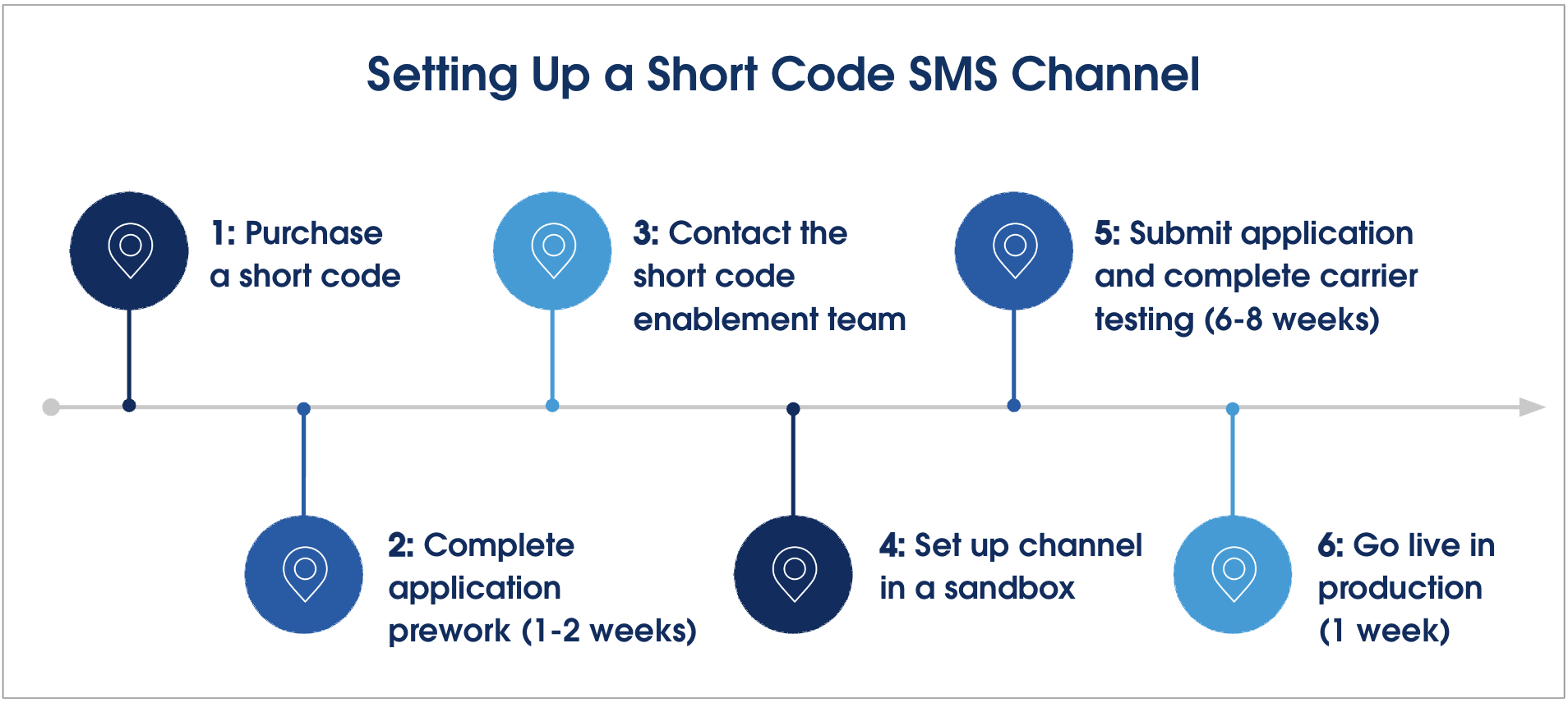
Setting up a standard or enhanced short code SMS channel involves a
multi-step application process. Approving and provisioning a short code can take 10–16
weeks. Here’s what to expect from the setup process:
Considerations for Short Codes When you use short codes, your business is required to follow carrier compliance requirements, industry standards, and applicable laws. Short codes are only supported in the US and Canada.
Did this article solve your issue?
Let us know so we can improve!
Loading
Salesforce Help | Article
Cookie Consent Manager
General Information
Required Cookies
Functional Cookies
Advertising Cookies
General Information
We use three kinds of cookies on our websites: required, functional, and advertising. You can choose whether functional and advertising cookies apply. Click on the different cookie categories to find out more about each category and to change the default settings.
Privacy Statement
Required Cookies
Always Active
Required cookies are necessary for basic website functionality. Some examples include: session cookies needed to transmit the website, authentication cookies, and security cookies.
Functional Cookies
Functional cookies enhance functions, performance, and services on the website. Some examples include: cookies used to analyze site traffic, cookies used for market research, and cookies used to display advertising that is not directed to a particular individual.
Advertising Cookies
Advertising cookies track activity across websites in order to understand a viewer’s interests, and direct them specific marketing. Some examples include: cookies used for remarketing, or interest-based advertising.