Configure Geolocation Settings for Appointment Assistant Real-Time Location
To give customers better insight into their mobile worker’s location while waiting for
their appointments, make sure your geolocation settings are set up.
Required Editions
Available in: both Salesforce Classic (not available in all orgs) and Lightning
Experience
The Field Service core features, managed package, and mobile app are available in
Enterprise, Unlimited, and Developer Editions.
The Field Service Appointment Assistant managed package and permission set
license are required.
User Permissions Needed
To configure resource tracking:
Customize Application
Geolocation settings are used for additional purposes in the Field Service mobile app, so it’s
likely they’re set up. To verify setup, follow these steps.
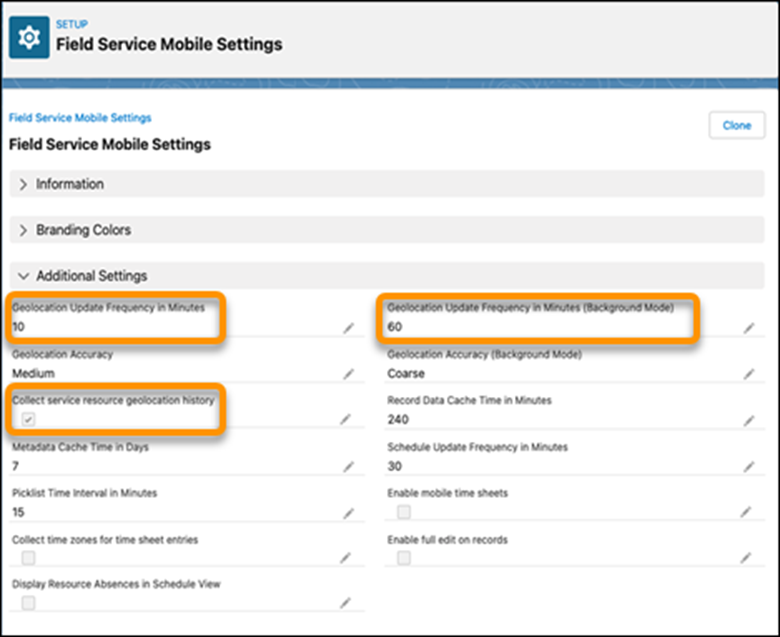
Open Field Service Mobile Settings.
Make sure that the Collect service resource geolocation history
option is enabled.
Make sure that values are entered for the Geolocation Update Frequency in Minutes and
Geolocation Update Frequency in Minutes (Background Mode) settings.
Note Mobile worker locations are shared during travel to the customer until
arrival. While the location is shared, geolocation settings are overridden and get updated
every 60 seconds.
We use three kinds of cookies on our websites: required, functional, and advertising. You can choose whether functional and advertising cookies apply. Click on the different cookie categories to find out more about each category and to change the default settings.
Privacy Statement
Required Cookies
Always Active
Required cookies are necessary for basic website functionality. Some examples include: session cookies needed to transmit the website, authentication cookies, and security cookies.
Functional Cookies
Functional cookies enhance functions, performance, and services on the website. Some examples include: cookies used to analyze site traffic, cookies used for market research, and cookies used to display advertising that is not directed to a particular individual.
Advertising Cookies
Advertising cookies track activity across websites in order to understand a viewer’s interests, and direct them specific marketing. Some examples include: cookies used for remarketing, or interest-based advertising.