
Let Customers Reschedule and Cancel Appointments in the Real-Time Location Component
Let your customers reschedule and cancel appointments even if the mobile worker is on the way to the appointment.
Required Editions
| Available in: both Salesforce Classic (not available in all orgs) and Lightning Experience |
| The Field Service core features, managed package, and mobile app are available in Enterprise, Unlimited, and Developer Editions. |
| The Field Service Appointment Assistant managed package and permission set license are required. |
| User Permissions Needed | |
|---|---|
| To customize component settings: | Create and Set Up Experience Sites AND View Setup and Configuration |
- To open the settings panel, click anywhere in the Real-Time Location component.
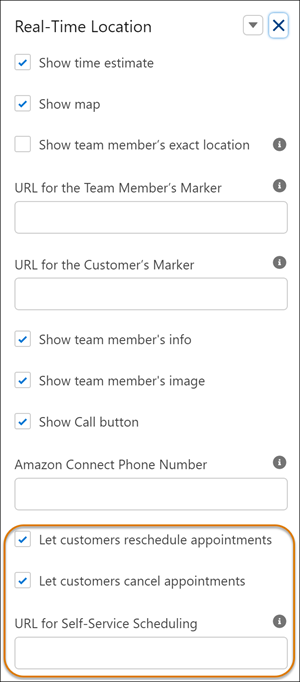
- Select Let customers reschedule appointments and Let customers cancel appointments.
-
In URL for Self-Service Scheduling, enter the URL of the page where your self-service
scheduling component is located.
 To find this URL:
- From Setup, in the Quick Find box, enter Digital Experiences, and then select All Sites.
- In the row of the required Experience site, click Builder.
-
In Experience Builder, click Settings
 .
.
- Copy the URL from the Publish Status. Make sure that the specific page is included in the URL.
-
Enable the notification delivery channels.
- From Setup, in the Quick Find box, enter Notification Builder, and then select Notification Delivery Settings.
- From Custom Notification Types, edit Appointment Assistant Custom Notifications.
- Select Salesforce Field Service for Android and Salesforce Field Service for iOS. If you can’t see these options, install the connected apps.
-
Mobile workers are notified when appointments are rescheduled or canceled. If you want to
disable the notifications, follow these steps.
- From Setup, in the Quick Find box, enter Process Automation, and then select Flows.
- Open the Self-Service Scheduling Notifications flow.
- Click Deactivate.
Did this article solve your issue?
Let us know so we can improve!
