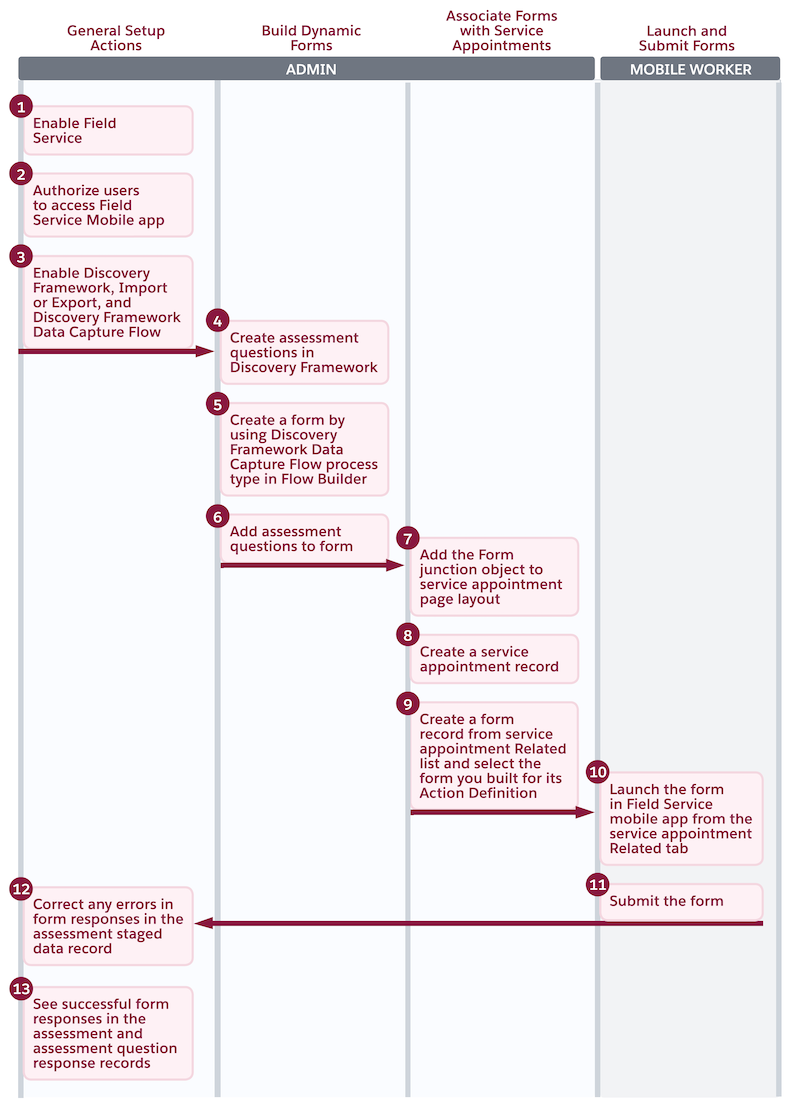
Discovery Framework-Based Data Capture with Field Service Mobile App
With Assessment Questions and the Discovery Framework Data Capture Flow process type in
Flow Builder, build dynamic and responsive forms to efficiently collect data from customers.
Your mobile workers can use these forms on the Field Service
mobile
app, even in areas with poor or no internet connectivity.
Required Editions
Available in: Lightning Experience
Available in: Enterprise, Unlimited, and Developer Editions
where Field Service, Discovery Framework, Discovery Framework Import or Export, and
Discovery Framework Data Capture Flow are enabled
Mobile workers can access forms directly from the Forms tab on Work Order Overview. They can
also access the forms from the related list on a service appointment, work order, and a work
order line item record. With Discovery Framework, you can maintain a clear audit trail by
reusing and versioning questions across multiple forms.
Important
The Discovery Framework-Based Data Capture with Field Service Mobile App feature isn't
available for non-Industries clouds. Only Industries clouds can create and access the
assessment questions in the Discovery Framework. Make sure that you have the appropriate
permissions and licenses to create and use these assessment questions. See Discovery Framework Editions and Permissions.
Set Up Discovery Framework-Based Data Capture with Field Service Mobile App Build data capture forms by using assessment questions from Discovery Framework and Flow Builder. Associate these forms with work orders, work order line items, or service appointments to help your mobile workers collect data during field visits by using the Field Service mobile app.
Discovery Framework Data Capture Flow Question Types Discovery Framework-Based Data Capture forms supports only specific data types in the questions that you create. The data type that you select when you create an assessment question maps to a standard flow screen component.
We use three kinds of cookies on our websites: required, functional, and advertising. You can choose whether functional and advertising cookies apply. Click on the different cookie categories to find out more about each category and to change the default settings.
Privacy Statement
Required Cookies
Always Active
Required cookies are necessary for basic website functionality. Some examples include: session cookies needed to transmit the website, authentication cookies, and security cookies.
Functional Cookies
Functional cookies enhance functions, performance, and services on the website. Some examples include: cookies used to analyze site traffic, cookies used for market research, and cookies used to display advertising that is not directed to a particular individual.
Advertising Cookies
Advertising cookies track activity across websites in order to understand a viewer’s interests, and direct them specific marketing. Some examples include: cookies used for remarketing, or interest-based advertising.