Customize and Extend the Field Service Mobile App with Lightning Web Components
Lightning web components (LWCs) let you create your own experiences using Quick Actions
to customize the app to meet your business needs. LWCs represent the best of the Salesforce
platform, bringing modern web standards in performant, modular components that are easy to
build.
Required Editions
Available in: both Salesforce Classic (not available in all orgs) and Lightning
Experience
The Field Service core features, managed package, and mobile app are available in
Enterprise, Unlimited, and Developer Editions.
To access the Field Service mobile app, users need the Field Service Mobile user
license.
Watch the video to see how LWCs can let your mobile workers find nearby records, add images
to a record, and reschedule an appointment directly from the Field Service mobile app.
What Can I Do with LWCs in the Field Service Mobile App?
You can create custom components that are accessed from the Actions menu. The Actions menu
is available globally and on record detail pages.
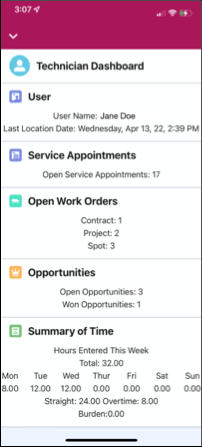
Lightning Web Components in Salesforce allow you to create a wide range of actions tailored
to your specific needs. They are versatile and can function seamlessly even when mobile
devices are offline. With LWCs, you can perform tasks such as adding annotations to images
for service reports, ordering parts, contacting subject matter experts (SMEs), and creating
custom dashboards for your mobile workers, as shown in the example image.
Work with LWCs
Use the resources in the following table to learn about LWCs for the Field Service mobile
app or find a partner who can help.
We use three kinds of cookies on our websites: required, functional, and advertising. You can choose whether functional and advertising cookies apply. Click on the different cookie categories to find out more about each category and to change the default settings.
Privacy Statement
Required Cookies
Always Active
Required cookies are necessary for basic website functionality. Some examples include: session cookies needed to transmit the website, authentication cookies, and security cookies.
Functional Cookies
Functional cookies enhance functions, performance, and services on the website. Some examples include: cookies used to analyze site traffic, cookies used for market research, and cookies used to display advertising that is not directed to a particular individual.
Advertising Cookies
Advertising cookies track activity across websites in order to understand a viewer’s interests, and direct them specific marketing. Some examples include: cookies used for remarketing, or interest-based advertising.