Set Up Voice to Form for the Field Service Mobile App
Set up Voice to Form, so Field Service mobile users can use voice input to automatically
fill out Data Capture forms.
Required Editions
Available in: Lightning Experience
Available in: The Field Service core features, managed package, and mobile app are
available in Enterprise, Unlimited, and Developer Editions.
Important
To access the Field Service mobile app, users need the Field Service Mobile User license. To
use Voice to Form users need the Agentforce for Field Service SKU license.
User Permissions Needed
To use Voice to Form and Field Service Einstein features
Einstein Field Service User
Before you begin the setup process, make sure the following conditions are met:
Provision and enable Data cloud for your Salesforce org. Data Cloud is required for
essential Einstein Generative AI functionality.
Tip If Data Cloud Setup isn’t
visible, try refreshing the page, logging out and back in, or confirming you're using a
required edition. If issues persist, contact your Salesforce Account Executive (AE).
Mobile workers must be on the latest version of the Field Service Mobile App.
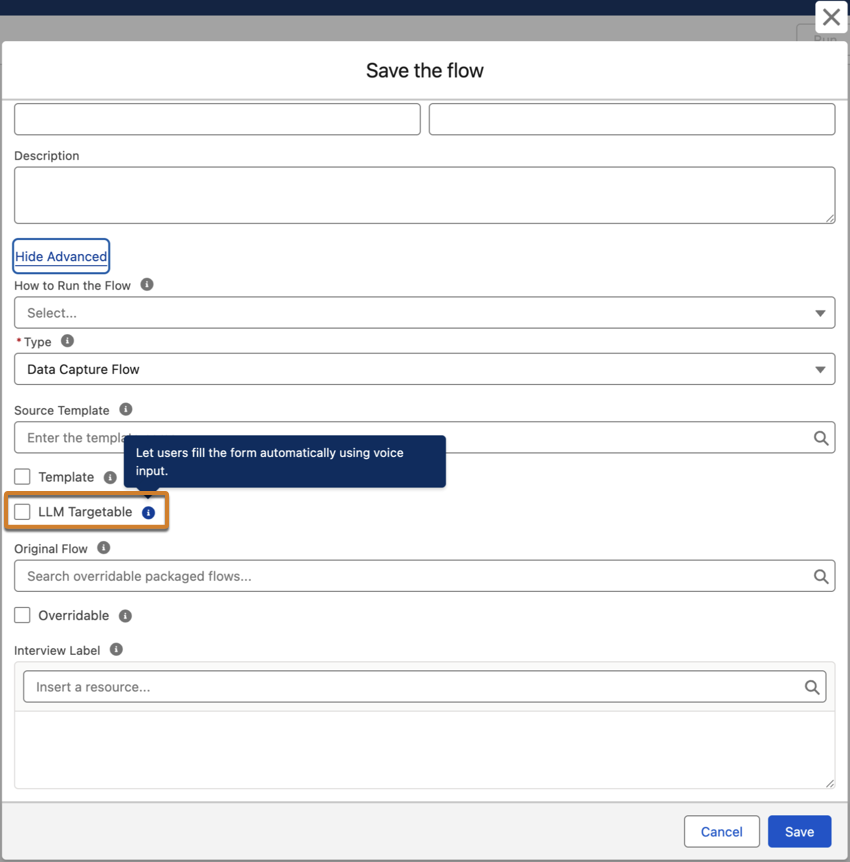
After setting up Data Capture, when saving your Data Capture flows, select LLM Targetable.
We include an LLM Context field for every Data Capture component. The maximum character length
for LLM Context is 131,072 characters.
On the "Save the Flow" screen, click Show Advanced.
Select LLM targetable.
Save the flow.
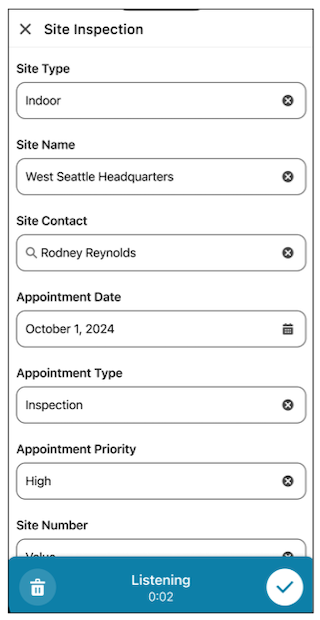
To use Data Capture Voice to Form on the mobile app, mobile workers tap the microphone icon on
the form and speak. The system intelligently captures information and populates the correct
fields.
Did this article solve your issue?
Let us know so we can improve!
Loading
Salesforce Help | Article
Cookie Consent Manager
General Information
Required Cookies
Functional Cookies
Advertising Cookies
General Information
We use three kinds of cookies on our websites: required, functional, and advertising. You can choose whether functional and advertising cookies apply. Click on the different cookie categories to find out more about each category and to change the default settings.
Privacy Statement
Required Cookies
Always Active
Required cookies are necessary for basic website functionality. Some examples include: session cookies needed to transmit the website, authentication cookies, and security cookies.
Functional Cookies
Functional cookies enhance functions, performance, and services on the website. Some examples include: cookies used to analyze site traffic, cookies used for market research, and cookies used to display advertising that is not directed to a particular individual.
Advertising Cookies
Advertising cookies track activity across websites in order to understand a viewer’s interests, and direct them specific marketing. Some examples include: cookies used for remarketing, or interest-based advertising.