
You are here:
Add a Skill Requirement Action
Add skill requirements to your work items to ensure the work is routed to the best service rep for the customer’s issue. You can add up to 10 skills with the Add Skill Requirements action and can define 20 skills overall in the flow when routing an individual work item.
- Follow the steps to create an Omni-Channel Flow.
- Drag the Add Skill Requirements action onto the canvas.
- Give the action a label and API name and optionally, a description.
- Under Set Input Values, optionally select a skillList variable that you created. This variable stores and aggregates skills as the flow runs.
-
Under Add Skill Requirement, enter the skills or a variable with the Skill IDs that the
service rep needs. You can specify a skill level, whether the skill is additional, and a
priority.
Initially, Omni-Channel tries to route work to a service rep with all the requested skills. If a service rep with all the skills isn't available and additional skills are configured to be dropped, Omni-Channel drops additional skills after a timeout. The router drops skills until a service rep who has the remaining skills is available. You can specify the order in which additional skills are dropped. Skills with a higher priority are dropped first. For example, a skill with priority 5 is dropped before a skill with priority 4. Skills with priority 0, or skills without a priority, are dropped last. The work item is then routed to the best-matched agent, even if the service rep doesn't have all the additional skills.
If a service rep declines work or goes offline, the required skills reset to what they were originally, and the timer resets. The router goes back to looking for service reps with all additional skills and begins the process of dropping additional skills over again.
-
If you aggregate skills in a skillList variable as the flow runs, in the Advanced
section, set that variable as output of the Add Skill Requirements action.
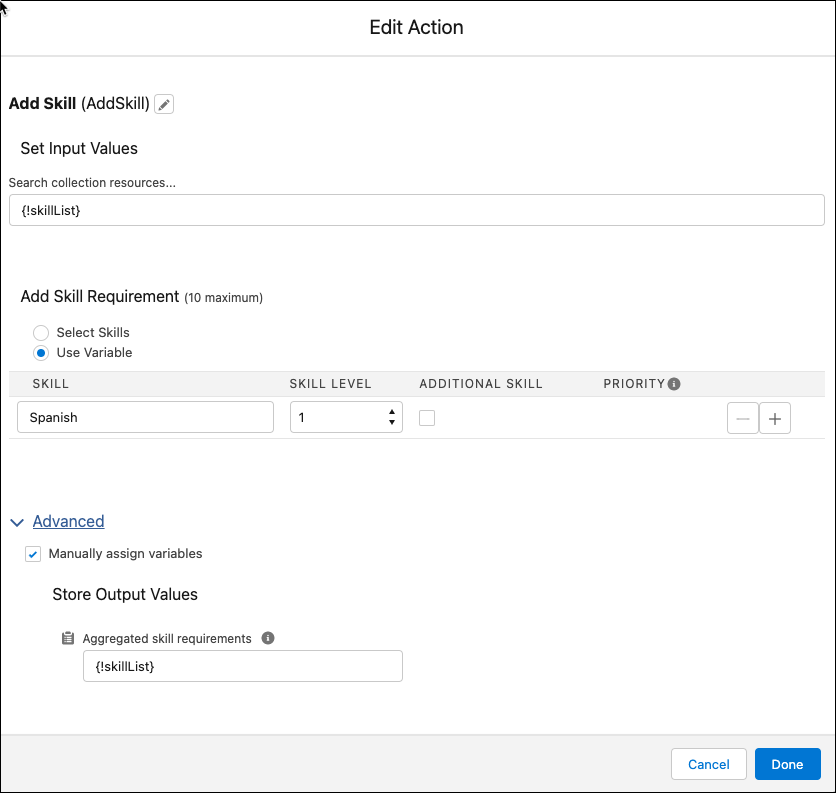
A subsequent Route Work action can use the output from your Add Skill Requirements action to define skills that service reps need for work items. For example, if the API name of an Add Skill Requirements action is AddSkill, specify that action’s outputs, {!AddSkill.skillRequirements}, in the Route Work action. If you aggregate skills in a skillList variable, specify it as output of your Add Skill Requirements action and as the skill requirements list in your Route Work action.The Add Skill Requirements action can be migrated with Omni-Channel Flows from sandbox to production organization without manual intervention. To migrate the Add Skill Requirements action, change the Action Version to version 2.0.0. Skills can't be migrated. You need to ensure that the required skills are present in the target organization for the Add Skill Requirements action to be migrated successfully. References to Skills can’t be migrated.
