
You are here:
Make Smarter Routing Decisions by Checking Service Rep Availability
Optimize routing by using information collected about your organization’s capacity to handle new work requests. Add the Check Availability for Routing action to an Omni-Channel flow to determine service rep availability and estimated wait time. This action can return the number of online service reps and number of work items waiting to be picked up given the specified routing requirements, including routing type and parameters. It can also estimate how long the customer has to wait before they reach a service rep. You can then build routing logic based on the results. For example, if the service rep has more than five backlogged work items in their queue, you can route work to another queue instead.
- In the Omni-Channel flow, click +, and select Check Availability for Routing.
- Give the action a label, API name, and, optionally, a description.
- Select the service channel.
-
In the Check Availability For field, select where to check.
-
To check availability when you route to a queue, select
Queue, select the queue or variable that stores the queue,
and select one of these Return Output options.
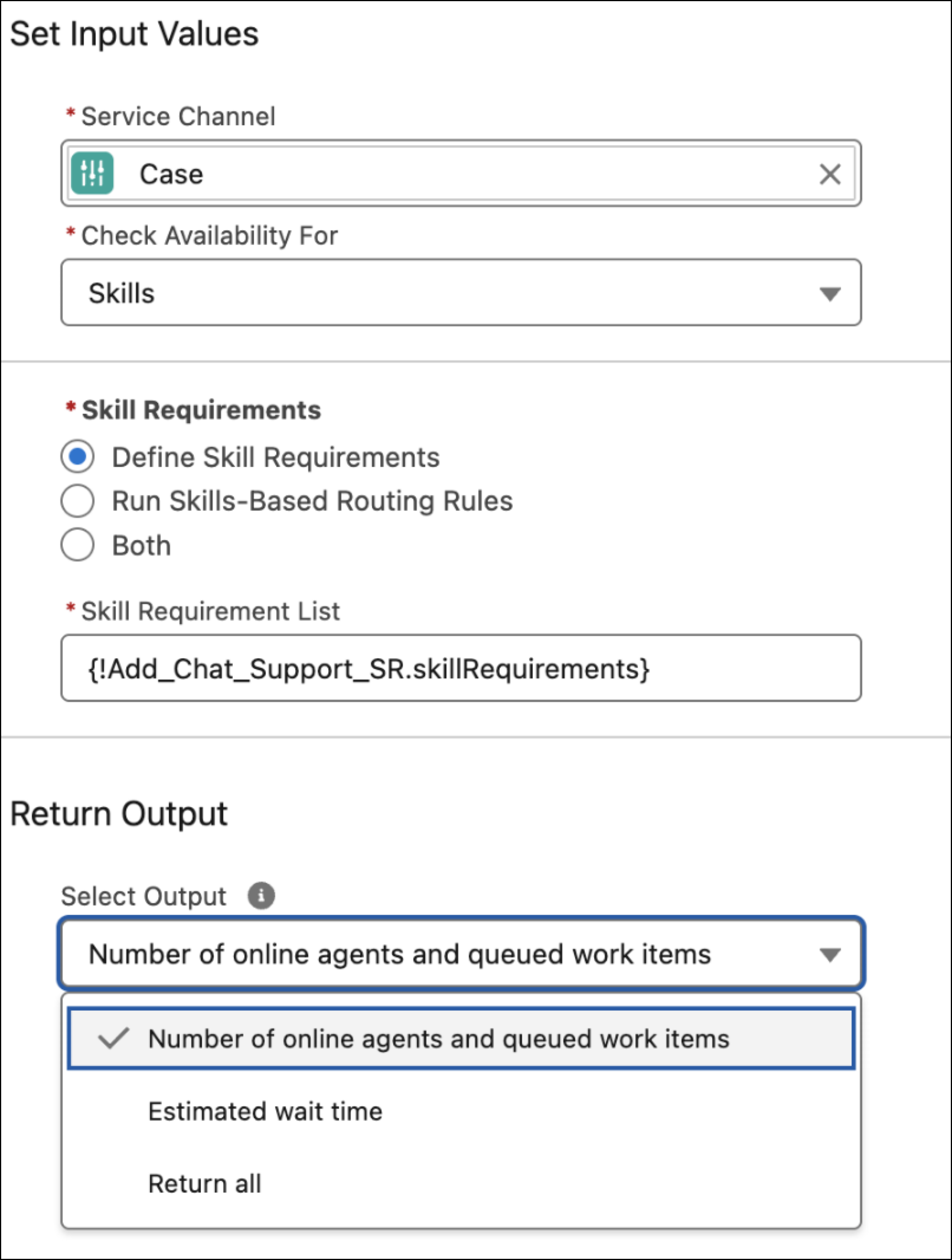
Option Description Number of online agents and queued work items Returns the number of reps who are online and the number of work items in the queue. If you don't select any option, this is the default. Estimated wait time Returns the estimated wait time. Return all Returns the number of reps who are online, the number of work items in the queue, and the estimated wait time. - To check availability when you route to a service rep, select Agent, and then select the service rep or variable that stores the service rep.
-
To check availability when you route to a skill, select
Skills, and then select one of these options.
Option Description Define Skill Requirements Use to select requirements from an Add Skill Requirement flow action. Run Skills-Based Routing Rules Use to select predefined skills-based rules. This option requires that you also select the recordId variable in the Record ID field, which stores the ID of the work record to be routed. Omni-Channel retrieves the rules assigned to the associated work record. Both Use to select predefined skills-based rules and requirements from an Add Skill Requirement flow action. To select predefined skills-based rules, select the recordId variable in the Record ID field, which stores the ID of the work record to be routed. Omni-Channel retrieves the rules assigned to the associated work record.
-
To check availability when you route to a queue, select
Queue, select the queue or variable that stores the queue,
and select one of these Return Output options.
-
Optionally, to assign the output of this flow action to variables so they can also be
used downstream in the Omni-Channel flow, expand the Show Advanced Options section, select
Manually assign variables, and then select the variable for each
output.
The action can store these output values.
Output value Description Estimated Wait Time (in seconds) The action returns the estimated wait time (in seconds) when routing work to a queue or skill given the specified routing parameters. For example, if you route work to a queue, this parameter shows the estimated time that the work can remain in the queue before a rep picks it up.
Omni-Channel calculates estimated wait time based on the last 1-10 work items that were accepted during the last 10 minutes. If no work items were accepted in the last 10 minutes, the Check Availability for Routing action returns -1. For calculation details, see Knowledge Article: Estimated Wait Time Calculation When Routing Work with Omni-Channel.
Wait times are calculated based on primary (not interruptible) work items in the queue. Interruptible work isn’t included in the calculation.
Number of Online Agents The action returns the number of service reps who are online but not necessarily available to accept more work—they could be working at capacity. If you route to a service rep, this value is 0 (the service rep is offline) or 1 (the service rep is online). If you route to a queue, this value is the number of online service reps assigned to that queue. If you route to a skill, this value is the number of online service reps who have the specified skillset. Number of Queued Work Items The action returns the number of items waiting to be picked up, which excludes items assigned to or accepted by service reps. If you route to a service rep, this value is the number of PSRs directly assigned to the service rep without a fallback queue. If you route to a queue, this value is the number of PSRs assigned to the queue, including PSRs assigned to a specific service rep with this queue as the fallback queue. If you route to skills, this value is the number of PSRs that share the exact same set of mandatory skill requirements, both skill and skill level, used in the action.
Queue size is calculated based on primary (not interruptible) work items in the queue. Interruptible work isn’t included in the calculation.
To make a routing decision based on the results of this action, add a Decision element to the Omni-Channel flow. In the Decision element, define the expected routing for different conditions. For instance, if at least one service rep is online and the queue size is less than or equal to 10, route cases to the queue using a Route Work action.
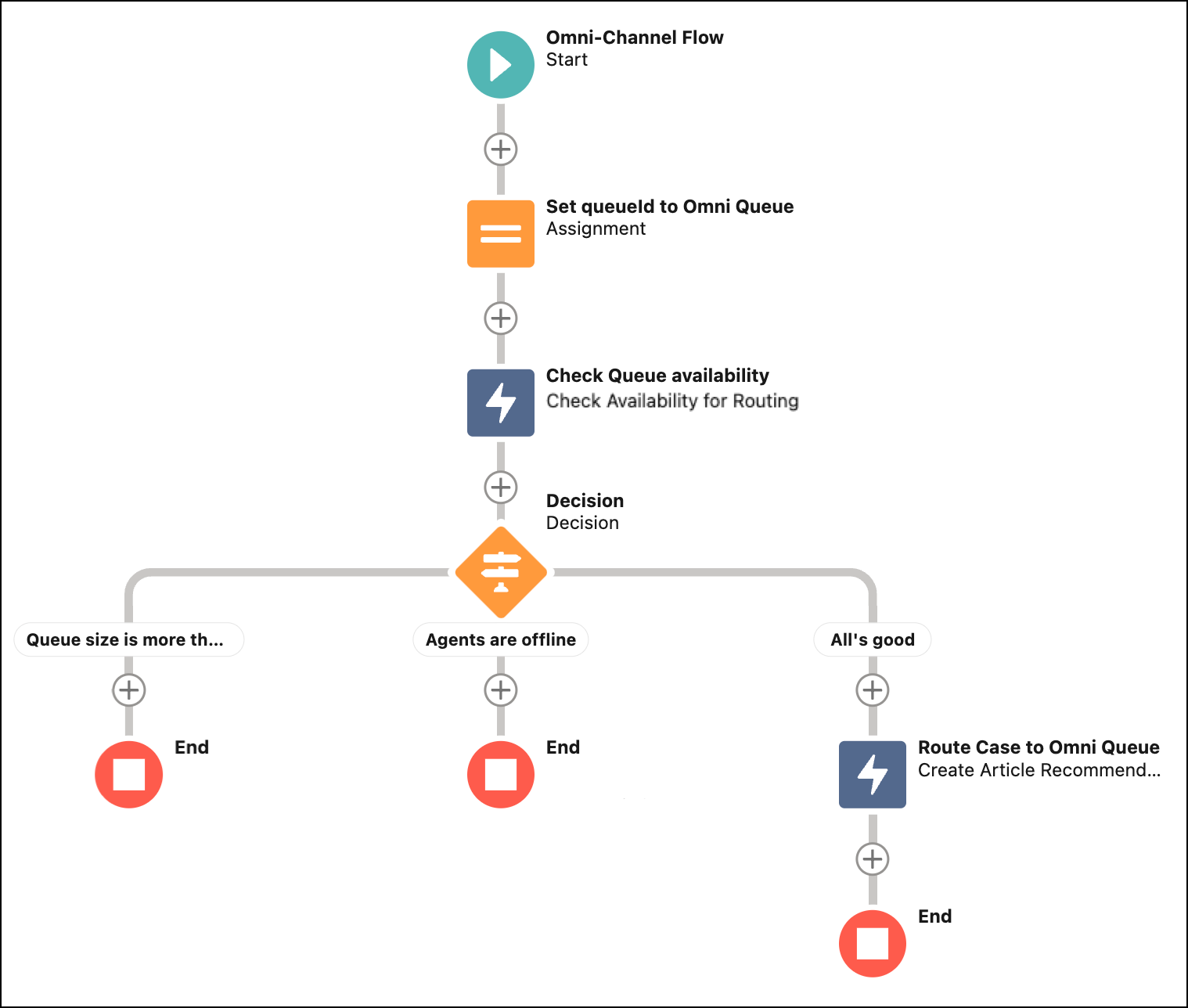
To route work based on the estimated wait time, output the time in a Check Availability for Routing action of an Omni-Channel flow, and use that output as input for the routing logic in a Route Work action.
The Check Availability for Routing action can be migrated with Omni-Channel Flows from sandbox to production organization without manual intervention. To migrate the Check Availability for Routing action, change the Action Version to version 2.0.0.
The references to Agent and Queue need a workaround to be migrated. Workaround for the references to the User Entity - Agent
- Use a Get Record flow action to retrieve the Agent ID (ex: By Username or email)
- In the Omni-Channel action field, use the User ID retrieved from the previous step
Workaround for the references to the Queue Entity
- Use a Get Record flow action to retrieve the Queue ID (ex: By Queue Name)
- In the Omni-Channel action field, use the Queue ID retrieved from the previous step for any field referencing a queue
The skills referenced with the action can’t be migrated.
