
You are here:
Configure Work Items as Primary or Interruptible
Make sure that uninterruptible work like a chat goes only to service reps with the capacity to handle it. Define uninterruptible work as primary, and long-standing or less-urgent work, like cases or leads, as interruptible.
Required Editions
| View supported editions. |
When service reps handle both time-sensitive and long-running work, Omni-Channel can route time-critical work items so that customers receive faster response times. You can define less pressing work items as interruptible so that Omni-Channel can route more urgent work to service reps right away.

A field on the work item—the Is Interruptible field on a Pending Service Routing or Agent Work record—determines whether a work item is interruptible.
You can set work items as interruptible in any of these ways: from the service channel, from routing settings, or in Apex.
- Use service channel settings to set work items as interruptible.
In Setup, under Omni-Channel Service Channels, select Is Interruptible. For example, configure work in the Case service channel as interruptible and work from the Chat service channel as primary.
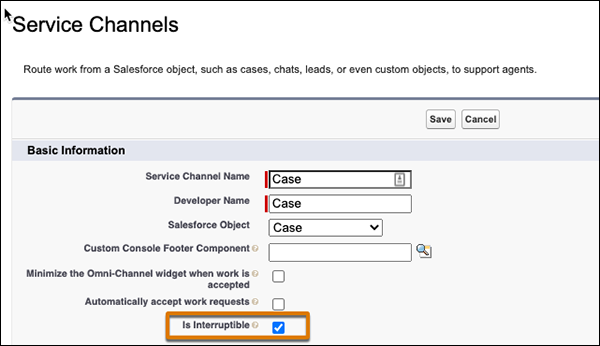
- Use routing configurations to set work items as interruptible.
In Setup, under Omni-Channel Routing Configurations, set Capacity Type for routed work items. You can set this field as interruptible, primary, or inherited from the service channel.
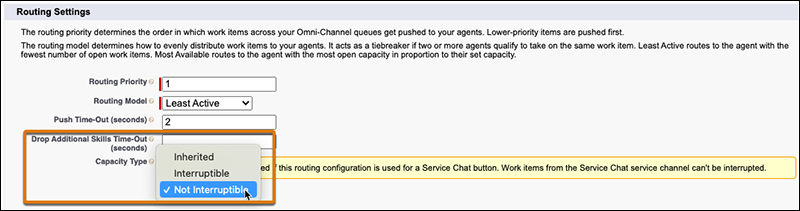
- Use Apex to set the capacity type.
In Apex, set the
IsInterruptiblefield explicitly on a Pending Service Routing record or Agent Work record for a work item.
If you define an Omni-Channel flow that uses the Route Work action, specify a service channel or routing configuration in the flow. Configure interruptibility in the service channel or routing configuration. Omni-Channel can then set the Is Interruptible field on Pending Service Routing records accordingly.

Configure Capacity Weight for Work Items
Omni-Channel routes according to both interruptibility and work item size. After you’ve set work items as primary or interruptible, configure their capacity weights.
You can set the capacity weight for work items in two ways: in the routing configuration, and in Apex.

-
Set the capacity weight for work items in the routing configuration.
In Setup, under Omni-Channel Routing Configurations, specify the work item size. Define the size as work units or as a percentage of a service rep’s capacity. For example, if a service rep has a capacity of six work units and all cases have a capacity weight of two, an agent can handle up to three cases. Alternatively, specify the work item’s required capacity as a percentage.
Note A voice call requires 100% of a service rep’s capacity, whether it’s specified through Units of Capacity or Percentage of Capacity.
When Omni-Channel makes routing decisions, it checks percentages of available primary and interruptible capacity. If you specify work item size using work units, it converts available capacities to percentages to check if the service rep has availability that meets the rules.
-
Alternatively, in Apex, set the Capacity Weight or Capacity Percentage field explicitly on these records:
PendingServiceRouting,AgentWork, andQueueRoutingConfig.
Now you’re ready for Omni-Channel to make routing decisions using primary and interruptible capacity.
