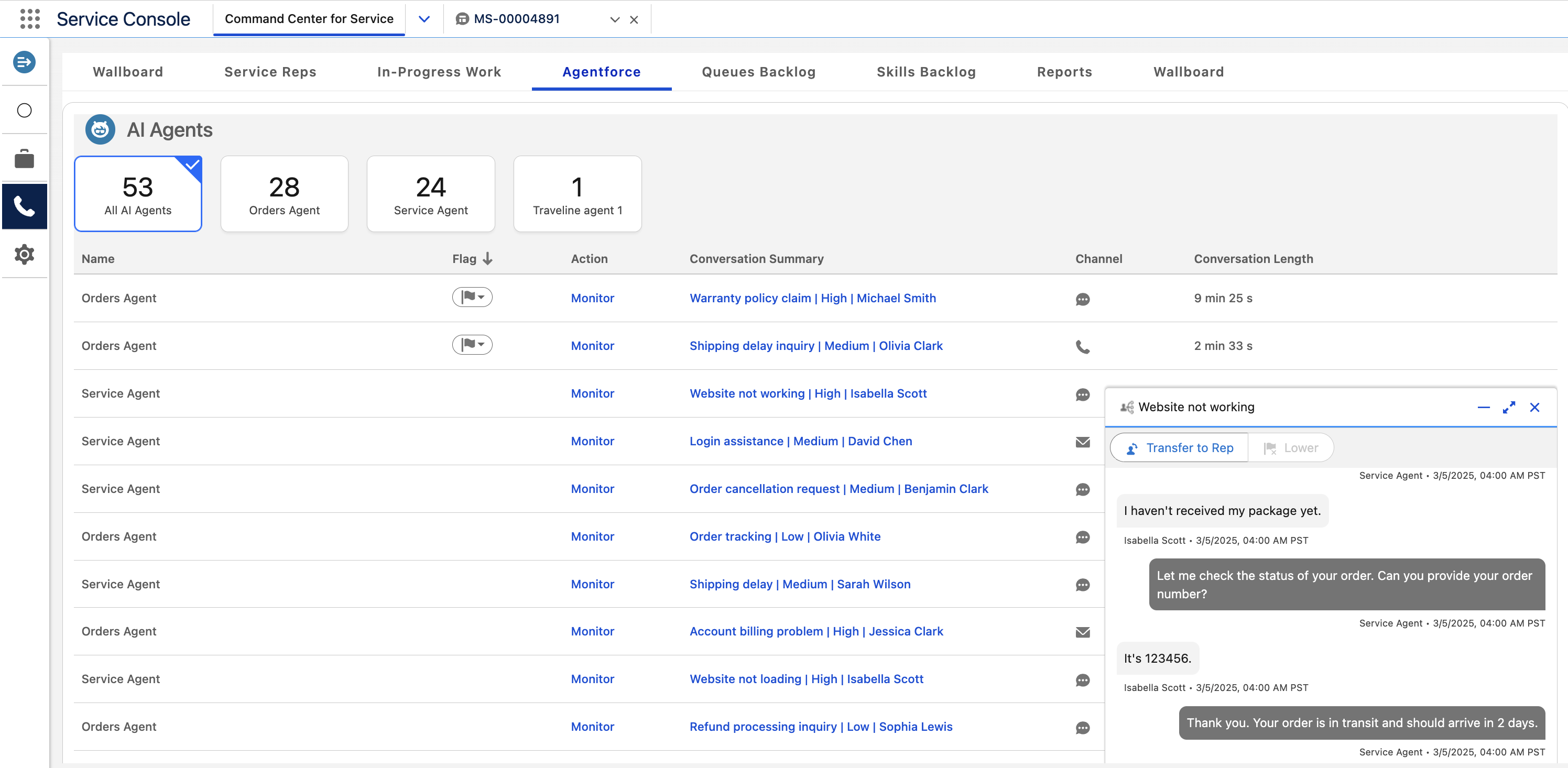
Monitor active enhanced messaging conversations with Agentforce Service Agents. In this
tab, you can view the conversations between them and your customers in real time. You can also
identify which Service agent needs help by looking for raised flags.
The Agentforce tab shows active conversations between Service agents and your
customers. For each conversation, it shows the AI agent name, conversation details, and, if
applicable, the raised flag. Conversations with raised flags appear at the top of the list.
This tab can show conversations for up to 10 Service agents. If there are more agents, the
top 10 agents with the most conversations appear in the tab. The boxes above the table show
the number of active conversations for each Service agent. To filter the list of agent
conversations, select one of the boxes. For example, click All Agentforce
Agents to view conversations for all Service agents.
To view the conversation between a Service agent and customer, click
Monitor. When you view the conversation, click Transfer to
Rep to transfer it to a human service rep. To lower the flag, click
Lower.
Agentforce Tab Fields The Agentforce tab contains fields that provide information about the Service agents’ current work. To filter the results for a specific agent, select the box with the agent’s name above the table.
We use three kinds of cookies on our websites: required, functional, and advertising. You can choose whether functional and advertising cookies apply. Click on the different cookie categories to find out more about each category and to change the default settings.
Privacy Statement
Required Cookies
Always Active
Required cookies are necessary for basic website functionality. Some examples include: session cookies needed to transmit the website, authentication cookies, and security cookies.
Functional Cookies
Functional cookies enhance functions, performance, and services on the website. Some examples include: cookies used to analyze site traffic, cookies used for market research, and cookies used to display advertising that is not directed to a particular individual.
Advertising Cookies
Advertising cookies track activity across websites in order to understand a viewer’s interests, and direct them specific marketing. Some examples include: cookies used for remarketing, or interest-based advertising.