
You are here:
Skills Backlog Tab
See pending work items for skills-based routing in the Command Center for Service Skills Backlog tab. The Skills Backlog tab is shown only if you have skills-based routing enabled in your org.
| View supported editions. |
Keep an eye on your backlog of unassigned work items using the Skills Backlog Summary view in the Skills Backlog tab. You can see your backlog’s work item types, work item details, skills, priority, work size, and wait times. The Skills Backlog Summary gives you an overview of the pending work items and the skills that are required to address these work items.

Skills are assigned to work items by the PendingServiceRouting. If there isn’t a service rep available who possesses the required skills, then the work item is placed in the backlog. You can see whether you need more service reps with certain skills by looking at the skills assigned to the work items in the Skills Backlog.
To drill down and see work items that require a specific set of skills, go to the Skills Backlog Summary and select one or more skills in the Skills column. The Skill view shows all pending work items that require any or all of the selected skills. You can see the skills needed and the skill level needed, in addition to the priority, work size, and waiting time for each work item.
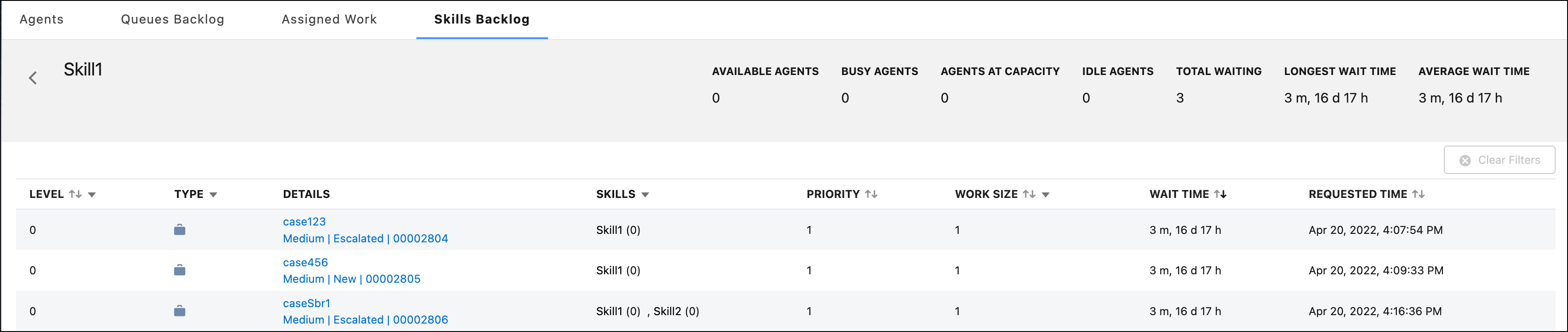
- Skills Backlog Tab Fields
Fields for the Command Center for Service Skills Backlog tab. The Skills Backlog tab is available only in orgs that use skills-based routing for Omni-Channel.
