Loading
Salesforce now sends email only from verified domains. Read More
Salesforce Field Service
Table of Contents
Select Filters

          No results
          No results
          Here are some search tips

          Check the spelling of your keywords.
          Use more general search terms.
          Select fewer filters to broaden your search.

          Search all of Salesforce Help
          Enable Enhanced Scheduling and Optimization

          Enable Enhanced Scheduling and Optimization

          Enhanced Scheduling and Optimization must be enabled to start using its features. As of Summer ’23, new Salesforce orgs have Enhanced Scheduling and Optimization enabled by default for all service territories. Existing orgs can opt in and enable the enhanced engine for all or selected service territories. The enhanced engine is an improvement of the optimization functionality and associated manual and semiautomatic scheduling services you’ve been using. The enhanced architecture and services are more efficient and improve scalability, performance, and schedule quality. Make sure you examine the Enhanced Scheduling and Optimization considerations and limitations before using the enhanced engine.

          Required Editions

          Available in: Available in Lightning Experience and Salesforce Classic in these editions where Field Service is enabled: Enterprise, Unlimited, and Developer Editions
          User Permissions Needed
          To enable Field Service: Customize Application
          To install the Field Service managed package: Customize Application
          To assign a permission set license: Manage Users
          To create a permission set: Manage Profiles and Permission Sets
          To enable Enhanced Scheduling and Optimization: Customize Application

          Package icon This is a Field Service managed package feature.

          Make sure that you meet these requirements.

          • Field Service is enabled.
          • The latest version of the Salesforce Field Service managed package is installed.
          Note
          Note Enhanced Scheduling and Optimization uses point-to-point predictive routing regardless of the travel time calculation preferences set in the Routing section of Field Service Settings.
          1. From Setup, in the Quick Find box, enter Field Service, and then select Field Service Settings.
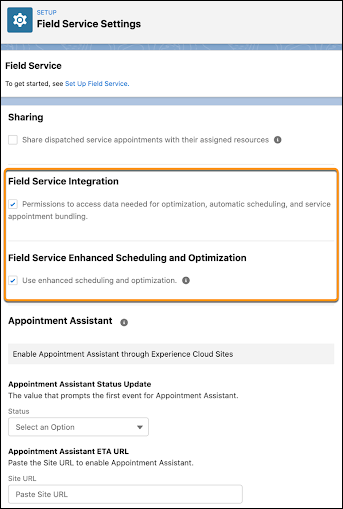
          2. To use the enhanced features, select Field Service Enhanced Scheduling and Optimization and then save your changes.
            Note
            Note Turning on Field Service Enhanced Scheduling and Optimization also turns on Field Service Integration.

            Field service settings page in Setup with Integration and Enhanced Scheduling and Optimization enabled.

          You can now configure to use the enhanced engine for all or selected service territories.

           
          Loading
          Salesforce Help | Article