
You are here:
Guidelines for Effective Schedule Automation and Optimization in Field Service
Before you use the Field Service tools for automating and optimizing your workforce’s schedule, make sure you review some key aspects and considerations.
Required Editions
| Available in: both Salesforce Classic (not available in all orgs) and Lightning Experience |
| The Field Service core features, managed package, and mobile app are available in Enterprise, Unlimited, and Developer Editions. |
 This is a Field Service managed package feature.
Defining Your Scheduling Goals
Before you start setting up schedule automation, define the measurable goals that you want to achieve. For example, are you looking to reduce your cost to serve by creating schedules with the most efficient route and minimal travel time? What other goals do you have? How do these goals and KPIs rank relative to each other? What's the most important KPI if no scheduling option exists that scores highest across these goals? Every business has its own goals when you’re creating a schedule. Salesforce Field Service helps you achieve these goals through its flexible configuration. The best way to define your scheduling goals is to start with a high-level vision of what you want to achieve and work your way down to specific metrics that you can measure.
Here’s an example:
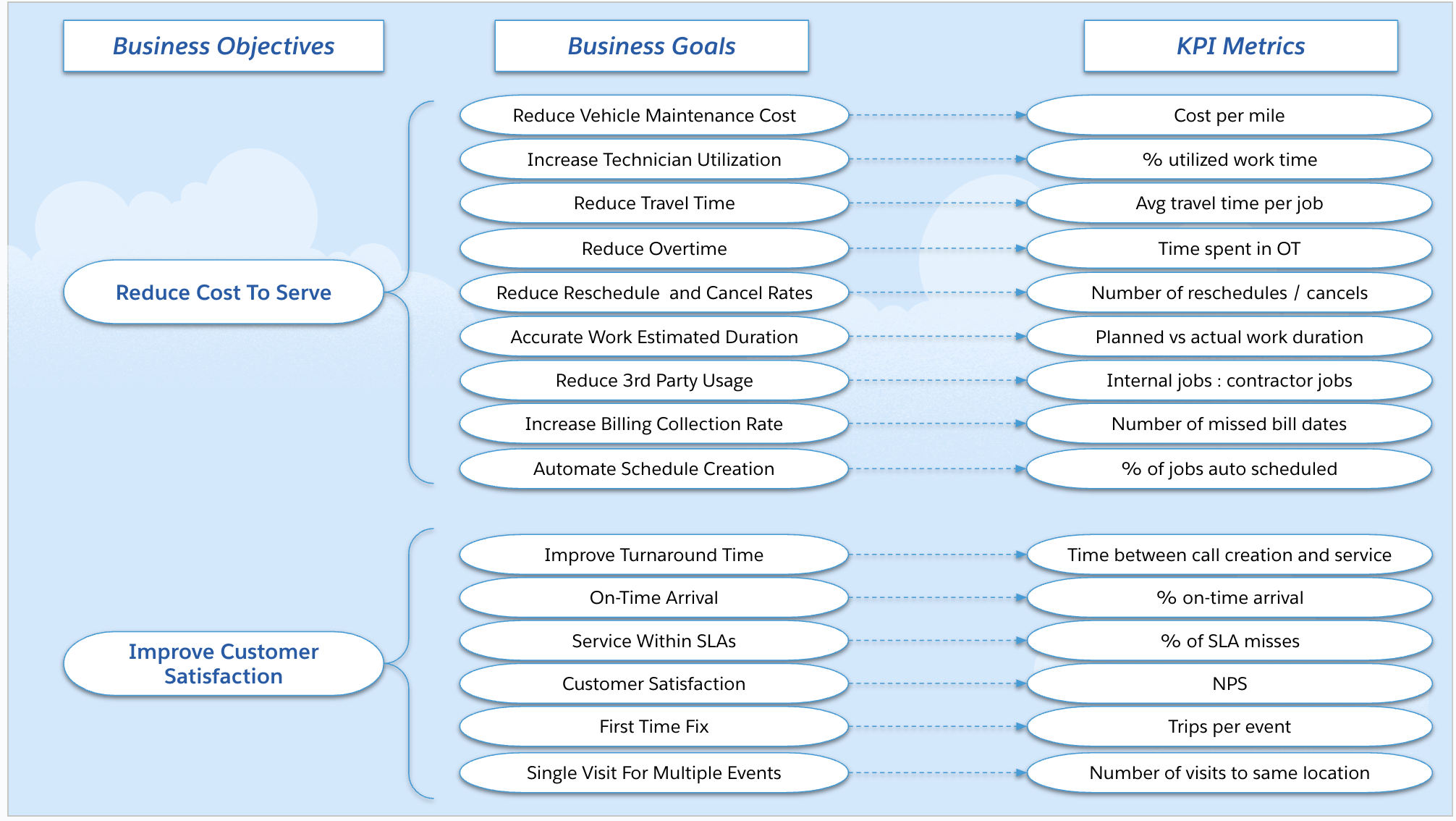
After you define your metrics, be clear about what level of improvement you expect to see and how it impacts your business objectives. For example, if one of your metrics is Utilization, what level of improvement impacts your Cost to Serve?
Before implementing automation, find the baseline measurements for each of your defined metrics so that you can measure the improvement automation has on those metrics. Use Field Service tools to track the progress of your metrics over time.
- Optimization Hub: Capture before-and-after data on common scheduling metrics when you run optimization. This data helps you visualize and measure the impact and value that schedule optimization has on a technician’s schedule metrics.
- Field Service Intelligence: Use the prebuilt dashboard to gain visibility into your scheduling metrics without having to run optimization. These metrics help you identify how your company is tracking against your KPIs, how healthy your operation is, and where you can improve.
- Reports and Dashboards: Customize your Salesforce reports and dashboards.
Data Setup and Quality Considerations
To generate an accurate schedule, automation and optimization tools rely on meaningful and correct input data. While it’s not always possible to have perfect data, the higher the quality of the input data, the more accurate the schedule generated by the system, and the less manual intervention is required.

Consider some aspects.
- Accurate geolocations: Salesforce Field Service has a built-in data integration service that resolves addresses on records into geolocations or latitude and longitude coordinates. These geolocations calculate travel times between appointments so that the best resource and time for an appointment can be scheduled. If the record addresses have data issues, such as missing a house number or ZIP code, the service can’t accurately resolve the address to a geolocation. This missing information affects the resulting schedule and travel metrics, so it's important to ensure data and address integrity. Use Address field validation rules and reporting on API-accessible latitude and longitude fields to ensure data integrity.
- Service territory hierarchy: Create a defined structure for your business’s service territories to help you manage your service resources more easily. A defined structure modularizes data into segments, which enhances the optimization’s ability to build an effective schedule. See Guidelines for Creating Service Territories for Field Service.
- Operating hours: Operating hours define when your resources are available to be scheduled for work and when your customers are available for onsite visits. Several types of operating hours help the optimizer find the best schedule for your work. See Guidelines for Creating Operating Hours for Field Service.
- Estimated duration: Service appointments require an estimated duration to complete the appointment. The better the estimate, the less uncertainty in the schedule. The most common way to define the duration of work is by work type. To set up work types, consider how long each type of work takes to complete based on historical data as well as feedback from service resources. Regularly review work durations for accuracy, more frequently at the beginning of your implementation to make sure you have a good baseline, and then less frequently as estimates become more accurate. See Guidelines for Creating Work Types for Field Service.
Scheduling Criteria Management
Scheduling criteria for a work order, work order line item, and service appointment define when and to whom a service appointment can be scheduled. A common scheduling criteria type is time restrictions. For example, the earliest a service appointment can occur (Earliest Start Permitted), the latest it can be scheduled (Due Date). When the technician can arrive to begin service (Arrival Windows), and any additional time requirements and SLAs. Another type of scheduling criteria is requirements, which determine which service resources can be assigned to a job. For example, areas of expertise critical to completing a job successfully, such as skill requirements on the work order or work order line item, and territory restrictions.
What’s the importance of accurately defining scheduling criteria? Accurate scheduling criteria are essential for completing jobs effectively and efficiently and to ensure customer satisfaction. Define your scheduling criteria to reflect your company's business logic so that your schedule meets your requirements.
What are the consequences of not defining scheduling criteria? Not defining precise scheduling criteria can lead to ineffective schedules created by the engine that require manual intervention to correct. No criteria can also result in reduced service resource satisfaction by assigning work to the wrong resources or times. Define the work rules that your scheduling policy must follow, and make sure the underlying data drives the correct behavior that your work rules enforce.
For example, a customer requests an appointment for a service but a critical part isn’t available until next month. You must set the Earliest Start Permitted on the Service Appointment so that a service resource isn’t assigned and dispatched to the customer’s location before the part is available. Similarly, if a job requires a certain skill set, it’s important to list the required skills on the work order or a similar record to make sure that you assign only the job to a resource that has those skills. Listing the skills prevents customer dissatisfaction and increased costs.
In addition to the accuracy of the schedule, not being specific with scheduling criteria can lead to a lower-quality schedule. As the number of possible permutations of the schedule increases, it requires more calculations and time to find a suitable schedule. For example, if five service appointments are to be scheduled to two candidate service resources over two time options, there are 1,024 schedule options available. By slightly increasing the complexity to schedule five service appointments to five candidates over five time options, the number of schedule options increases to over 9.7 million. By keeping the number of candidates and time options lower, the complexity of optimization is reduced and a better result can be found quicker.
The number of candidate service resources, the scheduling horizon (how far out you're scheduling), and variables such as appointment window granularity (30 minutes versus 2 hours) have an impact on the performance and run-time of scheduling and optimization services.
What are the consequences of defining too many or unnecessary scheduling criteria? Defining too many scheduling criteria can make it more difficult to find a service resource for an appointment. You can define as many scheduling criteria as needed, but each criterion is applied in addition to the others, which further reduces the number of scheduling options and resources that can perform the work.
For example, a service appointment is in a remote area where only one service resource has the skills within that area to service it. If that service resource calls out sick, the customer’s appointment is missed and can incur an SLA penalty.
Review your resource coverage to make sure that you have enough alternate scheduling options so the optimizer can reassign jobs in cases of low resource availability.
If multiple specialized skills are necessary for job completion, define these as criteria. However, if some criteria aren’t requirements to complete the job, define these as a Preferred type Service Resource Preference and not as a Required Service Resource Preference. This setting reduces the candidates to only that specific resource.
When you define scheduling criteria, make sure that the appointment can be scheduled.
For example, an appointment with a 30-day delta between Earliest Start Permitted and Due Date, yields more scheduling options than a 3-day period, which is a tight turnaround. While a shorter turnaround time is more appealing to some end customers, it’s important to set customer expectations and time requirements on service appointments to something that the company can commit to.
Consider these best practices to simplify optimization complexity.
- Reduce your optimization horizon to the lowest possible date range that makes sense for your business.
- Increase the duration of your appointment slot windows to the extent it makes sense for your business to reduce the number of time options.
- Use work rules such as Maximum Travel from Home and Extended Match to reduce the number of candidate service resources.
Learn how to improve the performance of scheduling and optimization processes. See Guidelines for Avoiding Apex CPU Timeouts in Field Service.
