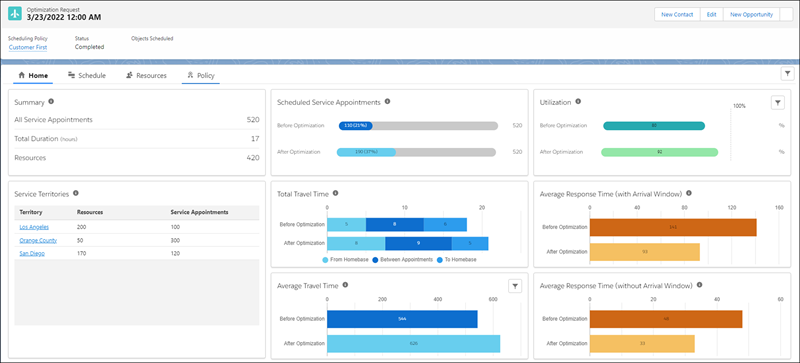
View Optimization Hub to learn what improvements optimization made to the scheduling of
service appointments across multiple territories and how to get the best results from
optimization.
Required Editions
Available in: Lightning Experience
The Field Service core features, managed package, and mobile app are available in
Enterprise, Unlimited, and Developer Editions.
This is a Field Service managed package feature.
Note Optimization Hub is available only when you’re using Enhanced Scheduling and Optimization.
When it’s enabled, a rich set of metrics for evaluating the optimization process is added
automatically.
Watch the video to see how to use the Optimization Hub dashboard to gain insights into how
scheduling optimization improves your business metrics.
Optimization Hub is a centralized dashboard where operation managers and business analysts
can view and track all optimization information related to an optimization request. It gives
you visibility into how scheduling optimization affects your business.
Optimization Hub updates the scheduling results after every optimization run and gives you a
comprehensive comparison of different metrics before and after optimization and across
multiple territories. It shows you what improvements optimization has made, and it provides
guidance on how to get more out of your optimization settings. By adjusting your scheduling
policy and prioritizing your business objectives, you can get even better scheduling results
compared to your last optimization run.
Optimization Hub considers only the service appointments that have territories. Service
appointments without a territory don’t affect metrics and key performance indicators.
Optimization Hub includes information relevant to scheduling, service resources, and the
scheduling policy. For example, it tracks the improvement of travel time, service resource
utilization, and response time.
Set Up Optimization Hub Configure your Optimization Hub settings and learn about the limitations of Optimization Hub.
Access Optimization Hub View Optimization Hub to get a snapshot of different metrics before and after optimization and across multiple territories.
Did this article solve your issue?
Let us know so we can improve!
Loading
Salesforce Help | Article
Cookie Consent Manager
General Information
Required Cookies
Functional Cookies
Advertising Cookies
General Information
We use three kinds of cookies on our websites: required, functional, and advertising. You can choose whether functional and advertising cookies apply. Click on the different cookie categories to find out more about each category and to change the default settings.
Privacy Statement
Required Cookies
Always Active
Required cookies are necessary for basic website functionality. Some examples include: session cookies needed to transmit the website, authentication cookies, and security cookies.
Functional Cookies
Functional cookies enhance functions, performance, and services on the website. Some examples include: cookies used to analyze site traffic, cookies used for market research, and cookies used to display advertising that is not directed to a particular individual.
Advertising Cookies
Advertising cookies track activity across websites in order to understand a viewer’s interests, and direct them specific marketing. Some examples include: cookies used for remarketing, or interest-based advertising.