
You are here:
Work Rule Type: Extended Match
Use the Extended Match database work rule type to schedule service appointments using custom criteria. It uses a junction, or linking, object to match a field on the Service Appointment object to a related list on the Service Resource object.
 This is a Field Service managed package feature.
Because you can use an Extended Match work rule to match appointments to resources using your own customizations, writing a rule requires some prior setup. Before you get started, create a data model or make sure that you have an existing data model with the appropriate fields. We suggest using Schema Builder.
You can apply Extended Match work rules when scheduling appointments. To use them with optimization, set up optimization.
A work rule of this type contains the following settings.
| Field | Description |
|---|---|
| Service Appointment Matching Field | The service appointment lookup field value that you're matching. The field must be of the type Lookup. When using Enhanced Scheduling and Optimization, if the service appointment matching field is empty, all resources are considered valid. |
| Linking Object | The junction object used to link service resources to the object that the service appointment matching field references. |
| Linking Object Reference Field | The reference field on the linking object that is matched with the Service Appointment Matching Field. When using Enhanced Scheduling and Optimization, if the Linking Object Reference Field is empty, then the service resource isn’t a valid candidate for any service appointment with matching field requirements. |
| Time-Phased | Indicates whether the work rule applies only to a certain time period. |
| Start Date Field Name | The Date-Time field name on the Linking Object that represents the start time. This field is required when you select Time-Phased. |
| End Date Field Name | The Date-Time field name on the Linking Object that represents the end time. This field is required when you select Time-Phased. |

After you create the data model for your work rule, finish setting it up by creating a work rule from the Work Rules tab. Use the Extended Match Rule custom Lightning Component helper, or enter the fields manually.
You can add work rules to a scheduling policy from the Customize Scheduling Policies page in Guided Setup or from the Scheduling Policy Work Rules related list on a scheduling policy. A policy can have up to five Extended Match work rules. Applying more than two Extended Match work rules with complex scenarios, such as multiday or crew scheduling, can affect scheduling performance. The scheduling operation can fail if a Salesforce platform limit is reached.

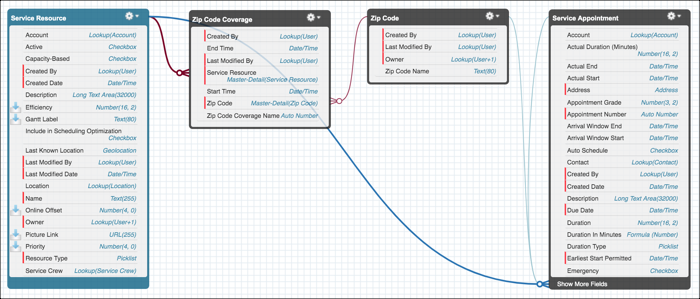
If your mobile workers support specific ZIP codes, use an Extended Match work rule to assign them appointments within their area. Create a ZIP Code lookup field on the Service Appointment object. Then create a ZIP Code Coverage linking object, add the ZIP Code field, and attach it to the Service Resource object as a related list. Use the Extended Match Rule Lightning Component to create a work rule.
The ZIP Code Coverage example has this data model.
Considerations:
- Time-phased Extended Match work rules can consume up to 80 records on a service resource during the selected time period. Work rules that aren't time-phased can consume up to 200 records.
- Relevance groups is supported with Extended Match work rules only if you're using Enhanced Scheduling and Optimization.
