
Work Rule Type: Match Time Rule
Match Time Rule is a Field Service Apex work rule type that limits the scheduling time frame based on an appointment’s date and time properties. For example, the Due Date work rule ensures that the appointment’s scheduled end is before its due date.
Required Editions
| Available in: both Salesforce Classic (not available in all orgs) and Lightning Experience |
| The Agentforce Field Service and Operations core features, managed package, and mobile app are available in Enterprise, Unlimited, and Developer Editions. |
 This is a Field Service managed package feature.
Work rules of this type contain the following settings.
| Field Name | Description |
|---|---|
| Service Schedule Time Property | Indicates whether the rule controls the service appointment’s scheduled start time or scheduled end time. Custom date/time fields aren’t supported. |
| Service Time Operator | The required relationship between the Service Schedule Time Property and the Service Time Property. For example, if you select Equal, a service appointment’s Service Schedule Time Property value must equal the appointment’s Service Time Property value. |
| Service Time Property | The service appointment field that defines the work rule requirement. There are four options.
 Note Match Time work rules with custom date/time
fields are fully supported for schedule optimization only when
you’re using Enhanced Scheduling and Optimization. When you aren’t
using Enhanced Scheduling and Optimization, custom date/time fields
are supported only for platform scheduling actions, for example,
Appointment Booking and Get Candidates, but not for optimization
services. |
| Pass Empty Values | If you select this option and any of the Service Time Property values are empty, the Match Time rule is ignored. |
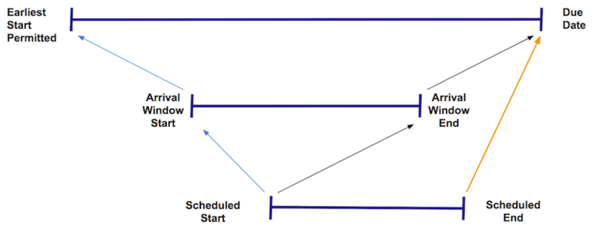
Field Service includes four standard Match Time Rule work rules.
- Earliest Start Permitted: Ensures that a service appointment’s Scheduled Start is equal to or later than the Earliest Start Permitted. This work rule is included in every standard scheduling policy.
- Due Date: Ensures a service appointment’s Scheduled End is equal to or earlier than the Due Date. This work rule is included in every standard scheduling policy.
- Scheduled Start: Ensures that a service appointment’s Scheduled Start is equal to or later than the Arrival Window Start.
- Scheduled End: Ensures that a service appointment’s Scheduled Start is equal to or earlier than the Arrival Window End.
An appointment’s Scheduled Start is based on the travel time recorded for previous appointments. The Scheduled End is calculated by adding the Duration to the Scheduled Start.
Work rules that impose time constraints limit your optimization flexibility. When you create Match Time Rule work rules, consider the commitments that you’ve made to customers and your goals regarding wait time.
Create work rules from the Work Rules tab. To view or add work rule fields open the Object Manager in Setup and select the Work Rule custom object. Add work rules to a scheduling policy from the Customize Scheduling Policies page in Guided Setup or from the Scheduling Policy Work Rules related list on a scheduling policy.
