Monitor Scheduling History in Field Service with Service Appointment Lifecycle
Keep track of changes made to service appointments with Service Appointment Lifecycle.
This makes it easy to see what happened to an appointment and to quickly resolve any related
issues.
Required Editions
Available in: Lightning Experience
The Field Service core features, managed package, and mobile app are available in
Enterprise, Unlimited, and Developer Editions.
This is a Field Service managed package feature.
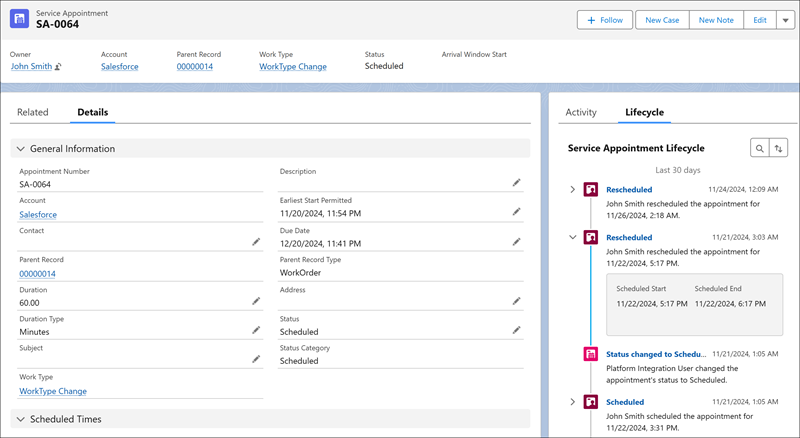
Service Appointment Lifecycle lets dispatchers, service managers, and Salesforce admins have
a clear view of service appointment scheduling history. It helps you track changes to key
service appointment details related to scheduling, such as service resource, duration, and
scheduled start and end times, and see who made them.
This information shows on the service appointment record page and helps you easily spot and
review scheduling issues. Each change is also saved to the Field Service object change record
page where you can see additional information related to the change.
For example, if a scheduled service appointment is unscheduled, Service Appointment Lifecycle
shows you who made the change and what scheduling details were changed. If the change was made
by optimization and you want to know why the appointment was unscheduled, you can find the
reason under Activity Details on the Field Service Object Change record page.
With Service Appointment Lifecycle, service managers and Salesforce admins can also gain
valuable insights into how dispatchers, optimization services, and Agentforce agents manage
service appointments. By reviewing the information in the Field Service object changes list
view and using the platform’s capabilities to create charts, you can identify and analyze
patterns and trends and create reports to better manage the scheduling process. For example,
you can identify who makes mostly manual updates versus who accepts the optimization’s
scheduling, and how many scheduling activities and detail updates exist for each service
appointment.
We use three kinds of cookies on our websites: required, functional, and advertising. You can choose whether functional and advertising cookies apply. Click on the different cookie categories to find out more about each category and to change the default settings.
Privacy Statement
Required Cookies
Always Active
Required cookies are necessary for basic website functionality. Some examples include: session cookies needed to transmit the website, authentication cookies, and security cookies.
Functional Cookies
Functional cookies enhance functions, performance, and services on the website. Some examples include: cookies used to analyze site traffic, cookies used for market research, and cookies used to display advertising that is not directed to a particular individual.
Advertising Cookies
Advertising cookies track activity across websites in order to understand a viewer’s interests, and direct them specific marketing. Some examples include: cookies used for remarketing, or interest-based advertising.