
You are here:
Check Rule Violations on the Field Service Gantt
Rule violations occur when a service appointment doesn’t follow predefined scheduling rules. Examples of rule violations include travel time conflicts and appointments that aren’t scheduled between their Earliest Start Permitted and Due Date.
Required Editions
| Available in: both Salesforce Classic (not available in all orgs) and Lightning Experience |
| The Field Service core features, managed package, and mobile app are available in Enterprise, Unlimited, and Developer Editions. |
| User Permissions Needed | |
|---|---|
| To enable dispatchers to check rules manually: | Custom permission sets:
Custom permissions:
|
 This is a Field Service managed package feature.
Right-click one or more appointments on the Gantt chart or list and click Check Rules to manually check rule violations for selected service appointments. To manually check rules on demand for all loaded services on the Gantt, click Check Rules next to the scheduling policy.
The scheduling policy selected at the top of the appointment list controls which rules are applied. If a rule violation occurs, the service appointment appears on the Gantt with a yellow triangle. Hover over the appointment to view its details and violated rules.
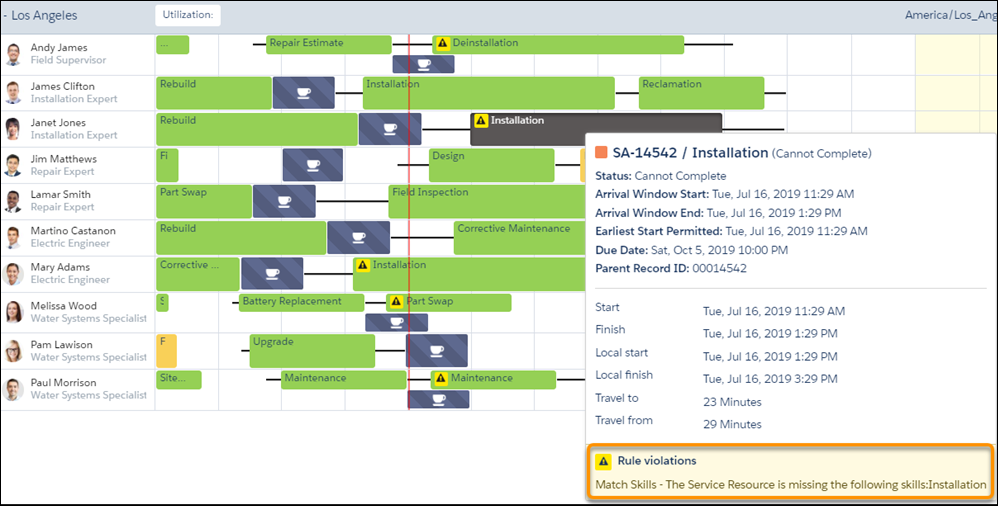
When optimizing your team’s or a service resource’s schedule, appointments with rule violations remain pinned. With Enhanced Scheduling and Optimization, the optimization engine tries to fix rule violations to improve the schedule by rescheduling or unscheduling rule violating appointments. To keep these appointments scheduled as is on the Gantt, the service appointments must first be pinned or in a pinned status.
Use the Check Rules feature to bulk-validate service appointments on the Gantt against your scheduling policy work rules and display rule violations. This feature is applicable only if your Rule Validation Frequency field in Field Service Settings isn’t set to Always. Always is the default setting for Salesforce orgs created before Summer ’21, where rules are checked for violations on all scheduled services after every operation.
When you click the Check Rules button next to the scheduling policy, the system validates up to 6,000 service appointments on the Gantt against your work rules and checks for violations. If you receive a notification that not all appointments were validated against your policy rules, try to load fewer service appointments by shortening the horizon or viewing fewer service territories. Then perform the check again to ensure all appointments are validated.

When automatic scheduling is used—with the Schedule or Candidates action—rule violations don’t occur. Field Service automatically formulates schedules that don’t violate rules, so rule violations occur only as a result of manual scheduling.
