
You are here:
What’s Enhanced Chat?
Enhanced Chat provides your customers with a personalized messaging experience from your mobile app or website to the Service Console.
Required Editions
| View supported editions. | |
 This article applies to:
|
Enhanced In-App Chat and Enhanced Web Chat channels |
 This article doesn’t apply to:
|
Enhanced WhatsApp, Standard and Enhanced Facebook Messenger, Standard and Enhanced SMS, Enhanced Apple Messages for Business, Enhanced LINE, and Bring Your Own Channel |
Enhanced Chat offers an asynchronous conversation experience where customers can stop and then resume the chat at any time without losing conversation history. Customers can also chat across browser tabs and devices without losing the conversational thread. To review the full range of features, see Compare Legacy Chat to Enhanced Chat Capabilities.
Understand the Flow of Data
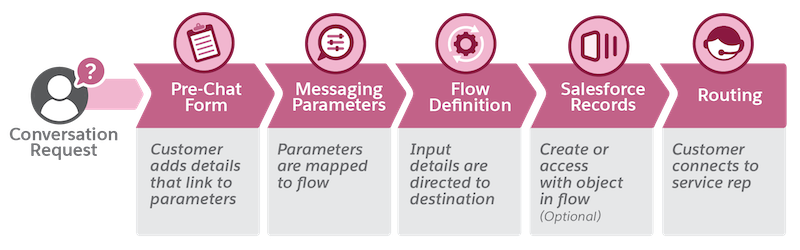
Understand how your customer’s information flows from a pre-chat form, to record generation and connection to the right member of your support team.
A customer requests a messaging conversation and provides contact info and other details in a pre-chat form. Their form-field inputs travel in your new messaging channel and are mapped as parameters. The flow you set helps define where the inputs go, such as an email address or an order number. A service rep connects and is ready to help with specific information at their fingertips. Optionally, a new Salesforce record can be created or updated as part of your enhanced flow.
- Replace Legacy Chat with Enhanced Chat
Legacy Chat will be retired on February 14, 2026. To avoid service interruptions to your end users, switch to Enhanced Chat (formerly known as Messaging for In-App and Web). Assess your readiness for transition with Chat Transition Readiness Report. Enhanced Chat offers many of the chat features that you love plus asynchronous conversations that can be picked back up at any time. Learn more about product improvements, feature comparisons, and setup considerations to prepare for your move to Enhanced Chat. - What’s Enhanced Chat v2?
Enhanced Chat v2 is a new customer interface for Enhanced Chat. V2 is optimized for modernized features and agentic use cases. It is a redesigned version to support multi-modal experience in the future. - Plan for Enhanced Chat
Before configuring an Enhanced Chat experience, consider your business's current support goals. This step helps you select the right Omni-Channel routing approach, pre-chat form fields, and custom parameters to personalize the experience. - Create a Synchronous Chat Experience in Enhanced Chat
Enhanced Chat provides an asynchronous chat experience, which allows the end user to start, stop, and resume the same conversation when it’s convenient. However, Enhanced Chat also supports synchronous conversations with a clear beginning and end. - Considerations and Limitations for Enhanced Chat
Before starting your setup process, review the considerations and limitations for Enhanced Chat. - Enhanced Chat FAQ
Review answers to commonly asked questions about Enhanced Chat, formerly Messaging for In-App and Web. - Rate Limits for Enhanced Chat
Before starting your setup process, review the rate limits for Enhanced Chat. - Enhanced Chat Preview Default Settings
When you turn on Enhanced Chat in Salesforce Go, these settings become active.
