You are here:
QR Code Generation
Safety Cloud generates QR codes when criteria on the Occasion Access Setting match data on an individual’s Health Verification record for the same Occasion.
Required Editions
| Available in: Enterprise and Unlimited Editions |
Occasion Access Setting records consist of Verification and Access values that you define when you create the Occasion Access Setting.
Safety Cloud generates multi-factor access credentials when a user meets the defined health and safety protocols. The rules and regulations that stipulate the criteria for generating these credentials (including the rule that specifies for how long the credential remains in effect) are set by a Salesforce admin for Safety Cloud to ensure compliance with the health and safety protocol of your occurrence (for example, event/office/location).
When a Health Verification record is created with verification and access data that matches the Occasion Access Setting, Safety Cloud generates the QR code for the Health Verification record. The QR code contains:
- Access Start Time
- Access End Time
- Health Verification Salesforce ID
- Occasion Salesforce ID
Use any QR code reader to scan values and determine access for an individual to an event.
QR Code Verification Values
These fields on the QR Code Generation record are the verification values that Safety Cloud uses to generate QR codes for Health Verification records.
- Health Verification Method
- This picklist value determines the Verification Method that a Health
Verification must have for Safety Cloud to generate a QR code.
The values available in this picklist mirror the values available on the Health Verification form and record.
If you select Proof of vaccination as the Health Verification method, only Health Verifications with the Proof of vaccination method pass this rule.
- Health Verification Status
- This picklist value determines the Verification Status that a Health
Verification record must have for Safety Cloud to generate a QR
code.
The values in this picklist mirror the values specified in the Health Verification Status field on the Health Verification form and record.
If you select Verified as the Health Verification Status, only Health Verifications with the Verified status pass this rule.
- Verification Datetime Range Start
- This datetime field represents the start date and time range for comparison against the field referenced in the Verification Datetime Field.
- Verification Datetime Range End
- This datetime field represents the end date and time range for comparison against the field referenced in the Verification Datetime Field.
- Verification Datetime Field
- This text field must contain the API name of a Date or Datetime field on
the Health Verification object. For example, CreatedDate or
safetycloud__TestDateTime__c.
The value of the CreatedDate or safetycloud__TestDateTime__c field on the Health Verification record gets compared against the Verification Datetime Start/End Range on the QR Code Generation record. If the date and time falls within the start and end range, the Health Verification passes this rule. For example, if you specify a CreatedDate in the Verification Datetime Field, QR Codes are generated only for Health Verifications where the CreatedDate occurs between Verification start and end range.
Access Criteria and QR Code Access Values
When Verification Method, Verification Status, and Date or Datetime fields on a Health Verification record match the values on the QR Code Generation record, Safety Cloud generates a QR Code.
The QR Code includes the specified access start and end times.
- Access Start Datetime
- This field shows the start date and time when the QR code is valid.
- Access End Datetime
- This field shows the end date and time when the QR code is valid.
- Access Offset
- Number of minutes access is given when the Health Verification meets the verification criteria.

QR Code Generation Examples
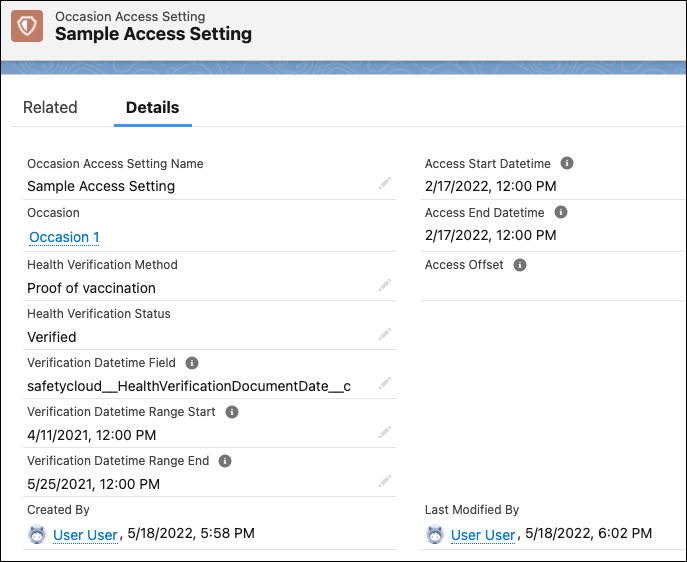
Example 1: The first column in the table shows the fields that you can set on the QR Code Generation Custom Metadata Object. The field settings are the criteria for generating a QR code.
The second column shows the Health Verification record values that match the defined criteria.
| Criteria for QR Code Generation | Health Verification Record Fields and Values |
|---|---|
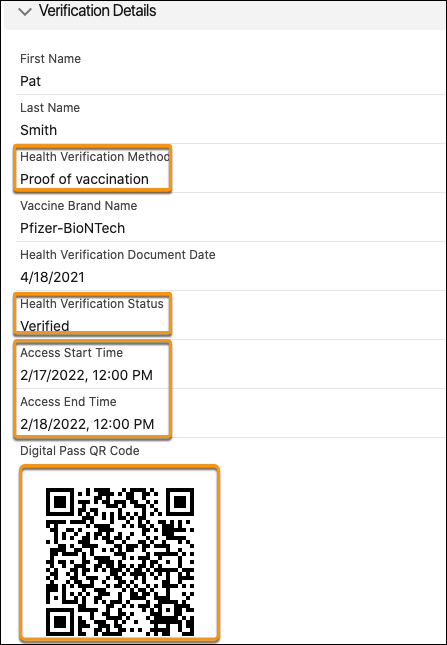
| Health Verification Method = Proof of vaccination | safetycloud__HealthVerificationMethod__c = ‘Proof of vaccination’ |
| Health Verification Status = Verified | safetycloud__HealthVerificationStatus__c = ‘Verified’ |
Verification Datetime Range Start = 2/10/2022 The start date of the Datetime Range used for comparison against the Verification Datetime field for Health Verifications. |
User defined in the record. |
Verification Datetime Range End = 3/1/2022 The end date of the Datetime Range used for comparison against the Verification Datetime Field for Health Verifications. |
User defined in the record. |
Verification Datetime Field API Name of a Date or Datetime field on a Health Verification, for example “CreatedDate” The date value from this field gets compared against the values in the Verification Datetime Start Range and Verification Datetime End Range fields. If the date falls within the dates specified in those fields, and if the other criteria on the Custom Metadata Object match the verification record, the QR code is generated. |
safetycloud__HealthVerificationDocumentDate__c = ‘4/18/2021’ |
| Access Start Datetime = 2/17/2022, 12:00 PM | safetycloud__AccessStartTime__c=2/17/2022, 12:00 PM |
| Access End Datetime = 2/18/2022, 12:50 PM | safetycloud__AccessEndTime__c=2/18/2022, 12:00 PM |
When the defined criteria and Health Verification fields match, Safety Cloud generates a QR code.
QR Code Generation record settings in column 1.
Here’s an example of a Health Verification record that meets the defined criteria.
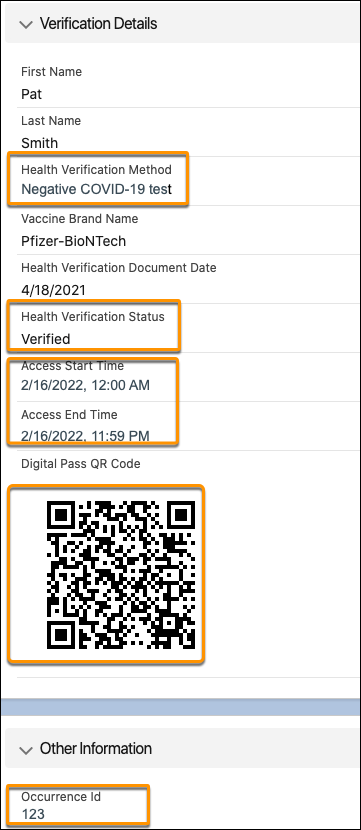
Example 2: The table shows the defined criteria for QR Code Generation. The rule states that a QR Code is generated when a Health Verification record shows a Health Verification Status of Verified and a Health Verification Method of negative COVID-19 test on February 15 to get access for February 17.
| Criteria for QR Code Generation | Health Verification Record Fields and Values |
|---|---|
| Occurrence Id = 123 | safetycloud__OccurrenceId__c = ‘123 |
| Health Verification Method = Negative COVID-19 test | safetycloud__HealthVerificationMethod__c = ‘Negative COVID-19 test’ |
| Health Verification Status = Verified | safetycloud__HealthVerificationStatus__c = ‘Verified |
| Access End Datetime = 2/16/2022, 11:50 PM | safetycloud__TestDateTime__c is between February 15 at 12:00 AM And February 15 at 11:59 PM |
Here’s an example of a Health Verification record that meets the defined criteria.