
You are here:
Service Intelligence Considerations and Requirements
Use the information in this section to ensure your org is set up correctly before you begin installation. To support your installation and visualizations, review the requirements for Data 360, CRMA, and your industry data.
Required Editions
| View supported editions. |

Service for Data 360 Requirements
- To use Einstein Conversation Mining, enable the feature, and run a report. The report must run 24 hours before Service Intelligence is installed to ensure data is present. For more information, see Einstein Conversation Mining.
CRM Analytics Requirements
- CRM Analytics Data 360 integration must be enabled.
- The CRM Analytics apps and template functionality included as a part of CRM Analytics is available in English only.
Service Intelligence Dashboards Requirements
To view data in the Service Intelligence dashboards, you need to have the features associated with the dashboards configured and populated with data. If you configure Einstein Conversation Mining, Knowledge, or survey data after installing the Service Intelligence app, and you want to see that data in dashboards, follow the instructions below:
- For components that display CSAT: If you later want to include survey data, generate surveys and get survey responses; install a fresh instance of Service Intelligence.
- For Einstein Conversation Mining (ECM): If you want to later view ECM data in dashboards, you need to complete at least one Einstein Conversation Mining report, and you’ll need to install a fresh instance of Service Intelligence. If you have the Service data kit installed, upgrade or reinstall it to access the ECM bundle in version 3.0 or later of the data kit. After you upgrade the data kit, Data 360 starts to capture EMC data from that time forward so that you can view data in your ECM dashboards.
- For Knowledge dashboards: If you have the Service data kit installed, upgrade or reinstall it to access the Knowledge bundle in version 3.0 or later of the data kit. After you upgrade the data kit, Data 360 starts to capture Knowledge Article Engagement data from that time forward so that you can view engagement insights in your Knowledge dashboard.
- Dashboard KPIs that mention queues can include generic queues or Omni-Channel queues. For more information, see Omni-Channel
Resources
It’s important to understand the resources created and used in your Service Intelligence installation because you may later need to update, delete, or troubleshoot them. You can also see how values in your dashboards were calculated when you inspect the associated assets.
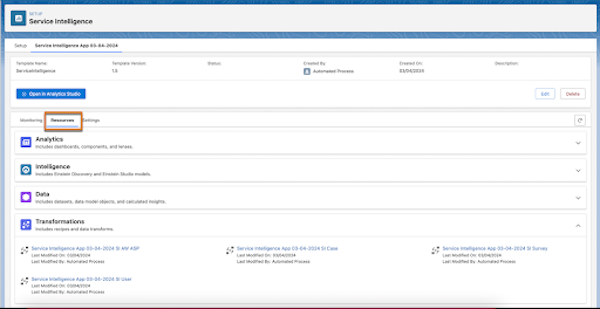
The app assets are listed under Resources on the Setup page for your app after successful installation. These include Data 360 data transforms and data model objects (DMO) and CRM Analytics dashboards and components. When you select an asset, it opens in its respective tool for detailed inspection.
Service Data Kit
The Service data kit may have updates each release, so always check to make sure your org has the latest version installed.
The Service data kit installs three data bundles, Service, ConversationMining, and Knowledge. The Service bundle includes more than twenty data streams that create DMOs and mappings for data on cases, support reps, surveys, and more. The ConversationMining bundle installs four data streams with conversation data and mappings. The Knowledge bundle installs four data streams with knowledge article view data and mappings.
View the data streams, data lake objects, data model objects, and batch transforms in Data Cloud. Open Data Cloud and use the Data Streams and Data Model Objects tabs to view the data mappings, relationships, and data field specifics.
