
You are here:
Service Intelligence Cases Dashboard
Get a comprehensive view of your service team’s caseload. Spot high-level stats, such as total escalated cases, average time to close, percentage of first contact resolution, customer satisfaction scores (CSAT) by channel, and more.
Required Editions
| View supported editions. |
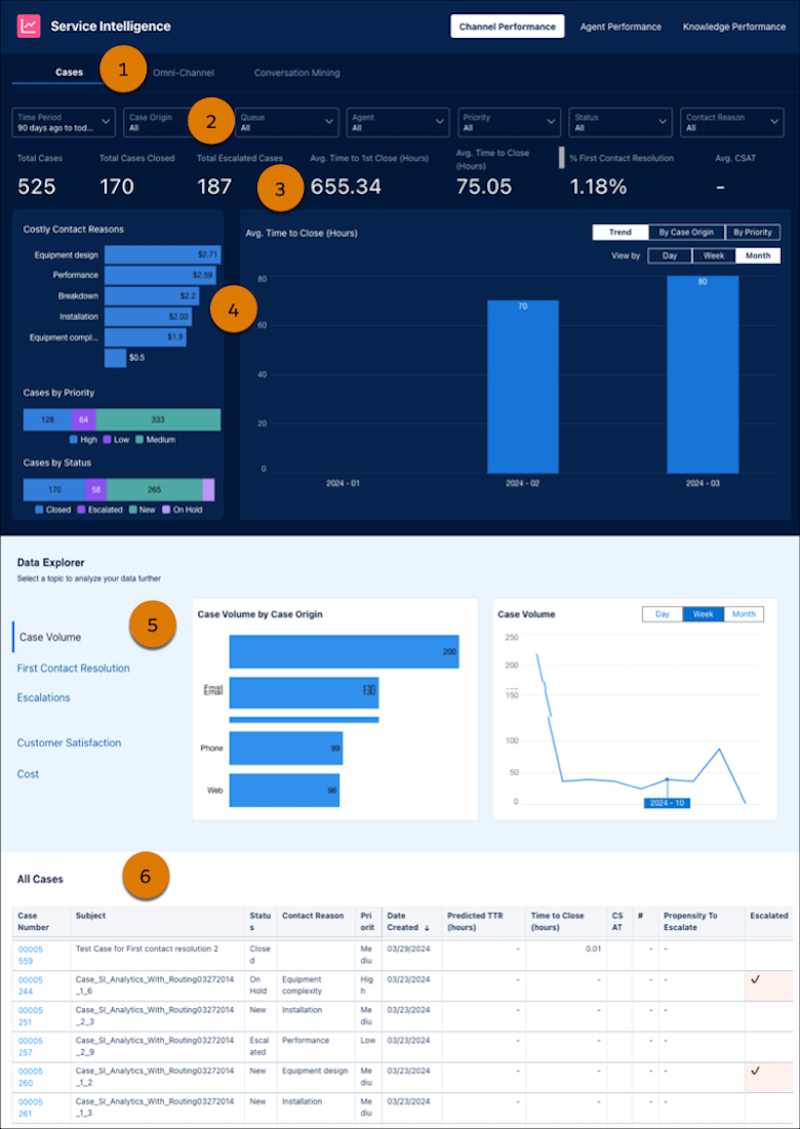
In the Channel Performance tab, you can see the high-level details by clicking Cases (1). Use filters to identify cases with poor handle time or first contact resolution so you can identify opportunities to improve customer support operations (2), and review the high-level statistics (3). In the charts, you can see costly contact reasons and cases by priority and status, along with average time to close (4). Understand case volume, escalated cases, and CSAT by surveys and cost (5). Lastly, drill into details for work you’re interested in (6).
| OVERVIEW KPI | CALCULATION |
|---|---|
| Total cases | Total number of cases created. |
| Total cases closed | Total number of cases closed. |
| Total escalated cases | The total number of cases escalated. |
| Avg time to first close (Hrs) | The amount of time between when the was case was created and when it was closed for the first time. This total excludes cases that are immediately closed upon opening. |
| Avg time to close (Hrs) | The amount of time between when the case was created and when it was closed for the last time. Includes when cases are reopened, and excludes cases that are immediately closed upon opening. |
| % First contact resolution | The percent of cases that were closed with only one response, such as one email, voice call, or messaging session. |
| Avg CSAT from surveys | The average customer satisfaction scores related to cases. |
| CSAT by channel | The average customer satisfaction scores related to a specific channel, such as email or voice call. |
| Cases by priority | Cases grouped by priority. |
| Cases by status | Cases grouped by status, such as new or closed. |
| Cases by channel | Cases grouped by channel, such as email or voice calls. |
| Case volume | The number of cases received for a specific channel or during a specific time period. |
| Cost | Cost per case based on an input value provided during setup for an estimated hourly cost for your service reps. |
