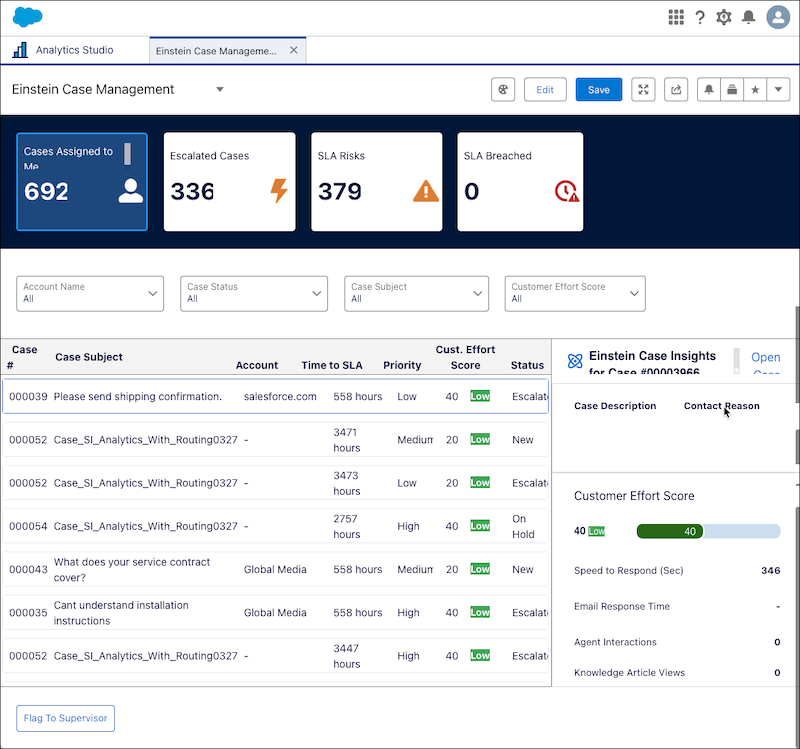
Service Intelligence Einstein Case Management Dashboard (Beta)
As a support rep, you can use this dashboard to get near real-time insights that help
you quickly identify and prioritize cases based on urgency, status, customer effort score, and
service level agreement (SLA) targets. If the Flag to Supervisor flow is set up by your admin,
you can instantly alert supervisors about case developments.
Note Einstein Case Management is a pilot or beta service that’s subject to the Beta Services Terms at Agreements -
Salesforce.com or a written Unified Pilot Agreement if executed by Customer, and applicable terms
in the Product Terms
Directory. Use of this pilot or beta service is at the Customer's sole discretion.
From Service Intelligence dashboards, you can see near-real time case metrics by clicking the
Open Analytics
Studio icon, and in Analytics Home, search for Einstein Case Management.
Use filters to sort by cases assigned to me, escalated cases, service level agreement (SLA)
risks, SLA breached, customer effort score, time to SLA, and so on.
Einstein Case Management KPI
CALCULATION
SLA Risks
Total number of cases at risk of missing SLA targets, grouped by status.
SLA Breached
Total number of cases that have missed SLA targets, grouped by status.
Customer Effort Score
Measures customer effort per case, influencing satisfaction.
The Customer
Effort Score ranges from 1 to 100, with 100 indicating the highest effort. The total
of these factors calculates it, with each given an equal weight of 20: speed of
initial response, number of support rep interactions, email response time, whether
the issue was escalated, and the number of knowledge articles viewed by the
customer.
Time to SLA
Hours until a case meets or exceeds its SLA target.
Did this article solve your issue?
Let us know so we can improve!
Loading
Salesforce Help | Article
Cookie Consent Manager
General Information
Required Cookies
Functional Cookies
Advertising Cookies
General Information
We use three kinds of cookies on our websites: required, functional, and advertising. You can choose whether functional and advertising cookies apply. Click on the different cookie categories to find out more about each category and to change the default settings.
Privacy Statement
Required Cookies
Always Active
Required cookies are necessary for basic website functionality. Some examples include: session cookies needed to transmit the website, authentication cookies, and security cookies.
Functional Cookies
Functional cookies enhance functions, performance, and services on the website. Some examples include: cookies used to analyze site traffic, cookies used for market research, and cookies used to display advertising that is not directed to a particular individual.
Advertising Cookies
Advertising cookies track activity across websites in order to understand a viewer’s interests, and direct them specific marketing. Some examples include: cookies used for remarketing, or interest-based advertising.