Quickly identify the routing efficiency and support rep performance across Omni-Channel
routing and queues. Check on work volumes, accepted or declined work, average handle times,
average speed to answer, percentage of service levels met, and more.
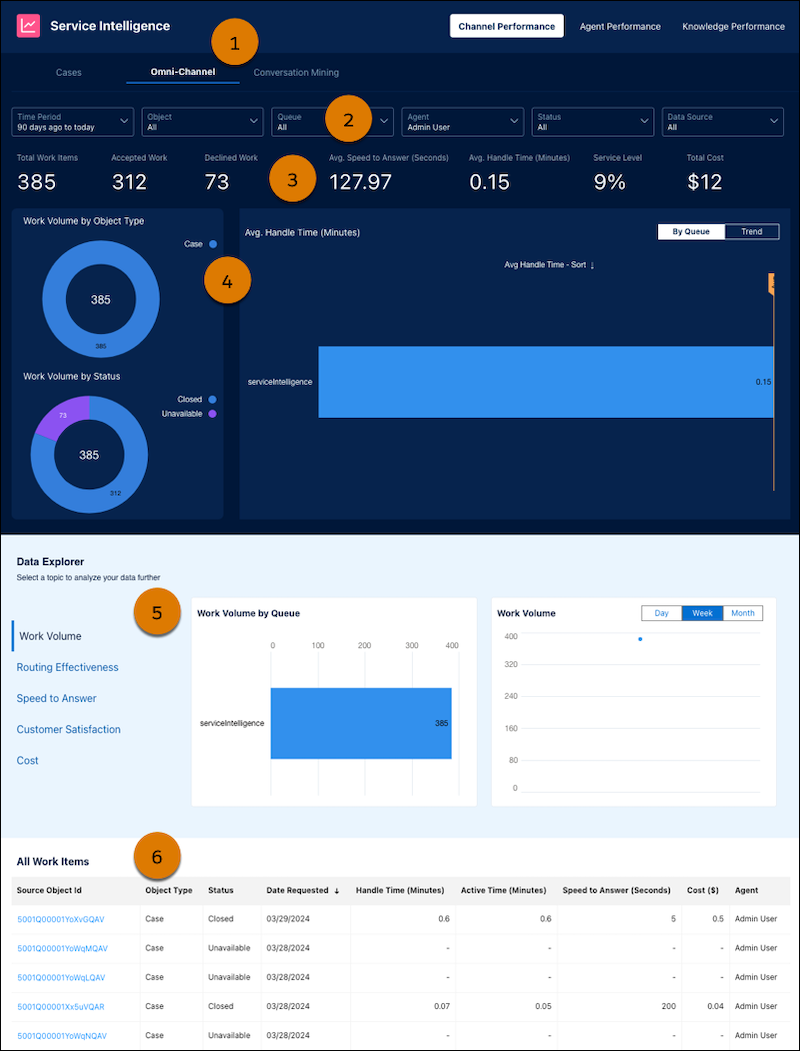
In the Channel Performance tab, you can see the high-level details by clicking
Omni-Channel (1). Select from the filters to refine your view (2), and
review the high-level statistics (3). In the charts, you can see work volume by object type,
status, and queue (4). You can see the overall work volume, average speed to answer, and service
level over time (5). Lastly, drill into details for each case you’re interested in (6).
ROUTING KPI
CALCULATION
Total work items
Total number of work items across all objects and channels, for support reps,
excluding bots.
Accepted work
Offered work items that a support rep accepted. Percent of work items that were
answered within a specified timeframe, such as twenty seconds, excluding bots.
Declined work
The percent of work that was assigned to support reps, but not accepted.
Avg speed to answer (Sec)
The percent of inquiries that are answered within a specified timeframe, for example
twenty or thirty seconds.
Avg handle time (Min)
The amount of time a support rep spends on the work item until it's closed or
until they close the browser tab (whichever comes first).
Service level
Service level is calculated as the percentage of inquiries that are answered within a
specified timeframe, such as twenty or thirty seconds.
Total cost
The total cost is based on an input value provided during setup for an estimate
of the hourly cost for your support reps. This hourly rate is multiplied by the handle
time to make up the total cost.
Work volume by object type
Total volume of work objects, such as cases or leads sorted by type.
Work volume by status
Total volume of work objects, such as cases or leads sorted by status.
Work volume by queue
Total volume of work objects, such as cases or leads sorted by queues. You can see the
volume for your specified queues.
Did this article solve your issue?
Let us know so we can improve!
Loading
Salesforce Help | Article
Cookie Consent Manager
General Information
Required Cookies
Functional Cookies
Advertising Cookies
General Information
We use three kinds of cookies on our websites: required, functional, and advertising. You can choose whether functional and advertising cookies apply. Click on the different cookie categories to find out more about each category and to change the default settings.
Privacy Statement
Required Cookies
Always Active
Required cookies are necessary for basic website functionality. Some examples include: session cookies needed to transmit the website, authentication cookies, and security cookies.
Functional Cookies
Functional cookies enhance functions, performance, and services on the website. Some examples include: cookies used to analyze site traffic, cookies used for market research, and cookies used to display advertising that is not directed to a particular individual.
Advertising Cookies
Advertising cookies track activity across websites in order to understand a viewer’s interests, and direct them specific marketing. Some examples include: cookies used for remarketing, or interest-based advertising.