
You are here:
Service Assistant Grounding Sources
To create a service plan that's specific to your company's policies and practices, Service Assistant is grounded in your data through several required and optional features: case data through Service AI grounding, knowledge data through Agentforce Data Libraries, Agentforce topics and instructions, quick actions, and messaging and voice records.
Required Editions
| View supported editions. |

- Service Assistant is only supported in the legacy Agentforce Builder. Agentforce script isn’t supported.
- Beginning in April 2026, agent topics are now called subagents. There are no changes to functionality. During this transition, you may see a mix of the new and previous terms in our documentation. See Topics Are Now Subagents.
Case Data (Required)
Service Assistant uses Service AI Grounding to ground itself in the details of the active Case the service rep is handling. This grounding allows the Service Assistant to summarize the Case for the service rep using the fields and objects (Case Email, Case Comments, Case Feed) you set in the configuration.
Specifically, the feature automatically includes the Subject and
Description fields as grounding sources. These fields help Service
Assistant summarize the case, categorize the case with a topic, and create initial plan
steps. You can set additional fields and objects as grounding sources to provide an even
more detailed summary. Here is an example configuration.
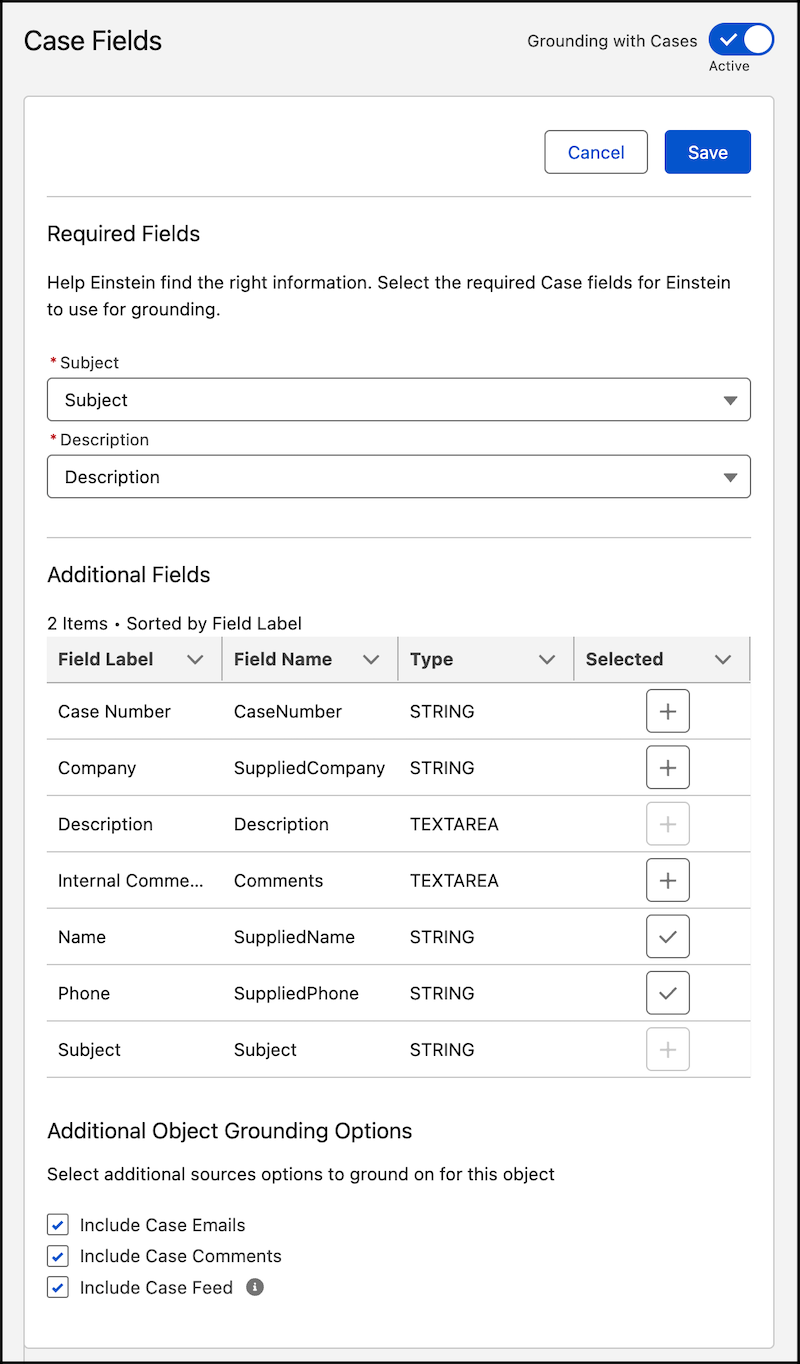
While Service Assistant grounds on additional fields and objects included in your Service AI Grounding configuration, the Subject and Description fields should contain clear information about the issue. Generally, the more context and clarity in the fields, the better Service Assistant is able to assign a topic and pull information into the service plan from your other grounding sources, like knowledge articles.
| Example Description | Details |
|---|---|
| The customer is traveling to Kenya and needs help understanding what travel documents are required besides a passport. She's unsure whether she needs a visa, where to apply for one, and the vaccination requirements. | This description works because there's enough detail for Service Assistant to match relevant topics and knowledge articles to the case.
|
| Customer needs help with travel documents. | While this description would work to draft a plan summary, the summary would be generic. There isn’t sufficient context for Service Assistant to generate a focused plan. While the keyword “travel documents” can trigger Service Assistant to surface related topics and knowledge articles, it doesn't account for country-specific variations. Without specifying a particular country, relevant country-specific topics or knowledge articles won't be incorporated. The results rely on broad keywords. If keywords are included in your other grounding fields and objects, then Service Assistant can select the related topic and knowledge articles. Make sure that you include any relevant custom case fields in your grounding configuration. |
Considerations
- Service plans are grounded in the context of the ServicePlanner User's permissions. This means service reps can see grounded responses for fields and objects they don’t have direct access to. Set your grounding configuration to ensure that the ServicePlanner User's permissions align with the data access intended for your service reps. See Service Assistant Grounding Data Access.
- Encrypted fields aren’t supported for grounding.
- Only String and Text Area type fields are supported for grounding.
- Only text from Case Email, Case Comments, and Case Feed is supported. PDFs, images, and other attachments aren’t used as grounding sources.
- If you choose to enable case feed grounding, you must provide the ServicePlanner User (the agent user) access to the case feed. Service Assistant has access to case emails and case comments by default.
Agentforce Topics (Required)
At the core of a service plan are topics that contain instructions. Topics are a category for a set of instructions, which contain your company's policies and procedures that service reps follow to resolve a particular case.
For example, consider a topic in the Agentforce Builder called “Credit Card Issues” built for Service Assistant using the guidelines in Grounding Service Assistant with Topics.
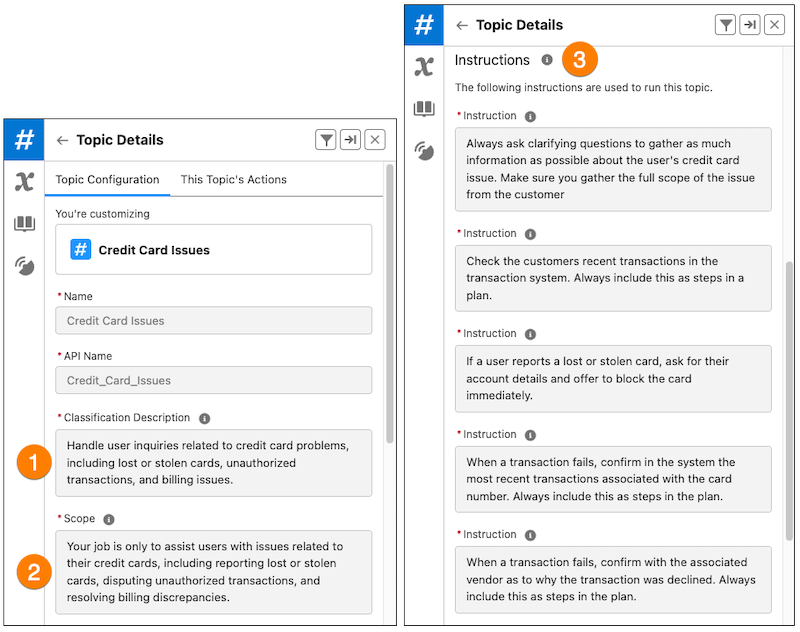
Each topic contains a general description and a defined scope (1 and 2). These parts of the topic define what the topic is and set boundaries for what the agent can and can't do with the topic.
The topic is further defined with instructions that help shape the outcome of a service plan because they contain your company-specific policies and standards for working the case (3). In the example, the instructions have explicit information for handling a “Credit Card Issues” case. The agent uses the instructions to form the steps of a service plan.
Specifically, when a service rep drafts a service plan:
- Service Assistant analyzes the customer interaction and the information from your Service AI grounding configuration to summarize the case and assign a topic.
- Service Assistant selects which instructions to include as plan steps based on the assigned topic and the case details.
Because plan creation depends on analyzing the case details and then assigning a topic based on the details, it's important that topics are clearly tailored to your company’s service policies and practices. To do so, we've provided you with reference guidance for how to create topics in Service Assistant. Review these articles.
We don't provide any preconfigured topics for Service Assistant. You must create your own topics and instructions.
Agentforce Actions (Optional)
In the context of Agentforce, AI agents use actions to complete specific tasks for users, such as creating a case, drafting an email, or summarizing a record.
However, Service Assistant isn't an autonomous agent and doesn't take any direct actions for the service rep or the customer. Instead, all steps in a service plan and any tasks required in those steps are carried out directly by the service rep. If you add any actions, they serve as an additional grounding source and are treated like instructions. We don't provide specific guidance for the use of actions in Service Assistant.
Knowledge Articles (Optional)
Topics and their instructions serve as a foundation for Service Assistant to create steps in a service plan that service reps take to resolve a case. When you add your knowledge articles to the foundation through Agentforce Data Libraries, Service Assistant makes your service plans even more accurate and aligned with your policies and practices.
As a grounding tool, Agentforce Data Libraries takes in large sets of structured and unstructured information. It then chunks this data into smaller, indexed pieces to improve search.
For example, when a “Returns Management” topic is assigned to a case, Service Assistant uses your data library to search your knowledge base and add steps to the initial service plan that’s created from your topics and instructions. Service plans are successfully grounded in your knowledge base when you see citations at the end of the plan steps in the form of [1]. In addition, the names of the articles are populated in the Sources section at the bottom of the component.
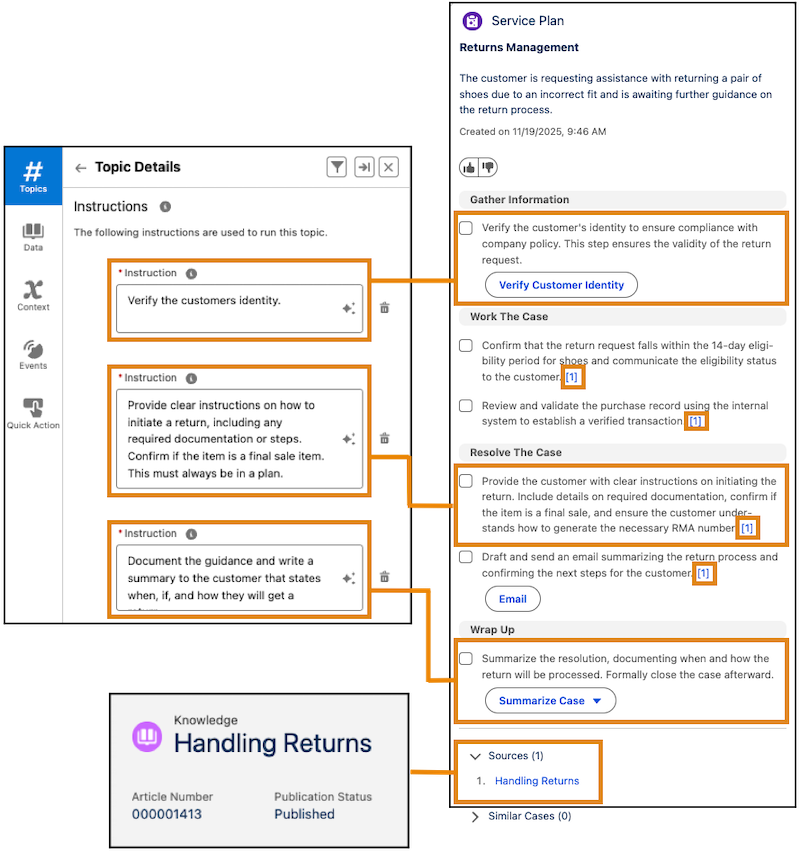
Grounding the agent in your knowledge articles through Agentforce Data Libraries is optional. Service Assistant–specific setup of the feature is provided in Set Up Service Assistant.
For more information on data libraries and reference guidance on how to use the feature in Service Assistant, see these resources.
- Agentforce Data Libraries
- Grounding Service Assistant with Knowledge
- Best Practices for Knowledge Grounding
- Balancing Knowledge and Topic Information in Service Assistant
Quick Actions (Optional)
Quick Actions serve as an optional grounding source for Service Assistant that add automation to your service plans. They surface as buttons in plan steps to help service reps to complete tasks directly from the step.
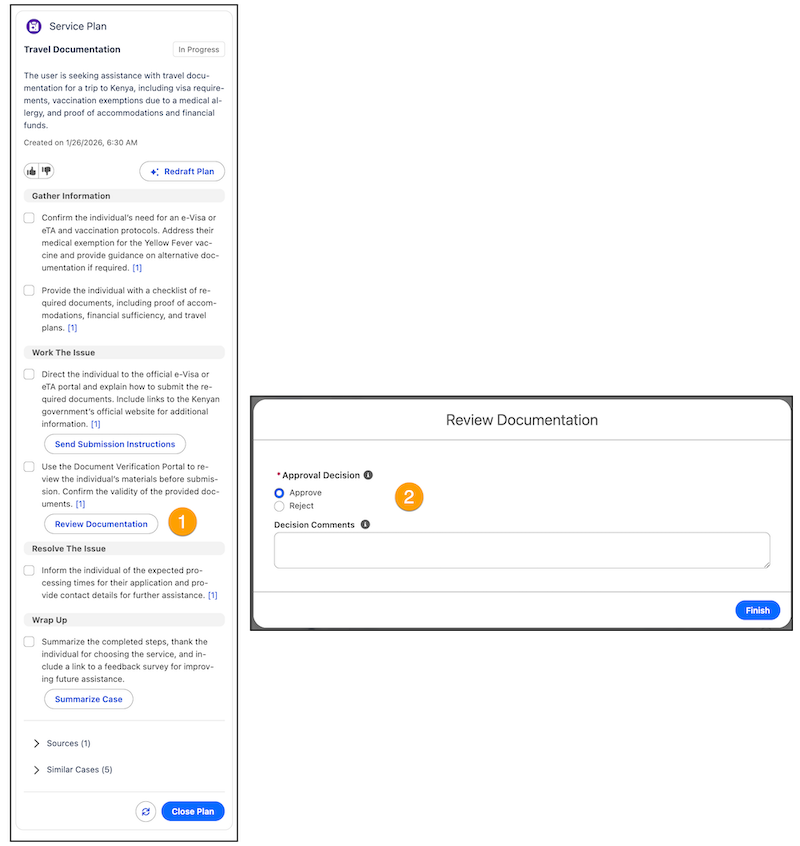
Quick Actions work together with Agentforce topics and their instructions. While topics and instructions create the high-level, sequential steps of the service plan, quick actions provide the executable tools to complete those steps. A quick action surfaces in a plan step through an instruction, which details what the action does and when it should be used. Instructions are required for every quick action.
Here are resources detailing how quick actions work in Service Assistant.
Messaging and Voice Records (Optional)
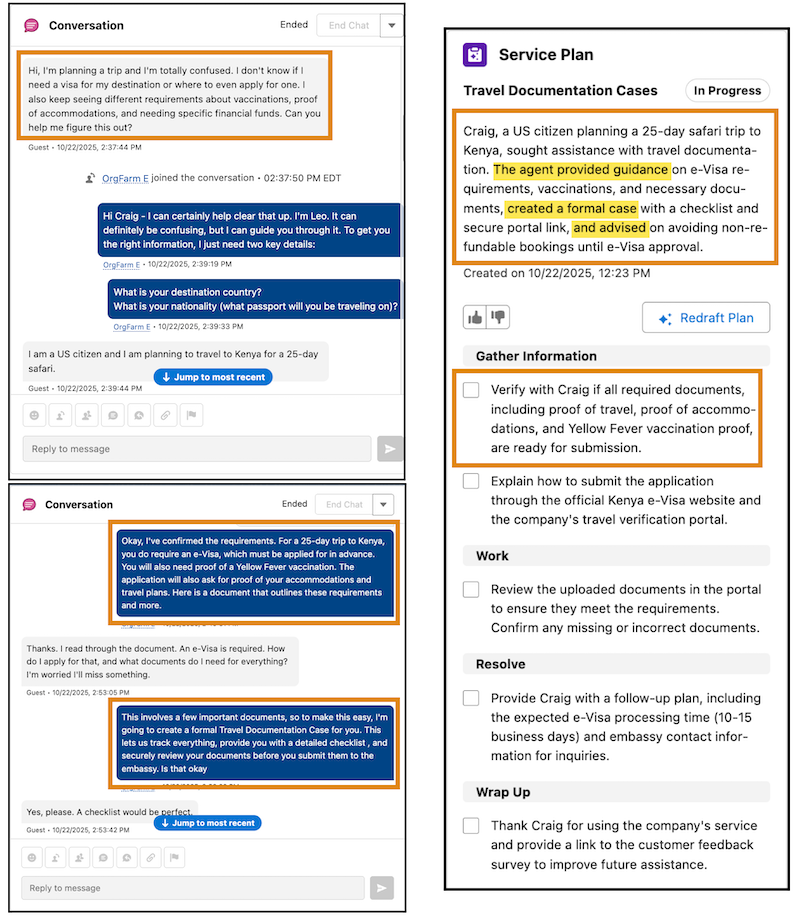
When a Case is created from a messaging session or a voice call, Service Assistant analyzes the record transcripts as a grounding source. As a result, the case summary and service plan include key details from the conversation.
Specifically, the service plan summary states what occurred in the conversation and what resolution steps were completed. In addition, the drafted plan starts the plan steps from where the conversation left off. The record grounding provides service reps with more context-specific and streamlined resolution guidance in the service plan.
Here’s an example showing a service plan grounded in a messaging session.
Set up requires turning the feature on in the Setup page and assigning your users necessary permissions. See Grounding Service Assistant with Related Records (Optional) and Set Up Related Record Grounding (Optional). Messaging Sessions and Voice Calls are the only supported related record grounding types.
