
You are here:
Ground Service Assistant
Before you start setting up Service Assistant, review our reference guidance and best practices for grounding Service Assistant in your company data.
Required Editions
| View supported editions. |

- Service Assistant is only supported in the legacy Agentforce Builder. Agentforce script isn’t supported.
- Beginning in April 2026, agent topics are now called subagents. There are no changes to functionality. During this transition, you may see a mix of the new and previous terms in our documentation. See Topics Are Now Subagents.
The information provided here and in the following sections provide you with reference guidance for the features used to ground Service Assistant in your company's data. We provide you with recommendations, best practices, and examples to ensure your data is optimized for Service Assistant. Set up guidance for these features is provided in Extend Service Assistant.
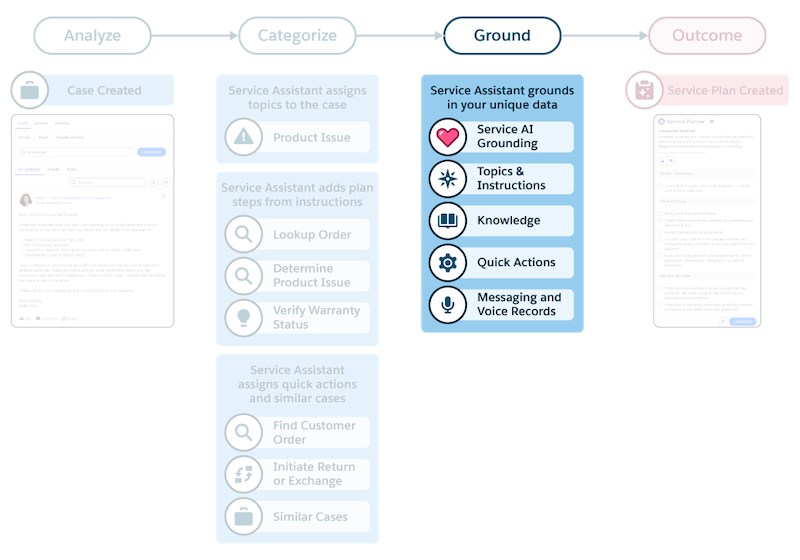
Specifically, Service Assistant is grounded in these data sources.
- Case data through Service AI Grounding (required)
- Your service policies and practices transcribed in Agentforce topics and instructions (required)
- Knowledge data through Agentforce Data Libraries (optional)
- Quick actions that provide automated workflows for completing Case tasks (optional)
- Messaging Session and Voice Call records (optional)
With Service AI grounding, you specify which Case fields and objects (Case Fee, Case Emails, and Case Comments) Service Assistant uses as a grounding source. These fields and objects help Service Assistant generate a case summary and categorize the case with a topic. You must select the Subject and Description fields. You can select any other available fields based on your preferences, including custom fields.
Keep in mind that Service AI grounding only supports String and Text Area fields for grounding. In addition, Service Assistant only references text from Case Emails, Case Comments, and the Case Feed. PDFs, images, and other attachments aren’t used as grounding sources.
Grounding Service Assistant with topics, knowledge, and quick actions requires planning and preparation to make sure each source is optimized for Service Assistant. Specifically, producing effective service plans is highly dependent on how each grounding is written and structured. Topics are a required grounding source. Knowledge articles and quick actions are optional.
Messaging and voice record grounding uses the conversation transcripts from the records to draft a contextual case summary and a service plan that continues the resolution process. This is an optional grounding source.
- Service Assistant Grounding Sources
To create a service plan that's specific to your company's policies and practices, Service Assistant is grounded in your data through several required and optional features: case data through Service AI grounding, knowledge data through Agentforce Data Libraries, Agentforce topics and instructions, quick actions, and messaging and voice records. - Service Assistant Grounding Data Access
Service plans are generated using the permissions of the ServicePlanner User (the agent user), which has a broader scope of grounding source data access to provide the most comprehensive service plans. This access supersedes any individual field-level security or sharing rules for service reps. The information in this section describes how the ServicePlanner User's permissions govern data access for each grounding source and we recommend configuring the ServicePlanner User’s permissions to align with the data access and sharing rules required for your service reps. - Grounding Service Assistant with Subagents
Learn the role of subagents in Service Assistant and review guidelines for creating them. - Grounding Service Assistant with Knowledge (Optional)
Use Agentforce Data Libraries to ground Service Assistant in your knowledge. - Grounding Service Assistant with Quick Actions (Optional)
Learn our recommended best practices for implementing quick actions in Service Assistant so you can create automated and actionable service plans. - Grounding Service Assistant with Related Records (Optional)
Learn how to use Messaging Session and Voice Call records as a grounding source in Service Assistant.
