
You are here:
Grounding Service Assistant with Knowledge (Optional)
Use Agentforce Data Libraries to ground Service Assistant in your knowledge.
Required Editions
| View supported editions. |

Agentforce Data Libraries index your knowledge base into chunks and use a data retriever to find the most relevant information in your articles to include as steps in the plan. This section details how the feature works in Service Assistant and provides our recommended best practices. For more general information on Agentforce Data Libraries and the exact details on how they work, check out What Are Data Libraries?.
How Data Libraries Enhance Service Plans
In Service Assistant, data libraries save you time and effort in setting up subagents and instructions by automatically augmenting them with your knowledge content. This improves the accuracy and effectiveness of a service plan.
For example, when a "Returns" subagent is assigned to a "Return Request" case, Agentforce Data Libraries can add to the subagent's instructions by automatically sorting through your knowledge base and identifying relevant information that can help resolve the case. Service Assistant then filters these sources to determine what's most relevant for the case and adds that content as steps in the plan.
Specifically, Service Assistant retrieves the 10 most relevant chunks of information related to the case from your knowledge base. It uses the chunks with the highest similarity scores as steps in the plan.
Keep in mind that the exact wording of your articles isn't included in the plan. Instead, Service Assistant summarizes the information to provide clear and succinct resolution guidance. This means that not all information in your articles is always added to a plan, including procedural steps. Procedural steps can be summarized and combined in a single step.
When you have Show Sources enabled in your data library, all service plan steps that are created from your knowledge articles are cited at the end of the step and in the Sources section at the bottom of the component. See Example Service Plan with Knowledge Content.
Grounding Service Assistant in your knowledge base with Agentforce Data Libraries requires specific permissions for the Service Assistant admin, the ServicePlanner User (the agent user), and service reps. These permissions are listed in Permissions and Licensing for Service Assistant and Best Practices for Grounding Service Assistant in Knowledge.
Knowledge Plan Processing
Data libraries and subagents work together in Service Assistant. Subagents help categorize cases, while instructions serve as the foundation for the service plan. By adding knowledge articles to this foundation, Service Assistant expands on your instructions to provide plans that are accurate and aligned with your company's policies. This allows you to keep your subagents concise, rather than writing highly detailed instructions as shown in Grounding with Subagents.
To see how subagents and data libraries work together in Service Assistant, consider an example for a "Return Request" case. In this scenario, the case has a "Return" subagent assigned. Here's how the process works.
- Service Assistant reviews the case details and your Service AI grounding configuration to determine the relevant subagents, instructions, and knowledge information for the case.
- A subagent is selected to categorize the case, and instructions are assigned to form the
initial steps of a service plan.
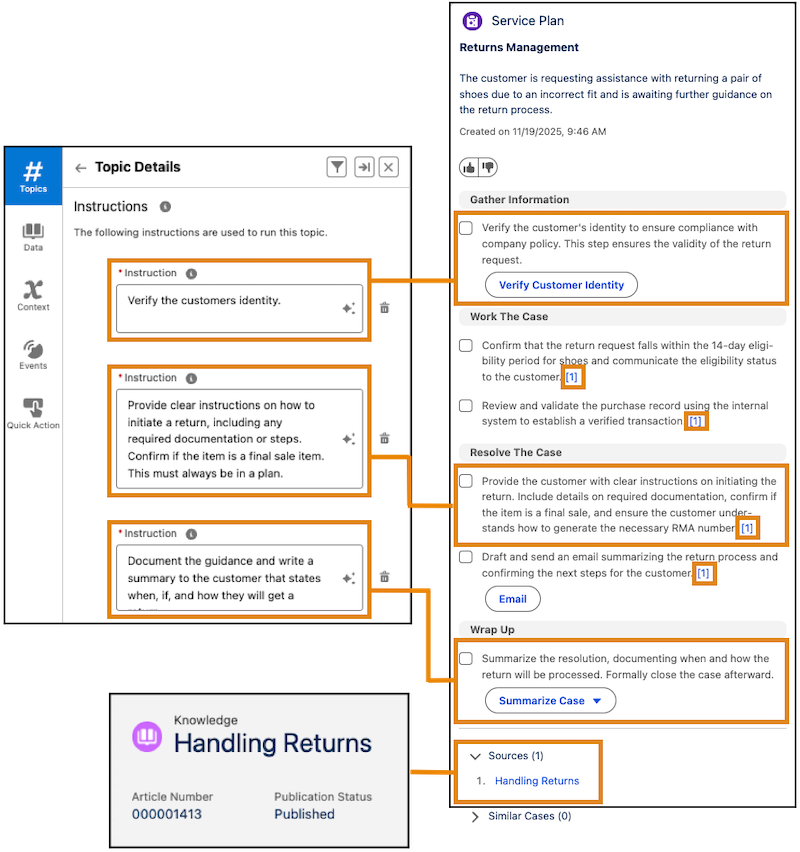
In the example, notice how the instruction states what to do but lacks information about the return time frame. This is where your knowledge articles fill in the gap.
- Using your data library, knowledge articles are retrieved and filtered to find the most relevant ones that match the case details, assigned subagent, and instructions.
- Service Assistant determines what information in the source articles is best suited to include in the service plan.
Example Service Plan with Knowledge Content
Here's a sample service plan that demonstrates the described service plan processing. Notice that the instructions aren't too detailed. Service Assistant uses knowledge articles to fill any gaps and provide more specific details.
Steps created from knowledge articles are cited in the form of [1]. The component lists all articles used to create the plan steps in the Sources section. In this example, all cited steps are from the Handling Returns knowledge article. Steps that aren't cited are created from subagent instructions.
Knowledge Citations Reference
From the example service plan, here are details about service plan steps created from knowledge articles.
General Considerations
- Service Assistant only supports the Knowledge data type. We don't provide guidelines or recommendations for other data types available in Agentforce Data Libraries.
- To show citations, enable Show Sources in your data library. See Set Up Knowledge Grounding.
- When using knowledge grounding, you only need to create a few instructions that serve as a general framework that describes the overall workflow. See Subagent Strategy for Service Assistant.
- Not all steps and information found in the article are always included in the service plan. The detail and amount of information included in the plan depend on the amount and relevance of the case data.
- Service Assistant summarizes the information in your knowledge articles, including ordered procedures. Procedural information can be summarized and combined in a single step.
Knowledge and Citations Permissions
- The ServicePlanner User (the agent user) and service reps require custom permissions to view service plan steps created from knowledge articles and the citations listed in the Sources section of the component. The specific permission settings are outlined in Best Practices for Grounding Service Assistant in Knowledge.
- The ServicePlanner User requires the Agent Knowledge Access custom permission set to access your knowledge articles and include the information in a service plan.
- Service reps require the Service Rep Knowledge Access custom permission set to view knowledge content in service plan steps and in the Sources section. We recommend that you set Read, View All Records, and View All Fields permissions in the custom permission set, but you can adjust this configuration to match your organization's security standards.
- Service plan generation relies on the ServicePlanner User's permissions. See Service Assistant Grounding Data Access. Because the ServicePlanner User has access to
all knowledge content through the Agent Knowledge Access custom permission set, the plan
may include knowledge articles that aren't accessible to service reps. This happens when
reps lack the recommended Read, View All Records, and View All Fields permissions in the
Service Rep Knowledge Access custom permission set. When the ServicePlanner User has
access to an article that the service rep doesn't:
- The plan steps are still grounded in the knowledge article content.
- The step-level citations and Sources section citations aren't included in the drafted plan to respect access rules for the service rep.
Citation Display and Navigation
- Each step created from a knowledge article is cited with a number at the end of the step in the form of [1]. The citation contains a hyperlink to the corresponding entry in the Sources section at the bottom of the component that lists the name of the knowledge article.
- The list of sources displays the name of the knowledge article used to create the plan steps.
- Each entry in the Sources section contains a link to the article used to create the step. In the example, the listed source links to the article that created the steps: Handling Returns.
- When a knowledge article is used to create multiple steps, the article is cited in all steps with the same citation number.
- A step can be created from both a subagent and a knowledge article, as shown in the first step under Resolve the Case. The first part of the sentence comes from the subagent; the last part comes from the Handling Returns knowledge article.
- A step can be created from multiple knowledge articles. This is indicated when you see two or more citations at the end of a step, like [1][2].
Knowledge and Citations Considerations
- If a knowledge article cited in a service plan is deleted after the plan is drafted, the citation number is removed from the plan step, and the article is removed from the Sources section. The knowledge content included in the steps remains in the plan. However, if a service rep redrafts the plan, the steps originally created from the deleted article are removed.
- If a knowledge article cited in a service plan is archived after the plan is drafted, the citation remains in the plan step and the article remains listed in the Sources section. However, if a service rep redrafts the plan, the citation is removed from the step and the Sources list. The steps originally created from the archived article are also removed.
Optimizing Your Knowledge Base for Grounding
Achieving detailed service plans using knowledge grounding depends on how the content of your knowledge base is curated and how your data library is configured. For best practices on structuring knowledge articles and data libraries, see Best Practices for Grounding Service Assistant in Knowledge.
- Best Practices for Grounding Service Assistant in Knowledge
Review required permissions, data library setup guidelines, and considerations for grounding Service Assistant in your knowledge articles. - Knowledge with Subagents in Service Assistant
Understand how the amount and accuracy of information in knowledge articles and subagents work together to create a service plan.
