
You are here:
Best Practices for Grounding Service Assistant in Knowledge
Review required permissions, data library setup guidelines, and considerations for grounding Service Assistant in your knowledge articles.
Required Editions

- This section contains reference guidance for knowledge grounding. Setup and testing guidance is provided in Set Up Knowledge Grounding (Optional). Additional testing and troubleshooting guidance is provided in Troubleshoot Knowledge.
- Beginning in April 2026, agent topics are now called subagents. There are no changes to functionality. During this transition, you may see a mix of the new and previous terms in our documentation. See Topics Are Now Subagents.
- Knowledge Permissions
- Knowledge Content Guidelines
- Data Libraries Setup Guidelines
- Additional Guidelines and Considerations
Watch this video to learn the key details and best practices for grounding Service Assistant in your knowledge articles. We also recommend reviewing Service Assistant Topic Strategy to learn how to best optimize your topics when using knowledge grounding. To open the video in full screen, click here.
Knowledge Permissions
Grounding Service Assistant in your knowledge base through Agentforce Data Libraries requires custom permissions for setting up, accessing, and viewing knowledge content in a service plan. The custom permissions are in addition to the mandatory Service Assistant permissions.
| Persona | User License | Required Permissions |
|---|---|---|
| Service Assistant Admin | Salesforce |
*Requires access to your default data space. See Associate a Permission Set with a Data Space. |
| Service Rep | Salesforce | Recommended custom permission set name: Service Rep Knowledge Access Permissions to include:
The custom permission set lets reps view knowledge content included in drafted service plans. |
| ServicePlanner User | Einstein Agent | Recommended custom permission set name: Agent Knowledge Access Permissions to include:
The custom permission set grants Service Assistant access to your knowledge content so it can add the content to service plans. |
Knowledge Content Guidelines
The data library you create for Service Assistant only references published knowledge articles, which can be internal or public. Your published articles must be precise and tailored to your company's policies. We highly recommend reviewing your articles before creating a data library so that information is effectively retrieved and added to service plans. We recommend that your articles:
- Have clear and specific titles and summaries.
- Are well-organized, specific, detailed, and easily parsed according to the guidelines provided in Prepare Source Content.
- Are up-to-date and contain the latest information, including confirming that any assigned data categories are correct.
- Don’t contain information that conflicts with the subagents you create for Service Assistant.
- Don’t duplicate or contradict information found in other articles.
Also, to best optimize your knowledge articles for AI, we recommend reviewing these additional Salesforce best practices.
- Salesforce blog: 10 Ways To Prep Your Knowledge Base for AI Grounding
- Trailhead: Optimize Knowledge Content for Large Language Models
We know a comprehensive review isn't always feasible for companies with large knowledge bases. If a full audit isn't possible, prioritize evaluating the Titles and Summaries of the articles you expect to use for your defined Service Assistant use cases. While updating these fields can also be difficult at scale, they play an important role when you set your data library configuration. See next section.
Data Libraries Setup Guidelines
When you set up a data library, you choose a data source for grounding: Knowledge, File Uploads, Custom Retriever, or Web Search. Service Assistant supports only the Knowledge data source. Then you set two field-level settings that tell Service Assistant what information to look for in your knowledge articles: identifying fields and content fields.
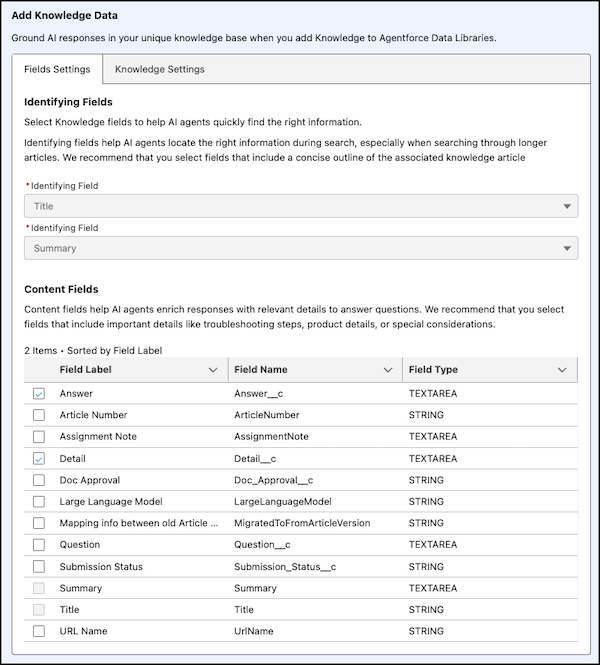
Identifying fields help Service Assistant optimize its search of your entire knowledge base to retrieve the articles that are most relevant for the given case and assigned subagent. In Service Assistant, you configure two identifying fields: one must be Title, and we recommend Summary or Question for the second. Together they give Service Assistant a clear overview so it can find articles that match the case details and assigned subagent.
After relevant articles are retrieved, Service Assistant uses the content fields to determine what information within the retrieved knowledge articles is relevant to include as steps in a service plan. We recommend selecting content fields that contain the most information, such as Answer and Detail.
Follow these guidelines for configuring identifying and content fields in Service Assistant. An example setup follows.
| Field type | Recommended Configuration | Details |
|---|---|---|
| Identifying | Service Assistant supports two identifying fields. One must be Title; we recommend setting the other to Summary or Question. Choose values that provide clear, concise summaries of the general context of each article. |
Identifying fields help Service Assistant find, sort, and group knowledge articles relevant to the case and its assigned subagent. Fields like Title, Summary, and Question often contain key identifying information. Identifying fields only support String (Text) and Text Area field types.
If your articles don’t meet these requirements, or if no identifying information is found, Service Assistant relies on information from subagents and instructions to propose steps in the plan. This increases the chances of Service Assistant suggesting its own steps that aren’t grounded in your knowledge articles or subagent instructions. See an example in the Considerations and Guidelines section. |
| Content | Given the case types you're using Service Assistant for, select the fields that contain guidance and task information. This information is used with your subagents and instructions to create a tailored service plan with specific, actionable guidance. Recommended content fields are Answer, Detail, and any custom fields you have. These fields typically contain information about procedural and troubleshooting steps and FAQs. |
If the information in the context fields isn't determined to be relevant for the case, Service Assistant uses the information in the identifying fields with your subagent instructions to propose steps in the plan. This typically occurs when knowledge content lacks quality information. |
Additional Guidelines and Considerations
General Considerations
- Not all steps and information found in the article are always included in the service plan. The detail and amount of information included in the plan depend on the amount and relevance of the case data.
- Service Assistant summarizes the information in your knowledge articles, including ordered procedures. Procedural information can be summarized and combined in a single step.
Permissions & Article Setup
- Setup and testing guidance is provided in Set Up Knowledge Grounding (Optional). Additional testing and troubleshooting guidance is provided in Troubleshoot Knowledge.
- Verify the Service Assistant Admin, service reps, and ServicePlanner User (agent user) have all standard and custom permission sets required for knowledge grounding.
- Confirm that you (the admin) have access to the default data space for the Data Cloud Architect permission set. See Default Data Space Access.
- Make sure to grant the ServicePlanner User access to the data categories used in your knowledge base and to any custom knowledge record types.
- Make sure your articles are public and published. Knowledge Articles that are publicly available have IsVisibleInPkb as True.
- Review or add information to the Summary field of your knowledge articles to briefly describe the article and its scope. Having a summary improves search results.
Data Library Considerations
- Agentforce Data Libraries support multiple data types, but Service Assistant supports only the Knowledge data source. You can choose to set up and test other data types, but we don’t provide any guidelines or recommendations.
- Only English knowledge articles are referenced in a data library.
- Only published knowledge articles are referenced in a data library. Published articles can be either internal or public.
- Service Assistant can reference only one data library at a time.
- If you set data category filter conditions for your library, make sure that your articles are assigned to the categories you’ve selected and that the ServicePlanner User has access to the data categories.
- Review your articles to ensure the structure and format match the identifying and content fields you’ve set in your data library. Identifying fields are used to search your knowledge base to find relevant articles that match the case details. Content fields are used to extract key information from the knowledge articles to create plan steps.
- Don’t set Detail, Answer, or Text Area fields as identifying fields. Such fields that hold large amounts of text should be set as content fields. For identifying fields, use fields that are short and under 255 charaters, like Title, Summary, or Question.
- Make sure to apply any custom knowledge fields to your data library configuration and grant the ServicePlanner User access to the custom record types.
Knowledge Indexing & Plan Generation
- Agentforce Data Libraries index and break down your knowledge base into chunks of information. Service Assistant then gathers the 10 most relevant chunks of information and scores each. The chunks with the highest similarity to the case are included as steps in a service plan.
- Service Assistant summarizes the information in your knowledge articles, including ordered procedures. Procedural information can be summarized and combined in a single step.
- Not all steps and information found in the articles are always included in the service plan. The detail and amount of information included in the plan depend on the amount and relevance of the case data.
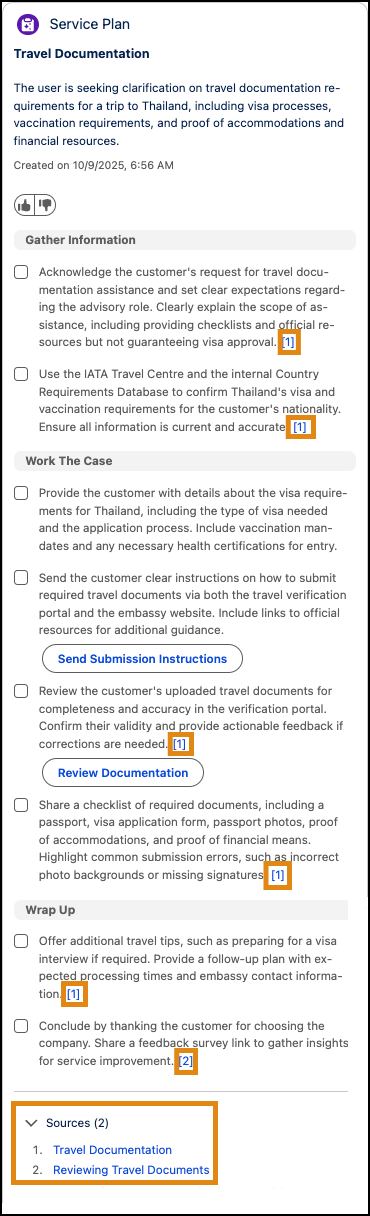
- Steps created from knowledge articles are indicated with a citation like [1] and are
listed in the Sources section at the bottom of the component. All other steps that aren’t
cited are created from the subagent instructions. To provide citations in service plans,
make sure you have Show Sources enabled in your data library. Find more details about
citations in Grounding Service Assistant with Knowledge.
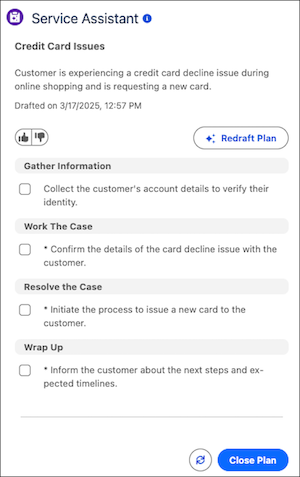
- When there isn't enough information in your knowledge articles or relevant ones aren't
found, your subagents and their instructions are used by Service Assistant to create a
service plan. If the instructions don't contain enough information, Service Assistant can
propose its own steps that aren't based on any grounding sources. Such steps are indicated
with an *. See Knowledge with Subagents.
Maintenance
- Libraries are updated if there are changes to knowledge articles, such as the editing, deletion, or addition of articles. The build automatically refreshes when new articles or changes to existing articles have been published in the last 24 hours.
- You can refresh your library at any time by rebuilding the search index for the library in the Search Index tab of the Data Cloud app. The name of your search index is the same as your data library. See Rebuild a Search Index Configuration.
