
You are here:
Identify Customers with Individual-Object Linking
To help support reps quickly assess a customer, automatically search, link, or screen-pop records during active Messaging, Email-to-Case, or Voice conversations.
Required Editions
| View supported editions. |
Support reps need help with identifying the humans behind their customer interactions. Individual-Object Linking, which replaces Channel-Object Linking, introduces a Search Individual flow action that associates contacts, leads, person accounts, or employees with an interaction.
To help you get started, Salesforce provides three flow templates that link individuals to interactions automatically. Add a template with just a few clicks, or customize it to suit your business needs.
You can add the Search Individual flow action to auto-launched flows, Omni-Channel flows, and screen flows. The flow action lets you take advantage of Individual-Object Linking in background processes or processes that accept user input.
How It Works
The basic premise of each flow template is that it takes an interaction record and runs a search for associated individuals based on an identifier. Let’s look at how that happens with each template.
- Find Contact Associated with Voice Call. This template uses the end user’s phone number from the voice call record to find contacts associated with a voice call. If the search yields multiple results, the support rep can select one. If the search yields no results, the support rep can create an associated contact.
- Find Contact for Associated Case from Email-to-Case. For cases created in Email-to-Case, this template finds all contacts with email addresses that match the inbound email address that resulted in the case. The support rep selects the correct contact to link to the case. If the search has no results, the flow tells you so. If you want the flow to search other records, such as leads, person accounts, or employees, edit the Find Matching Contacts flow action.
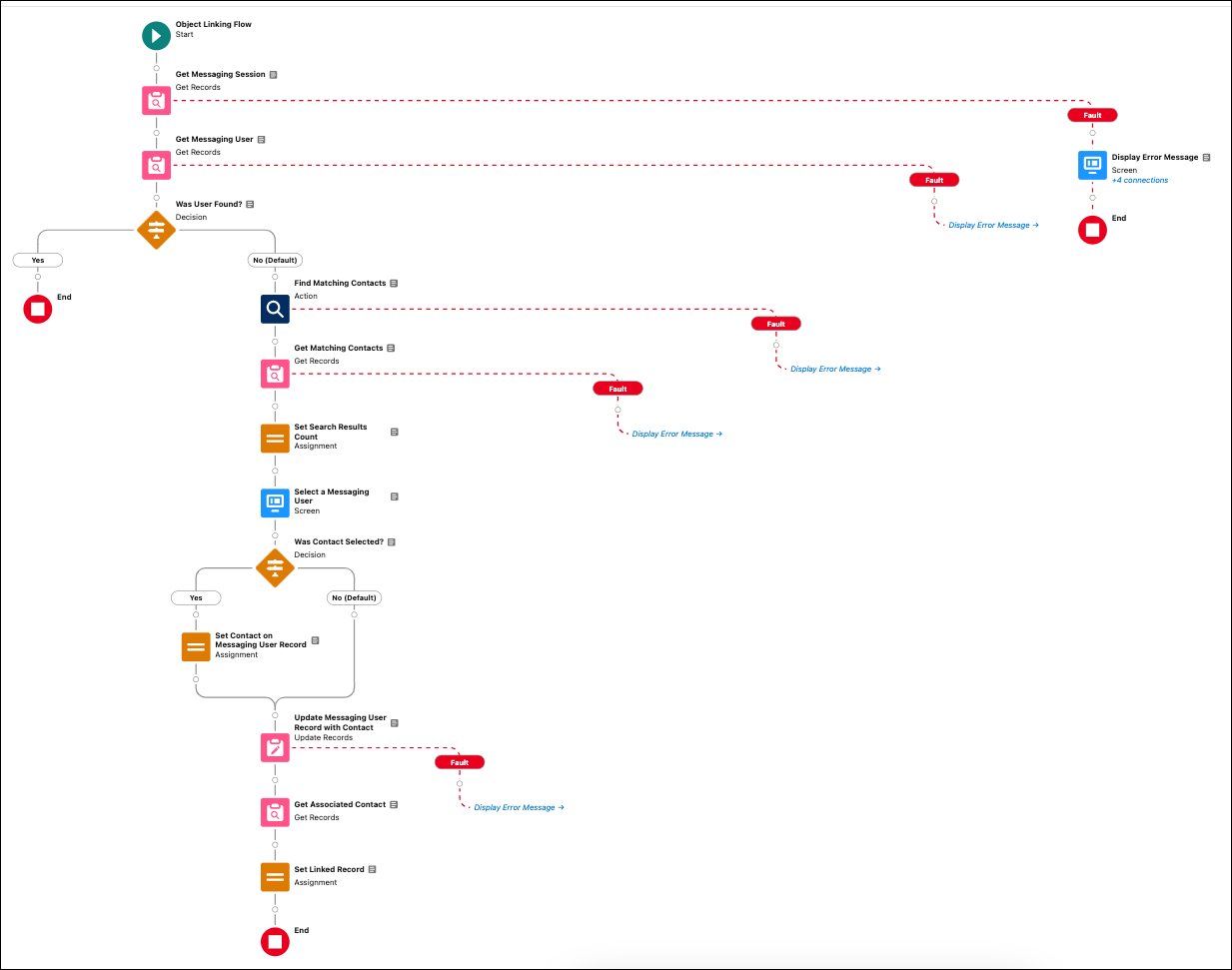
- Find Contact Associated with Messaging Session. This template uses a search term or variable of your choice to find contacts associated with a messaging session. Edit the Find Matching Contacts flow action to choose the type of individual you want to search (contact, lead, person account, or employee) and insert your preferred search term or variable. If the search yields multiple results, the support rep can select one. If the search yields no results, the support rep can create an associated contact.
The flow template for Find Contact Associated with Messaging Session looks like this. The other flow templates are similar.
Why Salesforce Uses Flows for Linking
Channel-Object Linking offered a way to associate contact records to voice calls, web chat sessions, and messaging sessions in standard Facebook and WhatsApp channels. But as channel interactions evolve and modernize, Salesforce customers want more flexibility.
For example, some sales and marketing-focused customers want to represent an individual using a lead record. So the new Individual-Object linking flow template lets you search leads, employees, and person accounts in addition to contacts.
Digital engagement customers want to use this feature for Facebook and WhatsApp. Service customers want to use it for Email-to-Case. Building Individual-Object Linking into flows lets you map individuals to interactions in every channel.
Some customers want control over the search query and how data is created. Flow Builder lets you do something as simple as customize a search term or as complex as using HTTP callouts to search external sources. Businesses that use Salesforce Data 360 can match end users to support cases and give service reps context that improves the support experience.
In summary, customers want flexibility in how they identify the human at the end of the interaction. That’s what Individual-Object Linking delivers.
- Create a Flow to Link Voice Callers to Records
To improve service and data quality, add a screen flow that guides support reps to find and link callers to leads, contacts, or employees. - Create a Flow to Link Contacts to Cases
To improve service quality, add a flow that finds contacts for cases created by Email-to-Case. Use the flow template Find Contact for Associated Case from Email-to-Case. - Create a Flow to Link Individuals to Messaging Sessions
Learn more about the person you’re messaging with. Use a flow template to auto-link contacts, leads, employees, or person accounts to your messaging session. - Channel-Object Linking (Beta)
Channel-Object Linking is a legacy tool that links contact records to phone calls, web chat sessions, and messaging sessions in standard Facebook and WhatsApp channels.
