
You are here:
Digital Trust Cards
Show your customers how you keep them safe as your business reopens during COVID. Trust Cards are a great way to give customers peace of mind in these uncertain times. Create a Trust Card for each of your business locations, and publish these trust cards on your website. Each trust card displays location trust measures, or COVID safety protocols that your business follows.
Required Editions
| Available in: Lightning Experience |
| Available in: Enterprise, Unlimited, and Performance Editions |
| User Permissions Needed | |
|---|---|
| To view locations; create, read, edit, and delete trust measures; and preview your location’s trust card: | Trust Card Manager permission set |
What Does a Trust Card Look Like?
Here’s an example trust card for Customer 360 Clothing & Co, a fictional clothing company with retail stores nationally. This trust card reflects the COVID guidelines for the company's Anywhere, CA location. Trust measures include the enforcement of masks, social distancing, cleanliness, and capacity limits. The trust card is displayed on Customer 360 Clothing & Co’s website:
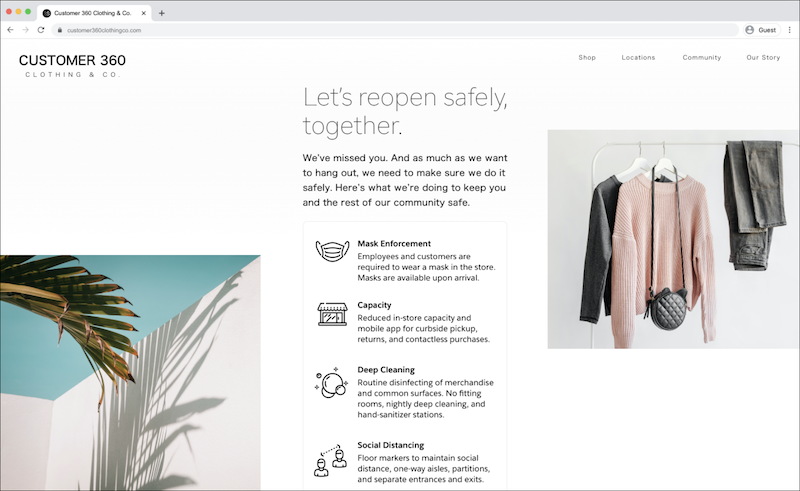
A trust card includes a location and several trust measures. A location represents a retail store, branch of a hotel chain, or other physical space your business occupies. A trust measure represents COVID safety protocols that your business location follows, such as mask or social distancing enforcement.

Many businesses have multiple physical locations. Create a unique trust card for each location to reflect the national and local COVID guidelines for that location. COVID guidance changes regularly, so assign each location to a Trust Card Manager who can keep the trust measures current to the guidelines.
Who Manages Trust Cards?
Your admin:
- Activates the trust cards feature, which creates a code snippet for your company website.
- Works with your developer resources to customize the code snippet and embed it on your company website.
- Assigns the Trust Card Manager permission set to users.
- Creates each trust card location, and assigns them to your trust card managers. A trust card manager can only manage the locations that an admin assigned to them.
Your Trust Card Manager:
- Creates trust measures, or COVID safety protocols, for each business location they’re assigned to.
- Publishes the trust measures, and chooses the layout for a location’s trust card. As long as their admin previously embedded the code on the company's site, these steps publish the trust card live to customers.
How Does a Trust Card End up on Your Website?
Add one code snippet to your website one time. Each location has an External Reference field, which is a unique ID that tells the code snippet when to display that particular location’s trust card. When trust measures for a location are published, the trust card is live on any website where the code is embedded.
- Install and Configure the Digital Trust Cards Feature
You must be an admin to activate the trust cards feature, customize and generate the code snippet for your website, and create trust card business locations. Before you enable your team of managers to create a unique trust card for each location, take these steps. - Create and Publish a Digital Trust Card on Your Website
Develop a strategy for your trust cards by studying government guidance. Then create location trust measures to reflect the steps you take to keep your customers safe in your business location. Publish these trust measures to your website as a trust card.
