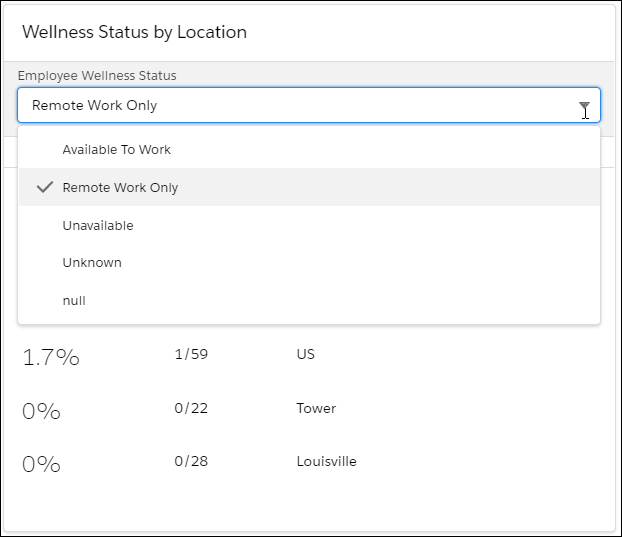
The Wellness Status by Location component provides a complete scrollable list of all the
locations or sublocations, such as individual floors of a building, that are present in the
current view for a selected status.
Required Editions
Available in: Lightning Experience
Available in: Enterprise and Unlimited Editions
Workplace Command Center is available as an add-on
license.
You can narrow the results shown in the Wellness Status by Location component to a
sublocation by using the location filter.
For the currently selected individual’s wellness status, the component shows the percentage
and ratio of the people who are associated with that wellness status. These totals are
aggregated from the responses to your wellness survey.
As shipped, wellness categories are the same as the ones in the Wellness Status component.
The list is ordered by decreasing percentage. To prevent confusion, “<1” and “>99” are
displayed in those cases where the percentages are 0 and 100 due to rounding. A value of
exactly zero is displayed as 100%; exactly 100% is displayed as “100.0.”
The wellness-count ratio represents the number of individuals in the current view that have
the selected status divided by the total number of individuals in the current view.
When no location filter is applied, this component includes all workplaces. When a location
filter is applied, the list includes all sublocations within the current workplace.
To display percentages for a different status, select it from the dropdown list.
Did this article solve your issue?
Let us know so we can improve!
Loading
Salesforce Help | Article
Cookie Consent Manager
General Information
Required Cookies
Functional Cookies
Advertising Cookies
General Information
We use three kinds of cookies on our websites: required, functional, and advertising. You can choose whether functional and advertising cookies apply. Click on the different cookie categories to find out more about each category and to change the default settings.
Privacy Statement
Required Cookies
Always Active
Required cookies are necessary for basic website functionality. Some examples include: session cookies needed to transmit the website, authentication cookies, and security cookies.
Functional Cookies
Functional cookies enhance functions, performance, and services on the website. Some examples include: cookies used to analyze site traffic, cookies used for market research, and cookies used to display advertising that is not directed to a particular individual.
Advertising Cookies
Advertising cookies track activity across websites in order to understand a viewer’s interests, and direct them specific marketing. Some examples include: cookies used for remarketing, or interest-based advertising.