
You are here:
Manage Tasks in the Operations Feed
Manage tasks in the Operations Feed so everyone knows the status of your plans.
Required Editions
| Available in: Lightning Experience |
| Available in: Enterprise and Unlimited Editions |
| Workplace Command Center is available as an add-on license. |
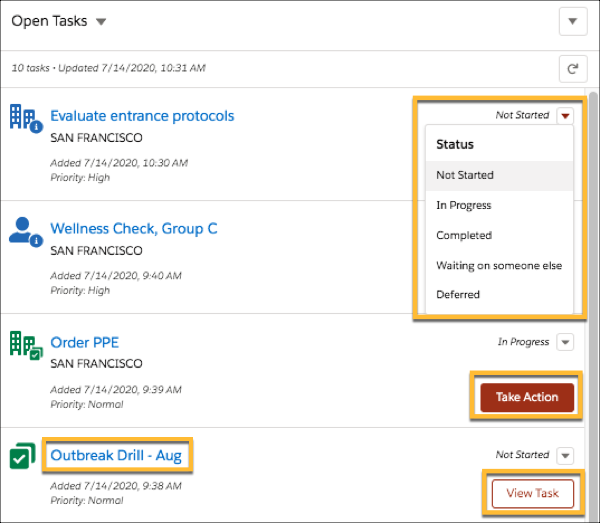
From the Operations Feed, you can view a task record, run an automated action associated with a task, and update the task status.
Several different types of tasks can appear in the Operations Feed. Simple tasks create text-based records and are available by default. Your Salesforce admin can also set up and associate automated processes with tasks. For example, say you have a task that launches a screen flow for entering or editing information, or a task that automatically checks records and sends a survey based on the field values. The types of tasks you see in the Operations Feed depends on how your Salesforce admin configures the Work.com Command Center for your organization.
To view a task record and see task details, click the task summary. You can also click View Task on a simple task to see details for simple tasks.
To update any task status, use the dropdown arrow next to the status. When a task is completed, the Take Action or View Task button disappears from the task.
To start the process associated with an automated task, click Take Action. When completed, the task status updates based on the results.
Talk to your Salesforce admin to find out if automated tasks are available in your org and for more information about how tasks are configured.

