Loading
Explore Legacy Service Features
Table of Contents
Select Filters

          No results
          No results
          Here are some search tips

          Check the spelling of your keywords.
          Use more general search terms.
          Select fewer filters to broaden your search.

          Search all of Salesforce Help
          Real-Time Adherence

          Real-Time Adherence

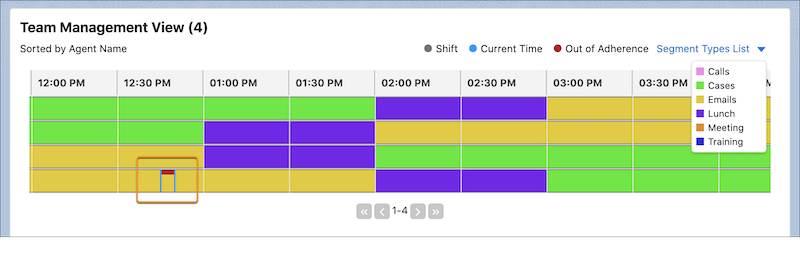
          Team leads can see which agents are working in their assigned shift segments and which agents are out of sync with their schedule. When agents are out of sync past a defined threshold, they’re considered out of adherence. A red line in the agent’s current shift segment indicates that the agent is out of adherence. The agent also receives an error message in Agent Home. The team lead can then communicate with the agent, determine why they’re out of adherence, and update their shift if necessary.

          Required Editions

          Example
          Example
          Note
          Note Workforce Engagement is scheduled for retirement. See Workforce Engagement Retirement.
          View supported editions.
          User Permissions Needed
          To view, create, and edit workload histories, intelligent forecasts, and to view and create capacity plans: Workforce Engagement Analyst or Workforce Engagement Planner
          To view, create, and edit shifts and shift segments: Workforce Engagement Planner
          To receive email notifications from Intraday Management: Workforce Engagement Agent
          Team Management View with an out-of-adherence flag on an agent's schedule
          Note
          Note You need an Omni-Channel queue-based routing workflow to access real-time adherence.

          Intraday Management relies on a service presence status and an adherence threshold to provide real-time adherence information.

          • The service presence status indicates which type of activity a shift segment represents. For example, when an agent is assigned to a shift segment with an associated service presence status called Emails, they’re expected to work on this activity. The agent must also set the service presence status in their Omni-Channel widget to Emails. If the agent sets the activity to something other than Emails, they risk being out of adherence.
          • An adherence threshold indicates how long an agent’s service presence status set in their Omni-Channel widget can differ from the status associated with their current assigned shift segment. You can set an adherence threshold for 0, 5, 10, or 15 minutes. If an agent’s status in their Omni-Channel widget continues to differ past the adherence threshold, the agent is considered out of adherence.
           
          Loading
          Salesforce Help | Article